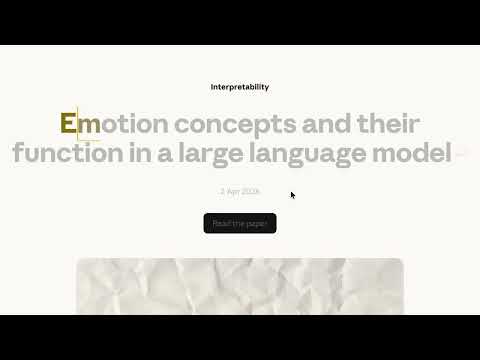
Item media 3 (screenshot) for TypeOver
Item video thumbnail
Item media 2 (screenshot) for TypeOver
Item media 3 (screenshot) for TypeOver
Item video thumbnail
Item media 2 (screenshot) for TypeOver
Item media 3 (screenshot) for TypeOver

Overview

Type articles as you read them. Dim-to-reveal typing practice on any webpage.

Turn any webpage into a typing practice session with original formatting and images. Practice typing while reading whatever you want.

Details

  • Version
    1.0.1
  • Updated
    April 21, 2026
  • Size
    65.12KiB
  • Languages
    English
  • Developer
    Eduard Hvižďak
    Kounicova 507/50 Brno 602 00 CZ
    Website
    Email
    eduardd.hv@gmail.com
  • Non-trader
    This developer has not identified itself as a trader. For consumers in the European Union, please note that consumer rights do not apply to contracts between you and this developer.

Privacy

Manage extensions and learn how they're being used in your organization
The developer has disclosed that it will not collect or use your data. To learn more, see the developer’s privacy policy.

This developer declares that your data is

  • Not being sold to third parties, outside of the approved use cases
  • Not being used or transferred for purposes that are unrelated to the item's core functionality
  • Not being used or transferred to determine creditworthiness or for lending purposes

Related

Pretty HTML | CSS | XML

3.0

A simple way to format your HTML, CSS, or XML code for easier reading!

Typeing Practice Anywhere

4.5

Practice Keyboard Typing with any webpages.

Minimal Reader

0.0

turn web page articles into minimal reading mode, remove distracting elements from the web page.

Practice typing with TipType

4.2

Practice typing directly on any webpage while reading real content. Improve your typing speed and accuracy on your favorite sites.

Bold Reading

4.8

Read faster online by making the first 3 letters of every word bold.

Copy & Paste Without Formatting

1.0

Always copy as plain text. Remove all formatting when copying text on the web.

Edit Website Copy

5.0

Toggle text editing on any webpage

Page Marker - Draw on Web

4.1

Draw or highlight on any website in real time. Add text, lines, and shapes. Move, undo, or redo anything you draw.

Smart Reader - Bionic Reader

3.5

Modify a web page to make it more readable

Type Master

5.0

Master Typing on Any Webpage

Scratch

5.0

Draw on any webpage with customizable shortcuts

Tim's Speedreader

0.0

Speed read any webpage by highlighting words one by one

Pretty HTML | CSS | XML

3.0

A simple way to format your HTML, CSS, or XML code for easier reading!

Typeing Practice Anywhere

4.5

Practice Keyboard Typing with any webpages.

Minimal Reader

0.0

turn web page articles into minimal reading mode, remove distracting elements from the web page.

Practice typing with TipType

4.2

Practice typing directly on any webpage while reading real content. Improve your typing speed and accuracy on your favorite sites.

Bold Reading

4.8

Read faster online by making the first 3 letters of every word bold.

Copy & Paste Without Formatting

1.0

Always copy as plain text. Remove all formatting when copying text on the web.

Edit Website Copy

5.0

Toggle text editing on any webpage

Page Marker - Draw on Web

4.1

Draw or highlight on any website in real time. Add text, lines, and shapes. Move, undo, or redo anything you draw.

Google apps