


Overview
Types your text into any text box as real key presses at human speed, instead of pasting it.
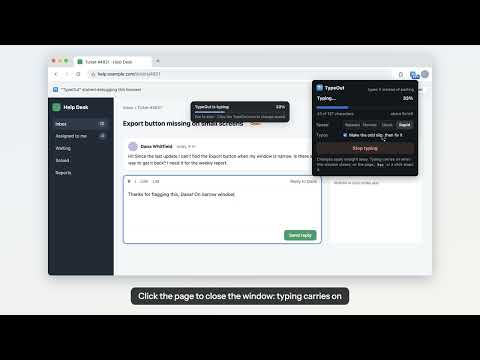
TypeOut types your text into the box you've selected, one real key press at a time, at a natural pace, instead of pasting it. Handy wherever pasting doesn't work well: • Fields and forms that block paste or only react to typing • Web terminals and in-browser editors that mangle pasted text or formatting • Live demos, tutorials and screen recordings where text should appear as it's typed HOW IT WORKS 1. Copy your text. 2. Click into a text box. 3. Press Alt+Shift+V (Option+Shift+V on a Mac). Prefer to check first? Click the TypeOut icon to preview and edit the text, pick a speed, then click "Type it". FEATURES • Real key presses with a natural rhythm: four speeds from about 45 to 95 words per minute, short pauses after punctuation, and a pace that varies a little each time • Change speed or switch typos on and off while it types; a small bar at the top of the page shows progress • Optional typos that are fixed with Backspace, so it looks like real typing; the finished text always matches what you copied • Line breaks typed as Shift+Enter by default, so chat boxes don't send early • Emoji and accented letters supported • Stop any time: press Esc, click the page, press the shortcut again, click Stop typing in the TypeOut window, or click Cancel on Chrome's bar • Safety stops: typing stops by itself if you switch tabs, the page reloads or changes, or the text box loses focus, so keys never land somewhere unexpected • "Type the rest" picks up where you stopped • A welcome page with a practice box, all the settings and help, also under Options • Pick your own keyboard shortcut • Light and dark mode ABOUT THE "STARTED DEBUGGING THIS BROWSER" BAR To press real keys, TypeOut uses Chrome's built-in DevTools protocol (the "debugger" permission). Chrome shows a bar whenever an extension does this. TypeOut uses it only on the tab where you started typing, and only while it types. PRIVACY TypeOut has no servers, no analytics and no network code. It reads your clipboard only when you press the shortcut or open TypeOut, and nothing you copy or type leaves your computer. Settings are stored locally in Chrome. GOOD TO KNOW • Up to 5,000 characters per run. • Chrome doesn't let extensions type on chrome:// pages or in the Chrome Web Store. • Key presses follow a US keyboard layout; other characters are inserted the way an emoji picker inserts them.
0 out of 5No ratings
Details
- Version1.0.0
- UpdatedNovember 8, 2026
- Size46.6KiB
- LanguagesEnglish
- Developer
- TraderThis developer has identified itself as a trader per the definition from the European Union and committed to only offer products or services that comply with EU laws.
- D-U-N-S571267668
Privacy

This developer declares that your data is
- Not being sold to third parties, outside of the approved use cases
- Not being used or transferred for purposes that are unrelated to the item's core functionality
- Not being used or transferred to determine creditworthiness or for lending purposes
Support
For help with questions, suggestions, or problems, visit the developer's support site