

txt-cal
1 rating
)
Overview
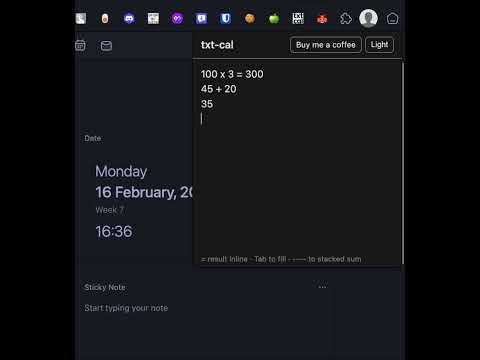
Lightweight text-based calculator in your browser. Type expressions, get inline results, use Tab to fill and stacked sums.
**txt-cal** is a minimal, text-based calculator that lives in your Chrome toolbar. No buttons to click—just type expressions like in a notepad and see results as you go. **What you can do** • **Inline results** — Type an expression followed by `=` (e.g. `10 * 5 =`) and the result appears on the same line. • **Tab to fill** — On any line with a valid expression (with or without `=`), press **Tab** to append `= result` in one keystroke. • **Stacked sums** — List numbers, one per line, then add a line of dashes (`----`). The sum appears on the next line. Use `(-)----`, `(*)----`, or `(/)----` for subtract, multiply, or divide the stacked numbers. • **Dark mode** — Toggle light/dark theme with the header button; your choice is remembered. **Math supported** Standard arithmetic: `+`, `-`, `*`, `/`, parentheses. You can use `x` instead of `*` (e.g. `2 x 3`). Numbers can include commas and decimals. All calculation runs locally; nothing is sent to any server. **Your data** Your text is saved locally (Chrome storage) so it’s there when you reopen the popup. No account, no tracking, no external requests except an optional “Buy me a coffee” link you can choose to open. --- ## How to use txt-cal (short tutorial) 1. **Open the calculator** Click the txt-cal icon in your Chrome toolbar. The calculator popup opens with a single text area. 2. **Type a simple expression** Type something like `1 + 2 + 3 =` and wait a moment. The result (`6`) appears after the `=` on the same line. 3. **Use Tab to fill the result** Type an expression on its own line (e.g. `100 / 4`) and press **Tab**. The line becomes `100 / 4 = 25` and the cursor moves to the end. 4. **Stack numbers and sum them** Enter numbers one per line, then on the next line type at least two dashes, e.g. `----`. The total of the numbers above appears on the line below the dashes. - Plain `----` = add. - `(-)----` = subtract (first number minus the rest). - `(*)----` = multiply. - `(/)----` = divide (first number divided by the rest). 5. **Switch theme** Use the **Dark** / **Light** button in the header to toggle appearance. The extension remembers your preference. 6. **Your work is saved** When you close the popup and open it again, your text is still there. Everything is stored only on your device
5 out of 51 rating
Details
- Version1.0.0
- UpdatedFebruary 16, 2026
- Size70.89KiB
- LanguagesEnglish
- Developer
Email
istiakpradhan@gmail.com - Non-traderThis developer has not identified itself as a trader. For consumers in the European Union, please note that consumer rights do not apply to contracts between you and this developer.
Privacy

This developer declares that your data is
- Not being sold to third parties, outside of the approved use cases
- Not being used or transferred for purposes that are unrelated to the item's core functionality
- Not being used or transferred to determine creditworthiness or for lending purposes
Support
For help with questions, suggestions, or problems, visit the developer's support site