

TwitPick - X/Twitter Keyword Highlighter & Reply Tracker
1 rating
)
Overview
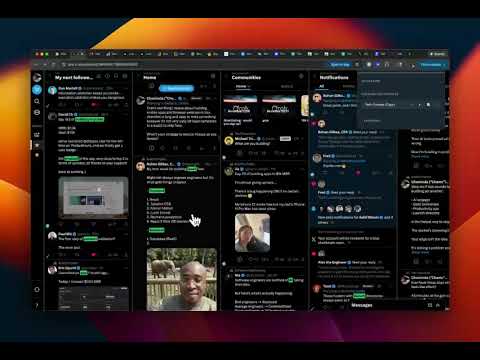
Stop endless scrolling on X/Twitter. Keywords you care about glow green. Replied tweets fade. Only see what matters.
🚀 Reply Faster, Engage Smarter on X (Twitter) TwitPick helps you pick replies faster, so you can hit high-visibility 𝕏 posts first — directly in your timeline. Stop guessing which tweets to reply to and start engaging where your responses actually get seen. 🎛️ Two Powerful Modes TwitPick offers two distinct modes to match your workflow: 🔵 Highlighter Mode (Simple & Visual) Perfect for casual users who want quick visual cues without complexity: • Shiny colored dots appear on tweets matching your keywords • Instantly spot relevant conversations in your timeline • Clean, minimal interface that doesn't overwhelm • Tooltip shows "TwitPick: X keywords matched" 📊 VPS Mode (Advanced Scoring) For power users who want data-driven engagement decisions: • Colored triangle badges show the Visibility Potential Score • Full scoring algorithm analyzes reach, timing, velocity, and more • Click the badge to see detailed score breakdown • Tooltip shows "TwitPick VPS: [score]" Both modes show a ✓ checkmark when you've replied to a tweet, so you always know where you've already engaged. 🎯 Preconfigured Niche Profiles - Ready to Use TwitPick comes with professionally optimized niche profiles, each with preconfigured keywords and scoring weights tailored for maximum effectiveness: 🚀 Tech Founder - Startup news, product launches, funding discussions 🤖 AI & Machine Learning - Latest AI research, LLM discussions, ML engineering 💰 Venture Capital - VC insights, investment trends, deal announcements 🎬 Content Creator - Creator economy, YouTube/TikTok growth, audience building 💻 Developer & Engineering - Code, open source, dev tools, programming 📊 Product Management - Product strategy, UX, user research, design patterns Each profile includes: ✅ Pre-optimized keyword lists (required, optional, and excluded) ✅ Fine-tuned scoring weights that optimize VPS calculations for your niche ✅ Relationship boost multipliers ✅ Ready to activate with one click Switch between profiles instantly or create your own custom profile with personalized keywords and weights. 🔍 How VPS Mode Estimates Reply Visibility 🎯 In VPS Mode, TwitPick calculates a Visibility Potential Score using signals already visible on X, including: 👉 Author reach (followers and verification status) 👉 Tweet freshness (how new the post is) 👉 Engagement velocity (likes, retweets, replies relative to age) 👉 Reply competition (how many replies already exist) 👉 Relevance to your niche (keyword matching from your selected profile) 👉 Basic filtering (ads and excluded content automatically filtered) 🚦 Each tweet is highlighted with a colored triangle badge based on its VPS: 🟢 High reply visibility (High VPS) - Best opportunities, reply now 🟡 Good opportunity (Good VPS) - Solid engagement potential 🔵 Competitive (Moderate VPS) - Worth replying, but more competition ⚪ Lower visibility (Low VPS) - May get less attention ✓ Already replied - You've already engaged here 🔵 How Highlighter Mode Works In Highlighter Mode, TwitPick keeps it simple: 👉 Keyword matching - Tweets containing your profile keywords get highlighted 👉 Visual dots - A shiny colored dot appears on matching tweets 👉 Quick keyword updates - Highlight any text in a tweet to add it as a keyword or remove existing ones 👉 Reply tracking - Checkmark replaces the dot when you've replied 🟢 Green dot - Multiple keyword matches (high relevance) 🟡 Yellow dot - Good keyword match 🔵 Blue dot - Some keywords matched ⚪ Gray dot - Scanned but minimal matches ✓ Checkmark - Already replied ⚙️ Customize Your Experience 🧭 TwitPick adapts to your goals with powerful customization: ✅ Mode Selection - Switch between Highlighter and VPS modes instantly ✅ Niche Keywords - Set include/exclude keywords to focus on relevant conversations ✅ Quick Keyword Management - Highlight any text in a tweet to instantly add it as a keyword (Required, Optional, or Exclude). If the keyword already exists, remove it from all categories with one click ✅ Scoring Weights (VPS Mode) - Adjust how much reach, timing, velocity, and relevance matter ✅ Relationship Boosts - Fine-tune signals for mutual follows and connections ✅ Profile Management - Create unlimited custom profiles for different goals ✅ Smart Filtering - Exclude topics you don't want prioritized Whether you're a marketer, content creator, developer, or entrepreneur, TwitPick adapts to your specific engagement strategy. 📊 Track Your Impact with Usage & Growth Analytics 📈 TwitPick's integrated dashboard lets you visualize your extension usage and correlate your reply activity with follower growth over time. See which types of replies (high potential, good opportunity, moderate, or lower priority) you're engaging with most, and track how your follower count evolves alongside your engagement patterns. 🧠 Lightweight, Private, and Non-Intrusive ✅ No auto-posting or automation - You control every reply ✅ No popups or interruptions - Subtle visual cues only ✅ No backend tracking - Everything runs locally in your browser ✅ Learns naturally - Only processes data when you browse or interact ✅ Cached for performance - Fast loading with automatic expiry ✅ Privacy-first - Your data stays on your device ❤️ Your Voice, Your Choice TwitPick doesn't tell you what to say or who to engage with. It simply helps you understand where your replies are most likely to be seen on X, so you can focus your time and energy where it matters most. Perfect for: 📱 Twitter marketers and growth hackers 🎨 Content creators building their audience 💼 Entrepreneurs and founders networking 👨💻 Developers sharing knowledge 📊 Product managers engaging with users 🚀 Anyone looking to maximize X reply engagement Disclaimer: TwitPick is not affiliated with X Corp. "X" is a trademark of X Corp.
5 out of 51 rating
Details
- Version2.4.8
- UpdatedFebruary 3, 2026
- Offered byChamsDel Online
- Size154KiB
- LanguagesEnglish (United States)
- DeveloperChamsDel Online LLC
304 S Jones Blvd #3646 Las Vegas, NV 89107 USEmail
chaminda@chamsdel.online - Non-traderThis developer has not identified itself as a trader. For consumers in the European Union, please note that consumer rights do not apply to contracts between you and this developer.
Privacy
TwitPick - X/Twitter Keyword Highlighter & Reply Tracker has disclosed the following information regarding the collection and usage of your data. More detailed information can be found in the developer's privacy policy.
TwitPick - X/Twitter Keyword Highlighter & Reply Tracker handles the following:
This developer declares that your data is
- Not being sold to third parties, outside of the approved use cases
- Not being used or transferred for purposes that are unrelated to the item's core functionality
- Not being used or transferred to determine creditworthiness or for lending purposes
Support
For help with questions, suggestions, or problems, visit the developer's support site