

TwitchFollowingOrganizer
6 ratings
)
Overview
Organize the Twitch channels you follow into folders, right inside twitch.tv's sidebar.
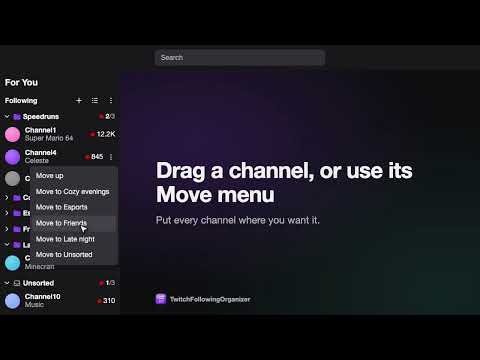
What's new in 1.1 • Live channels come first in every folder, so you never miss who just went live. Offline channels follow, still in your order. • New sort button in the folders' header: keep live channels in your own order, or put the ones with the most viewers first. • The header now reads "Following", and "Show Twitch's list" moved into the options menu (the three dots). • Clearer messages when Twitch's sign-in page can't load. Coming from an older version? TFW 1.0 was rebuilt from scratch: your folders live inside twitch.tv's own sidebar and sync across every browser where you sign in. Favourites saved by versions before 1.0 are not carried over, so please add your channels to folders again. Follow a lot of channels? TFW (TwitchFollowingOrganizer) sorts them into folders of your own, right where Twitch lists them, so you can see at a glance who is live in each group. What it does • Replaces the Followed Channels list in twitch.tv's sidebar with your folders, followed by an Unsorted section for every channel you have not filed yet. • Shows each folder's live channels first, in your order or by viewer count, with offline channels after them. • Shows each channel the way Twitch does: avatar, category, live dot and viewer count, or Offline. • Shows how many channels in each folder are live, even when the folder is collapsed. • Keeps working in Twitch's narrow sidebar, where live channels stay grouped by folder. • Follows Twitch's light and dark themes. • Syncs your folders to every browser where you sign in with the same Twitch account. How to use it 1. Open twitch.tv and click "Sign in with Twitch" in the sidebar. TFW only asks to read the channels you follow; it cannot post, chat or change anything on your account. 2. Click + next to "Following" to create a folder. 3. Drag channels into folders, or hover a channel and use its Move menu to move it to another folder, up or down, or back to Unsorted. 4. Drag folders to reorder them, or use a folder's menu to rename, move or delete it. 5. Click a folder's name to collapse or expand it. 6. Click the sort button next to "Following" to show live channels by viewer count instead of in your order. Click it again to switch back. 7. Want Twitch's own list back? Choose "Show Twitch's list" in the options menu (the three dots next to "Following"). "Show TFW folders" switches back. 8. If the sidebar is hidden or Twitch changes its layout, click the TFW button in Chrome's toolbar to open your folders in a floating panel. Privacy The TFW server stores only your Twitch user ID, your folder names and which channel is in which folder (plus when you first and last used TFW, so unused accounts can be deleted). No ads, no analytics, no tracking. Delete everything at any time with "Delete my data" in the options menu (the three dots next to "Following"). Full policy: https://tfw-api.javimbk.workers.dev/privacy TFW is an independent project. It is not affiliated with, endorsed by or sponsored by Twitch Interactive, Inc.
2.3 out of 56 ratings
Details
- Version1.1.0
- UpdatedNovember 3, 2026
- Offered byjavimbk
- Size153KiB
- LanguagesEnglish
- Developer
Email
javimbk@gmail.com - Non-traderThis developer has not identified itself as a trader. For consumers in the European Union, please note that consumer rights do not apply to contracts between you and this developer.
Privacy

TwitchFollowingOrganizer has disclosed the following information regarding the collection and usage of your data. More detailed information can be found in the developer's privacy policy.
TwitchFollowingOrganizer handles the following:
This developer declares that your data is
- Not being sold to third parties, outside of the approved use cases
- Not being used or transferred for purposes that are unrelated to the item's core functionality
- Not being used or transferred to determine creditworthiness or for lending purposes