


Overview
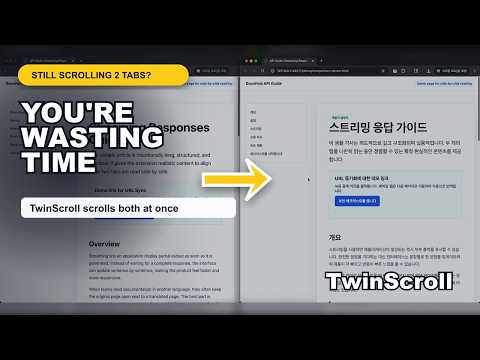
Stop scrolling twice. Sync, compare, and translate two tabs side by side.
Stop scrolling the same page twice. TwinScroll helps you read, compare, and translate two web pages side by side without constantly losing your place. Open a paired tab, place both pages next to each other, and scroll them together while you work. It is built for people who read long pages, compare similar pages, review translations, test web content, or use technical documentation every day. Previously known as Simultaneous Scrolling, TwinScroll is the same extension with a clearer name. The new name better reflects what the extension does: sync two tabs so you can read, compare, and translate side by side. Why use TwinScroll? • Save time when comparing two pages No more switching back and forth or manually dragging both scrollbars. TwinScroll keeps your paired tabs moving together. • Read original and translated pages side by side Keep the original page on one side and a translated version on the other. This is useful for technical documentation, articles, tutorials, API references, and research. • Choose the right scroll mode for the job Pixel mode mirrors the scroll position directly. Smart mode follows matching content on the same page, which helps when one side becomes longer because of translation or layout differences. • Compare different but related URLs Turn URL Sync off when you want to compare two different pages, versions, documents, specs, or test environments side by side. • Keep paired tabs together when browsing With URL Sync on, navigating in one paired tab can move the other tab to the same page, so both sides stay connected while you browse. • Use Chrome built-in translation when available On supported Chrome versions, TwinScroll can use Chrome's built-in translation capability so you can read the original and translated page together. Common use cases • Read English documentation with Korean translation beside it • Compare original and translated articles • Review API references, specs, standards, or tutorials • QA two similar pages or different environments • Check long pages without losing the section you were reading • Compare documentation before and after changes Notes Chrome built-in translation depends on your Chrome version and available language support. Some protected browser pages, Chrome Web Store pages, PDFs, and pages that block extension scripts may not support pairing, translation, or scroll synchronization.
4.2 out of 512 ratings
Details
- Version1.1.0
- UpdatedMay 22, 2026
- Offered byfumyparli
- Size5.38MiB
- LanguagesEnglish
- Developer
Email
qkskskm7@gmail.com - Non-traderThis developer has not identified itself as a trader. For consumers in the European Union, please note that consumer rights do not apply to contracts between you and this developer.
Privacy

This developer declares that your data is
- Not being sold to third parties, outside of the approved use cases
- Not being used or transferred for purposes that are unrelated to the item's core functionality
- Not being used or transferred to determine creditworthiness or for lending purposes