

Twitter Bookmarks Search & Export – X Bookmarks & Likes | Twillot

Overview
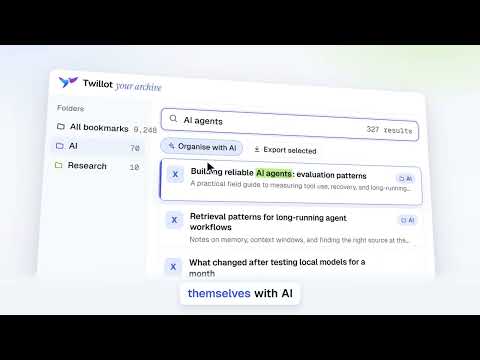
Find any saved tweet again: search Twitter (X) bookmarks & likes, sort into folders with AI, export to CSV, JSON, Markdown or PDF.
Find any tweet you've ever bookmarked or liked — without endless scrolling. X doesn't let you search your bookmarks, and scrolling back through hundreds of saves to find one thread is painful. Twillot syncs your bookmarks, likes, tweets and replies into one fast, searchable workspace, so the tweets you saved are always one search away. Whether you want to find a thread you saved months ago, check which bookmarks have been deleted, back up your bookmarks to Notion or Obsidian, download the videos you liked, or finally clean up years of old tweets — Twillot does it in a few clicks. ━━━━━━━━━━━━━━━━━━━━ 🔍 FIND ANY SAVED TWEET ━━━━━━━━━━━━━━━━━━━━ ✓ Search the Bookmarks X Can't Search Search Twitter bookmarks, likes and your own tweets by keyword, then filter by date, author, folder or media type. ✓ Go Past X's Scrolling Limit Sync your bookmarks, likes, tweets and replies beyond what X lets you scroll back to. ✓ Search Right From the Address Bar Type "tt", press Tab and enter a keyword. No need to open X first. ✓ Find Bookmarks That Disappeared Check whether your saved posts are still available, then filter out the ones that were deleted, made private or are no longer accessible. ✓ See Every Image and Video You Saved Browse all your saved media in one gallery. ━━━━━━━━━━━━━━━━━━━━ 📤 EXPORT AND BACK UP YOUR TWEETS ━━━━━━━━━━━━━━━━━━━━ ✓ Export to CSV, JSON, Markdown or PDF Take your Twitter bookmarks, likes and tweets into spreadsheets, Notion, Obsidian or any note app. ✓ Keep Exports Organized Group exported files by date, author or folder. ✓ Never Lose a Tweet You Cared About Keep a backup of the tweets you saved, even if the original is deleted later. ━━━━━━━━━━━━━━━━━━━━ 🎬 DOWNLOAD TWITTER VIDEOS AND MEDIA ━━━━━━━━━━━━━━━━━━━━ ✓ Download Videos, Images and GIFs Save media from your bookmarks and likes. ✓ Batch Download, Not One by One Download media in bulk instead of saving files individually. ✓ Save Whole Threads Keep complete threads together with their media. ━━━━━━━━━━━━━━━━━━━━ 📁 ORGANIZE WITH BOOKMARK FOLDERS ━━━━━━━━━━━━━━━━━━━━ ✓ Unlimited Folders, Custom Colors Create as many Twitter bookmark folders as you need. ✓ Let AI Do the Sorting AI sorts your bookmarks into your folders, or suggests new ones for you. ✓ Move or Delete in One Step Move or bulk delete bookmarks and likes at once. ━━━━━━━━━━━━━━━━━━━━ 🧹 BULK CLEAN UP WITH TASK CENTER ━━━━━━━━━━━━━━━━━━━━ ✓ Act on Everything That Matches Your Filter Bulk delete old tweets, unlike, remove bookmarks, unfollow or remove followers — on every item that matches, not one page at a time. ✓ Spot Suspended and Deleted Accounts Check the accounts you follow, your followers and your blocked list to see which ones are suspended, deleted or protected. ✓ Pause, Resume or Cancel Anytime Track every task in one place and export a processing log when it's done. ✓ Paced for X's Rate Limits Tasks run at a steady pace and pause automatically when X rate limits you, then continue when it's time. ✓ Keep Your Account Tidy Manage lists, blocked users and muted keywords, hide promoted tweets from your timeline, and review the apps connected to your X account. ━━━━━━━━━━━━━━━━━━━━ ⚡ HOW IT WORKS ━━━━━━━━━━━━━━━━━━━━ 1. Install Twillot and sign in to X in your browser. 2. Click the extension icon to open your Twillot workspace. 3. Choose what to sync — and start searching. Tasks run in your browser — keep Twillot open while they work. ━━━━━━━━━━━━━━━━━━━━ 🔒 PRIVACY ━━━━━━━━━━━━━━━━━━━━ Your X password is never required. Twillot uses your active X session — only for the data you choose to sync. Synced data is stored in your browser. Sync and account actions only run when you start them. ━━━━━━━━━━━━━━━━━━━━ 💎 PLANS ━━━━━━━━━━━━━━━━━━━━ Cloud backup, AI organization and higher usage limits may require a Twillot account or a paid plan. ━━━━━━━━━━━━━━━━━━━━ Perfect for researchers, writers, founders, marketers and anyone who saves more tweets than they can find. Twillot is an independent product and is not affiliated with X Corp. X and Twitter are trademarks of their respective owners.
4.4 out of 5105 ratings
Details
- Version11.0.10
- UpdatedOctober 17, 2026
- FeaturesOffers in-app purchases
- Size76.29KiB
- Languages58 languages
- DeveloperWebsite
Email
simon@twillot.com - Non-traderThis developer has not identified itself as a trader. For consumers in the European Union, please note that consumer rights do not apply to contracts between you and this developer.
Privacy

This developer declares that your data is
- Not being sold to third parties, outside of the approved use cases
- Not being used or transferred for purposes that are unrelated to the item's core functionality
- Not being used or transferred to determine creditworthiness or for lending purposes
Support
For help with questions, suggestions, or problems, please open this page on your desktop browser