


Overview
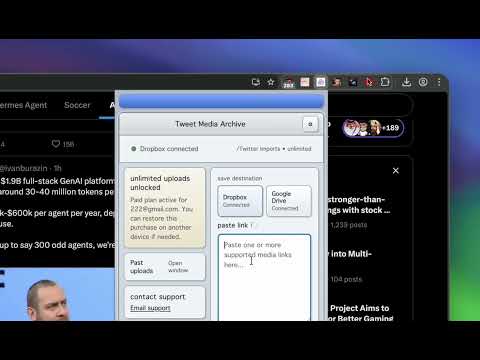
Save media and public files from supported links to Google Drive, Dropbox, or Downloads.
Tweet Media Archive saves user-selected media and public files from supported posts and links to the storage destination you choose. Paste a supported social post, profile media page, bookmark page, direct media URL, or public file link. The extension resolves the media or file, then saves it to Google Drive, Dropbox, or your local Downloads folder. Use it for memes before they disappear, receipts you may need later, research references, and profile media you want in one place. Upload history, gallery view, progress, retry, folder choices, optional native sharing, and local copies help you find and move saved files later. You control the destination. Connect Dropbox or Google Drive with OAuth, or keep everything local in your browser Downloads folder. The 7 successful URL uploads are free per 30 mins forever
5 out of 52 ratings
Details
- Version0.4.14
- UpdatedJune 9, 2026
- FeaturesOffers in-app purchases
- Size455KiB
- Languages7 languages
- Developer
- Non-traderThis developer has not identified itself as a trader. For consumers in the European Union, please note that consumer rights do not apply to contracts between you and this developer.
Privacy

Tweet Media Archive has disclosed the following information regarding the collection and usage of your data. More detailed information can be found in the developer's privacy policy.
Tweet Media Archive handles the following:
This developer declares that your data is
- Not being sold to third parties, outside of the approved use cases
- Not being used or transferred for purposes that are unrelated to the item's core functionality
- Not being used or transferred to determine creditworthiness or for lending purposes
Support
For help with questions, suggestions, or problems, visit the developer's support site