

Tweet Preview for X (Twitter)
1 rating
)
Overview
Preview posts on X before publishing — live phone and desktop timelines with accurate limits, mixed media, video, polls and threads.
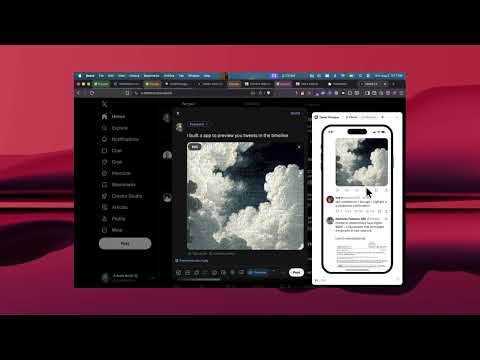
See exactly how your tweet will look on the timeline — before you post it. Tweet Preview for X (Twitter) adds a live post preview right inside x.com. Open the compose box and a "Preview" button appears next to the Post button. Click it and a preview panel opens, updating with every keystroke: your real name, handle and avatar, your text with links, @mentions, #hashtags and $cashtags highlighted, your attached photos, videos, GIFs and polls — all rendered in X-style timeline layouts, surrounded by real tweets you can interact with (likes, reposts, bookmarks, Show more) so you see your post in context. Unlike web-based tweet mockup generators, nothing to copy-paste and no login: it previews the tweet you are actually writing, where you are writing it. WHAT YOU GET 📱 Phone preview — an iPhone-style frame with true device proportions, so you see the exact line breaks and image crop mobile followers will see 🖥️ Desktop preview — a browser-window mockup of the X web timeline ✍️ Live as you type — text, emoji, line breaks, links, mentions and hashtags update instantly; up to four mixed photos, videos and GIFs appear the moment you add them ▶️ Playable video — muted video plays in place and stays mounted while you type; short and GIF-like media loops while longer video follows X's non-looping behavior 🔢 Character counter — accurate weighted counting (URLs count as 23, emoji and CJK count as 2) with X-style progress ring; Standard mode enforces 280 characters while Premium mode previews posts up to 25,000 characters with working Show more/Show less 📊 Poll preview — options and poll duration appear inside the timeline card 🧵 Thread preview — composing a thread? Every tweet in it is stacked with the connector line, just like the timeline 💬 Replies & quotes — reply previews include the "Replying to" line 🌗 Theme aware — Dark by default; matches or overrides X's Light / Dim / Lights-out 🪄 Your timeline, your context — swap the tweets shown around your preview by pasting any tweet links; their author, avatar, text, images and counts are fetched on your device and rendered in place 🎛️ On your terms — the panel opens only when you click Preview, can be dragged anywhere, collapses to a pill, and every new compose box starts clean PRIVACY FIRST No account, no login, no analytics, no third-party servers. Everything runs locally in your browser; the only network requests are to X's own public endpoints (to fetch tweets you explicitly paste). Settings sync through your own Chrome profile. WHO IT'S FOR Creators, ghostwriters, social media managers, marketers, founders building in public — anyone who wants to check a post's line breaks, image crop, link preview length or character count before hitting Post, without a separate tweet mockup tool. HOW TO USE 1. Install and pin the extension 2. Go to x.com and open the compose box (click Post, or press N) 3. Click the new "Preview" button next to the Post button 4. Type away — the preview updates live beside the composer 5. Toggle Phone/Desktop and theme in the panel header; configure posting limits and defaults in the popup Not affiliated with or endorsed by X Corp. "X" and "Twitter" are trademarks of X Corp., used solely to describe compatibility.
5 out of 51 rating
Details
- Version1.6.0
- UpdatedAugust 10, 2026
- Offered byAmin Wani
- Size269KiB
- LanguagesEnglish (United States)
- Developer
Email
arhamwani765@gmail.com - Non-traderThis developer has not identified itself as a trader. For consumers in the European Union, please note that consumer rights do not apply to contracts between you and this developer.
Privacy

This developer declares that your data is
- Not being sold to third parties, outside of the approved use cases
- Not being used or transferred for purposes that are unrelated to the item's core functionality
- Not being used or transferred to determine creditworthiness or for lending purposes
Support
For help with questions, suggestions, or problems, visit the developer's support site