

Tuxx, Fetch!

Overview
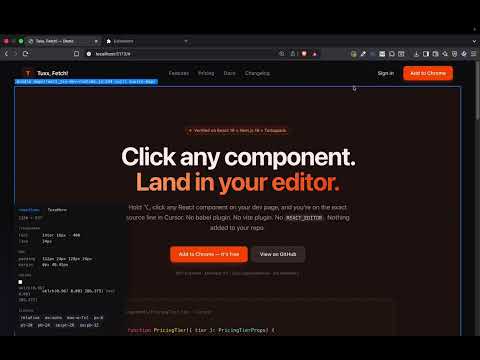
Click a React component. Tuxx fetches the source straight into Cursor (or VS Code). No repo plugins. No REACT_EDITOR.
Tuxx, Fetch! — Click any React component on your dev page and jump straight to the source line in Cursor (or VS Code). No babel plugin. No vite plugin. No REACT_EDITOR. Nothing added to your repo. ━━━━━━━━━━━━━━━━━━━━━━━━━ THE 10-SECOND PITCH ━━━━━━━━━━━━━━━━━━━━━━━━━ You're staring at a button on localhost:3000 and you want the JSX. Today that means: open DevTools → Inspect → hunt the React tree → guess the file → Cmd+P and pray. With Tuxx: Hold ⌥. Click. You're in your editor on the exact line. ━━━━━━━━━━━━━━━━━━━━━━━━━ TWO FEATURES IN ONE ━━━━━━━━━━━━━━━━━━━━━━━━━ 1) CLICK-TO-SOURCE (React) Reads React fibers (_debugSource on React ≤18, _debugStack on React 19+), source-maps the result client-side, and opens it in your editor over a URL scheme. Works across multiple repos from a single install — just map hostname → repo path. 2) DESIGN INSPECTOR (any DOM) Hover any element while holding the modifier and Tuxx pops a small panel showing exactly what the browser is rendering: size, typography, padding/margin/radius/border (collapsed to CSS shorthand), background and text colors as hex with swatches, and the full class list. Reads getComputedStyle(), so it reflects every cascaded style — :hover states, @media rules, CSS variables, theme overrides. Pull colors straight into Figma's picker. ━━━━━━━━━━━━━━━━━━━━━━━━━ WHY THIS EXISTS ━━━━━━━━━━━━━━━━━━━━━━━━━ Every other tool — click-to-react-component, react-dev-inspector, Locator, the new Next.js DevTools — wants a Babel/SWC/Vite plugin shoved into every codebase you want it on. That's friction. And most of them silently broke when React 19 dropped _debugSource for _debugStack. Tuxx doesn't touch your repo. The browser does the work — your codebase stays clean. ━━━━━━━━━━━━━━━━━━━━━━━━━ COMPATIBILITY ━━━━━━━━━━━━━━━━━━━━━━━━━ Verified: • React 18 + Next.js • React 19 + Next.js (webpack) • React 19 + Next.js 16 (Turbopack, indexed source maps) Should work (untested by maintainer): • Vite + React, Create React App, Remix v2+, Rspack/Rsbuild, Astro (React islands) Editors: Cursor (default), VS Code, VS Code Insiders, or any editor with a <scheme>://file/<path>:<line>:<col> handler. Source-map formats: flat, indexed (Turbopack/webpack v5), inline base64. Source-path schemes handled: file://, webpack://, turbopack://, absolute, project-relative. ━━━━━━━━━━━━━━━━━━━━━━━━━ REQUIREMENTS ━━━━━━━━━━━━━━━━━━━━━━━━━ For click-to-source to work, the page must be: • Running React 16+ in development mode (production builds strip fiber debug info) • Built with the JSX dev transform (default in every modern starter) • Serving same-origin source maps (default in dev) The design inspector has no such requirements — it works on any page, any framework, any DOM. ━━━━━━━━━━━━━━━━━━━━━━━━━ QUICKSTART ━━━━━━━━━━━━━━━━━━━━━━━━━ 1. Install Tuxx, Fetch! and pin it to your toolbar. 2. Click the icon → Open settings. 3. Add a mapping: Hostname: localhost:3000 Repo path: /Users/you/code/your-repo Modifier: ⌥ Option 4. Open your dev URL → hold ⌥ → click anything. While holding the modifier, an orange overlay highlights the element under your cursor and shows the file path that would open. Click and you're there. Color codes: 🟧 Orange — direct source path (React ≤18) 🟦 Blue — bundle URL needs source-mapping (React 19+); resolved on click ⬜ Gray — element has no React source info ━━━━━━━━━━━━━━━━━━━━━━━━━ PRIVACY ━━━━━━━━━━━━━━━━━━━━━━━━━ Tuxx only runs on localhost and 127.0.0.1. It does not make network requests to anywhere except your own dev server (to fetch source maps). It does not collect, store, or transmit any analytics or telemetry. Settings are stored via chrome.storage.sync and never leave your Google account. ━━━━━━━━━━━━━━━━━━━━━━━━━ OPEN SOURCE ━━━━━━━━━━━━━━━━━━━━━━━━━ MIT licensed. Manifest V3. Zero dependencies. Plain JS/HTML/CSS — no build step. 🐶 Named for Tuxx, the very good boy.
0 out of 5No ratings
Details
- Version1.0.0
- UpdatedMay 5, 2026
- Offered byawesammcoder
- Size304KiB
- LanguagesEnglish (United States)
- Developer
Email
awesammcoder@gmail.com - Non-traderThis developer has not identified itself as a trader. For consumers in the European Union, please note that consumer rights do not apply to contracts between you and this developer.
Privacy

This developer declares that your data is
- Not being sold to third parties, outside of the approved use cases
- Not being used or transferred for purposes that are unrelated to the item's core functionality
- Not being used or transferred to determine creditworthiness or for lending purposes