

Tutorial Cursor – Cursor Highlighter for Screen Recording

Overview
Mouse cursor highlighter with click effects and keyboard shortcuts for screen recordings, tutorials, demos and screen sharing.
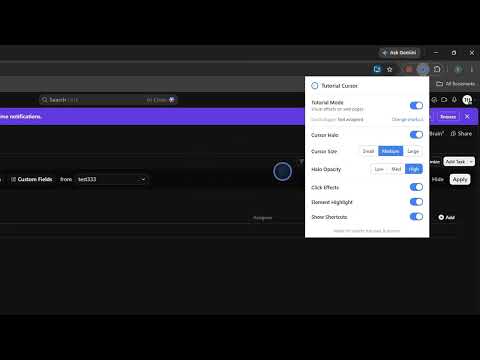
Tutorial Cursor is a lightweight cursor highlighter for screen recording, software tutorials, product demos, training, presentations, and screen sharing. Make every interaction easier to follow with a clear mouse cursor halo, click effects, element highlighting, and keyboard shortcut visualization. Tutorial Cursor helps viewers instantly see where you are pointing, what you clicked, and which shortcut you used. Perfect for: • Screen recording and software tutorials • Product demos and customer onboarding • Training videos and walkthroughs • Zoom, Google Meet, and screen sharing • Presentations and live demonstrations Features: • Cursor highlighter / mouse halo • Click ripple effects • Highlight the exact button or control you click • Show keyboard shortcuts on screen • Adjustable cursor size and opacity • Quick Tutorial Mode toggle • Lightweight and responsive Privacy: Tutorial Cursor works locally in your browser. It does not collect, upload, sell, or share your browsing data, page content, typed text, or personal information. No account required. No tracking. No analytics. Turn on Tutorial Mode and make your next screen recording, tutorial, demo, or screen share easier to follow.
0 out of 5No ratings
Details
- Version1.0.0
- UpdatedSeptember 8, 2026
- Offered bytronghoanghoctin
- Size25.61KiB
- LanguagesEnglish
- Developer
Email
tronghoanghoctin@gmail.com - Non-traderThis developer has not identified itself as a trader. For consumers in the European Union, please note that consumer rights do not apply to contracts between you and this developer.
Privacy

This developer declares that your data is
- Not being sold to third parties, outside of the approved use cases
- Not being used or transferred for purposes that are unrelated to the item's core functionality
- Not being used or transferred to determine creditworthiness or for lending purposes