

TurboFlow - Auto Flow on Google Flow

Overview
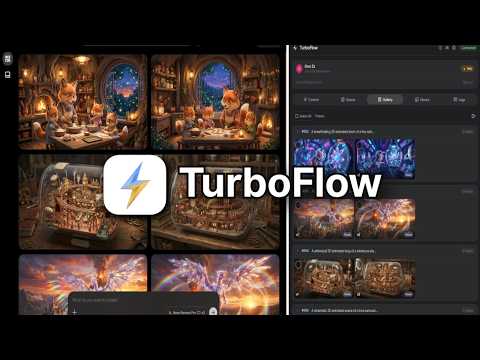
Auto Flow on Google Flow. Batch generate Veo 3.1 videos & Nano Banana Pro images, auto 4K upscale, auto-download.
Auto Flow for Google Flow — batch generate, auto-upscale, auto-download. TurboFlow is an Auto Flow and Auto Veo automation tool for Google Flow (flow.google.com and labs.google/fx/tools/flow). Batch generate hundreds of AI videos and images with Veo 3.1, Omni Flash, Nano Banana Pro, and Nano Banana 2. Auto-submit prompts, auto-upscale to 4K, auto-download everything. Paste your prompt list, press generate, walk away. 🖼 NANO BANANA PRO — BATCH IMAGE GENERATION Batch generate images on Google Flow with Nano Banana Pro, Nano Banana 2, and Nano Banana 2 Lite. 1 to 4 variants per prompt Five aspect ratios: 16:9, 4:3, 1:1, 3:4, 9:16 Up to 10 reference images per prompt Reference chaining — each image guides the next prompt Auto 2K or 4K upscale (4K requires a Google AI Ultra account) Auto-download into organized folders No manual clicking. No babysitting. Auto Veo at scale. 🎬 AUTO VEO — BATCH VIDEO GENERATION Batch generate videos on Google Flow with Veo 3.1 Fast, Veo 3.1 Quality, Veo 3.1 Lite, and Omni Flash. Text to video — paste prompts, auto-generate Image to video — start frame and start + end frame modes Reference mode — guide video style with reference images Durations of 4, 6, 8, or 10 seconds (Omni Flash supports all durations on free Google AI accounts; Veo durations depend on your account tier) Continue from last frame — video chaining for continuous scenes 1 to 4 videos per prompt Landscape and portrait Auto-download at 720p, or upscale to 1080p or 4K 📎 REFERENCE MAPPER Assign a different reference image to each prompt individually. This is what makes batch work with references actually practical. Auto 1:1 — bulk upload images, mapped to prompts in order Auto-Tag — tag library images with names like @hero or @logo, then use those tags in your prompts and TurboFlow matches them automatically Same for All — one reference applied to every prompt Drag and drop to swap references between prompts Works with image references, video references, start frames, and end frames 🔗 CHAINING — CONTINUITY ACROSS PROMPTS Reference chaining: each generated image becomes the reference for the next Video chaining: the last frame of each clip becomes the next clip's start frame Works alongside per-prompt references from the mapper Built for storyboards, comic panels, and continuous scenes 📋 QUEUE & AUTO-CHAIN Stack multiple batches with different settings. When one finishes, the next starts automatically. Queue unlimited batches Each batch keeps its own model, ratio, and reference settings Retry failed prompts in one click Import and export batches as JSON Duplicate, rename, and reorder batches Editable download folder per batch Set up 10 batches before bed. Wake up to hundreds of downloads. ⚡ SPEED CONTROL Fast, Balanced, Slow, or a custom delay from 1 to 60 seconds between generations, so you can stay within your account's rate limits. 📝 PROMPT INPUT One prompt per line Import from .txt files Import JSON prompts — single objects or full arrays Single-prompt mode — one prompt applied across many start frames ⬇️ AUTO-DOWNLOAD & FILE NAMING 2K and 4K upscale for images, 1080p and 4K upscale for videos Auto-download to a named folder per batch File naming: numbered, prompt-based, or custom prefix with separator Custom start number — numbering continues across batches Export selected images as a single ZIP Bulk download from the gallery with quality selection 📸 IMAGE LIBRARY Upload and organize reference images for reuse across all batches. Tag images for automatic prompt matching Auto-tag your whole library from filenames Drag-and-drop upload Use as references, start frames, or end frames Persists across sessions 🖼 LIVE GALLERY Results appear in real time as they generate, grouped by batch and prompt. Regenerate any image or video in one click Animate — turn a generated image into a video Select and bulk download, or export as ZIP Full-screen preview with keyboard navigation 🛡 RELIABLE BATCH PROCESSING If a generation fails mid-batch, TurboFlow retries it, slows down when it hits rate limits, and keeps going. Failed prompts are listed so you can retry them without rerunning the whole batch. A detailed activity log with filters and search shows exactly what happened. ✅ PERFECT FOR Content creators, AI video producers, storyboard artists, and anyone producing large sets of images or video. 🔧 HOW IT WORKS 1. Open Google Flow (flow.google.com or labs.google/fx/tools/flow) 2. Click TurboFlow to open the side panel 3. Choose your model and settings 4. Paste your prompts, one per line 5. Press generate Requires a Google account with access to Google Flow. Generation runs through your own Flow account and uses its quota. 🔒 PRIVACY Your prompts and generated media are processed in your browser on the Google Flow page. They are never sent to TurboFlow servers. 💳 PRICING Free: 30 prompts per day, all features unlocked, no credit card. Pro: $12/month or $99/year for unlimited prompts. 📧 support@turboflow.art 🌐 www.turboflow.art ❓ FAQ: www.turboflow.art/faq 💬 Discord: discord.gg/z7qFUGrM3h ✈️ Telegram: t.me/+HPQd-ZJmzclhNzFk TurboFlow is an independent tool and is not affiliated with or endorsed by Google.
4.4 out of 5100 ratings
Details
- Version2.4.0
- UpdatedOctober 30, 2026
- FeaturesOffers in-app purchases
- Size209KiB
- LanguagesEnglish
- DeveloperWebsite
Email
support@turboflow.art - Non-traderThis developer has not identified itself as a trader. For consumers in the European Union, please note that consumer rights do not apply to contracts between you and this developer.
Privacy

TurboFlow - Auto Flow on Google Flow has disclosed the following information regarding the collection and usage of your data. More detailed information can be found in the developer's privacy policy.
TurboFlow - Auto Flow on Google Flow handles the following:
This developer declares that your data is
- Not being sold to third parties, outside of the approved use cases
- Not being used or transferred for purposes that are unrelated to the item's core functionality
- Not being used or transferred to determine creditworthiness or for lending purposes
Support
For help with questions, suggestions, or problems, visit the developer's support site