

Tuner — Hide Notion clutter, dial in your view

Overview
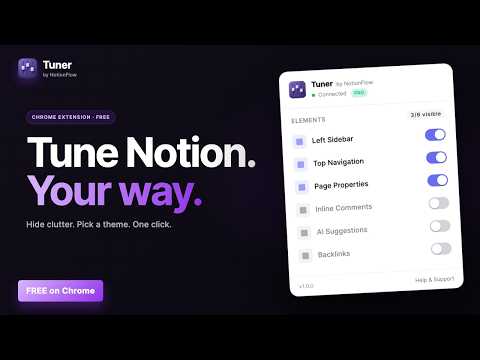
A remote control for Notion's UI. Hide the sidebar, top nav, AI buttons, comments. Pick fonts, themes, page width. Free.
Notion is great. The screen is busy. Tuner is a one-click remote control for Notion's interface — hide the sidebar, top nav, page properties, inline comments, AI buttons, and block hover handles in one tap. Opt in to extra advanced toggles for backlinks, the help button, updates inbox, database view tabs and toolbar, and the "last edited by" footer. Pick a font, theme, and page width. Save your favorite combination as a custom mode. Open Notion the way you want it. HOW IT WORKS 1. Install Tuner from the Chrome Web Store. 2. Open any Notion page. Click the Tuner icon in your toolbar. 3. Flip toggles, pick a theme, choose a font. Changes apply instantly. 4. Save your setup as a custom mode and switch between them with one tap. WHY TUNER • Subtraction-focused. Notion has been adding features for a decade. Tuner is the only tool dedicated to hiding the ones you don't want. • Privacy-first. Tuner never connects to your Notion account. It does not use Notion's API. It does not read your page contents. Tuner only modifies how Notion displays in your browser, via CSS. • Sync built-in. Your toggles, fonts, and themes sync across every Chrome instance you sign into — no account or backend needed. • Pre-built presets. "Minimalist" hides everything but content. "Reading" applies a comfortable serif at 1.7 line-height. Custom modes let you save your own. • Wide typography range. Font sizes 14-30px, line heights 1.2-2.5, three density presets — usable for tight engineering notes through large-print reading. • Themes color the whole frame. Sidebar and topbar adopt the theme background too, so the chrome no longer fights the page. WHO IT'S FOR • Writers who want a distraction-free Notion. • Power users who hate AI suggestions in their workspace. • Designers who want to override Notion's typography. • Anyone who's tried Notion Enhancer and wants something polished and supported. 100% FREE — EVERYTHING INCLUDED • All themes: Default, Warm Paper, True Dark (OLED black), Soft Focus, plus a custom theme picker for your own colors. • All font families: Inter, System, and premium Google Fonts (Lora, IBM Plex Sans, Source Sans, Fira Code, Crimson Pro). • All advanced hide-toggles: Backlinks, Help Button, Updates Inbox, Database View Tabs, Database Toolbar, and Page Metadata footer. • Unlimited saved custom modes with drag-to-reorder. • No subscription, no license key, no catch. PRIVACY-FIRST DESIGN • Tuner does NOT connect to your Notion account, ever. • Tuner does NOT use Notion's API. It only modifies how Notion pages display in your browser via CSS injection. • Tuner does NOT read your page contents. The extension only sees the CSS selector targets it needs to apply hide/show rules. • Anonymous product analytics (PostHog) capture button clicks and feature usage to detect bugs. No content, no URLs, no browsing history. Full disclosure on the privacy page. WHY TUNER vs. NOTION ENHANCER Notion Enhancer adds features (custom widgets, integrations, dashboard mods). Tuner removes them. If you've installed Notion Enhancer and ended up with more buttons than you started with, try Tuner. SUPPORT • Email: support@notionflow.io • Privacy: https://www.notionflow.io/tuner/privacy • Uninstall feedback: https://www.notionflow.io/tuner/uninstall Built by NotionFlow. Sibling extensions: Clipper (clip web pages to Notion), DailyFlow (daily-note + streak tracker), DeadlineFlow (calendar view for Notion databases), and more — all at notionflow.io.
0 out of 5No ratings
Details
- Version0.1.5
- UpdatedOctober 8, 2026
- FeaturesOffers in-app purchases
- Size320KiB
- LanguagesEnglish
- DeveloperBeast Creative LLCWebsite
30 N Gould St Ste N Sheridan, WY 82801-6317 USEmail
treyinchina@gmail.comPhone
+1 503-308-8900 - TraderThis developer has identified itself as a trader per the definition from the European Union and committed to only offer products or services that comply with EU laws.
- D-U-N-S143977674
Privacy

Tuner — Hide Notion clutter, dial in your view has disclosed the following information regarding the collection and usage of your data. More detailed information can be found in the developer's privacy policy.
Tuner — Hide Notion clutter, dial in your view handles the following:
This developer declares that your data is
- Not being sold to third parties, outside of the approved use cases
- Not being used or transferred for purposes that are unrelated to the item's core functionality
- Not being used or transferred to determine creditworthiness or for lending purposes
Support
For help with questions, suggestions, or problems, visit the developer's support site