


Overview
Back up any public Tumblr blog to a browseable local archive (CSV + HTML + media).
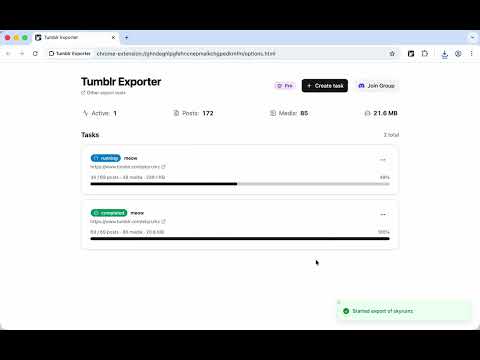
Back up Tumblr blogs, likes, following lists, and post notes to your own computer. It exports posts from any public blog, your own liked posts, your following list, and the notes on a specific post (likes, plain reblogs, quote reblogs with commentary, and replies). You can save the output as a CSV, as a self-contained HTML archive that opens offline with images and videos bundled in, or as a ZIP of just the media files with a metadata.json that maps each file back to its source post. Public blogs work without a login. Personal data like your likes and following list needs you to be signed in to tumblr.com; the extension just uses your existing browser session, no extra credentials. NSFW or age-gated blogs need a session that is allowed to view them. Long exports run in the background. They pause automatically when Tumblr rate-limits the API or the network drops, and resume when ready. You can also pause and resume manually. Progress is checkpointed page by page, so a half-finished task survives a browser restart. Everything happens locally in your browser. Nothing is uploaded to any server. The free version covers up to 1,000 records per task and one task at a time. Pro removes both limits and unlocks the bundled-media HTML archive and the media ZIP output.
0 out of 5No ratings
Details
- Version0.0.20
- UpdatedOctober 11, 2026
- FeaturesOffers in-app purchases
- Size263KiB
- LanguagesEnglish
- DeveloperWebsite
Email
rxliuli@gmail.com - Non-traderThis developer has not identified itself as a trader. For consumers in the European Union, please note that consumer rights do not apply to contracts between you and this developer.
Privacy

This developer declares that your data is
- Not being sold to third parties, outside of the approved use cases
- Not being used or transferred for purposes that are unrelated to the item's core functionality
- Not being used or transferred to determine creditworthiness or for lending purposes
Support
For help with questions, suggestions, or problems, please open this page on your desktop browser