


Overview
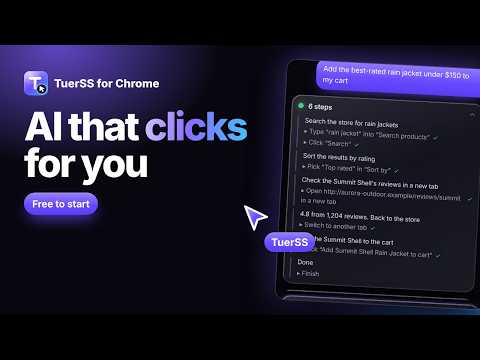
Chat with TuerAI beside any page, or let it work in your own browser: it clicks, types, scrolls and organises your tabs.
TuerSS puts an AI assistant in Chrome's side panel. It stays open on the right while you browse, and it can either talk with you about the page or do the work in your browser for you. CHAT BESIDE ANY PAGE • Ask about the page you're on: summaries, explanations, key facts, translations, replies • Compare all your open tabs at once • Type / for skills: /summarize, /explain, /translate, /reply, /key-points, /compare, /extract and more • Save any request as your own skill and run it with one slash command • Right-click any page or selected text to ask, summarize, explain or translate LET HAZEL DO IT Switch to Agent mode and describe the task: "find the cheapest flight and open the top three", "fill in this form with my details but don't submit", "fix the typo in this editor". • Uses a real mouse and keyboard, so it works in code editors, Google Docs and canvas apps • Its own visible cursor and a Stop button on the page, so you can follow and stop every step • Puts the tabs it opens in a "TuerSS" tab group, and can sort your other tabs into groups • Reads pages that are images or drawings by looking at a screenshot when it needs to IN YOUR LANGUAGE English, French, Spanish, Arabic, Portuguese and German. Choose yours in Settings and the whole panel follows, including what TuerAI answers. Arabic reads right to left. YOU STAY IN CONTROL • Reading, scrolling and moving between tabs just happen. Sending, posting, buying, deleting and closing your tabs ask first • Payments always ask, even with Full access on • Never reads or types into password or card fields • "Allow once", "Allow for this task" or "Always on this site", and you can remove trusted sites at any time • Nothing runs in the background: pages are only sent when you share them or a task you started is running WORKS WITH THE REST OF TUERSS Start a browsing task from tuerss.com, the TuerSS VS Code agent or the FORGE editor and run it here in your own Chrome, without using a cloud Auto Browser run. Every task asks you to allow it first. You need a TuerSS account (free to start, tuerss.com). Sign-in is one click. Usage comes out of your TuerSS credits.
0 out of 5No ratings
Details
- Version0.4.1
- UpdatedOctober 28, 2026
- FeaturesOffers in-app purchases
- Size87.17KiB
- Languages5 languages
- DeveloperWebsite
Email
support@tuerss.com - Non-traderThis developer has not identified itself as a trader. For consumers in the European Union, please note that consumer rights do not apply to contracts between you and this developer.
Privacy

TuerSS: AI Browser Agent & Chat has disclosed the following information regarding the collection and usage of your data. More detailed information can be found in the developer's privacy policy.
TuerSS: AI Browser Agent & Chat handles the following:
This developer declares that your data is
- Not being sold to third parties, outside of the approved use cases
- Not being used or transferred for purposes that are unrelated to the item's core functionality
- Not being used or transferred to determine creditworthiness or for lending purposes
Support
For help with questions, suggestions, or problems, visit the developer's support site