

TubePrompt
4 ratings
)
Overview
Copy YouTube transcript text into a reusable AI prompt template
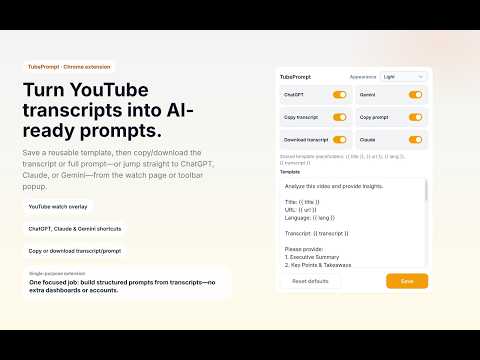
TubePrompt helps you use YouTube transcript text in a reusable prompt workflow. It adds a compact toolbar on YouTube watch pages so you can: - Copy prompt - Copy transcript - Download transcript - Copy to ChatGPT - Copy to Claude - Copy to DeepSeek - Copy to Gemini - Copy to Grok The popup lets you customize one shared prompt template with placeholders: - {{ title }} - {{ url }} - {{ lang }} - {{ transcript }} How it works: 1. Open a YouTube watch page. 2. Use toolbar actions to copy or download transcript content, or copy a built prompt. 3. Open ChatGPT, Claude, or Gemini and paste the prompt into your workflow. TubePrompt is focused on a single workflow: transcript and page context from YouTube watch pages into reusable prompts Why TubePrompt: - Fast workflow for research and note-taking. - Clean popup settings for template and button visibility. - Focused single-purpose extension (YouTube transcript -> reusable prompt). Install free. No account required.
5 out of 54 ratings
Details
- Version1.10.0
- UpdatedJune 8, 2026
- Offered byameon
- Size87.57KiB
- LanguagesEnglish
- Developer
Email
pnamhn16@gmail.com - Non-traderThis developer has not identified itself as a trader. For consumers in the European Union, please note that consumer rights do not apply to contracts between you and this developer.
Privacy

This developer declares that your data is
- Not being sold to third parties, outside of the approved use cases
- Not being used or transferred for purposes that are unrelated to the item's core functionality
- Not being used or transferred to determine creditworthiness or for lending purposes