

TubePrompt: YouTube Transcript to AI Prompt
4 ratings
)
Overview
Copy YouTube transcripts into reusable AI prompts for ChatGPT, Claude, DeepSeek, Gemini, Grok and other AI Assistant
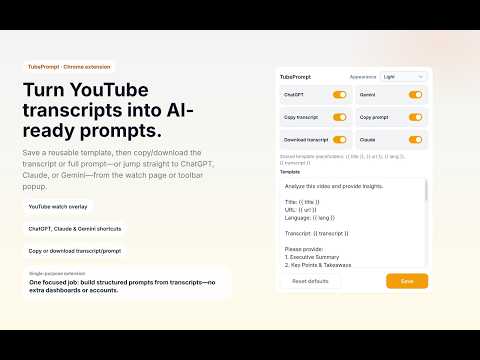
TubePrompt turns YouTube video transcripts into ready-to-use AI prompts. Copy the transcript, captions, or a fully built prompt from any YouTube watch page and paste it straight into ChatGPT, Claude, Gemini, DeepSeek, or Grok. WHAT IT DOES TubePrompt adds a compact toolbar on YouTube watch pages so you can: - Copy prompt (your saved template filled with the video transcript, ready to paste) - Copy transcript (plain text from the video captions or subtitles) - Download transcript as a text file - Copy to ChatGPT - Copy to Claude - Copy to DeepSeek - Copy to Gemini - Copy to Grok The popup lets you customize one shared prompt template with placeholders: - {{ title }} - the video title - {{ url }} - the video URL - {{ lang }} - the transcript language - {{ transcript }} - the full transcript text HOW IT WORKS 1. Open a YouTube watch page. 2. Use the toolbar to copy or download the transcript, or copy a built prompt. 3. Paste into ChatGPT, Claude, Gemini, or any AI chat and get your summary, notes, or analysis. TubePrompt is focused on a single workflow: turning transcripts and page context from YouTube watch pages into reusable prompts. WHO IT'S FOR - Researchers: summarize YouTube videos and extract key points from lectures, interviews, and conference talks without scrubbing through hours of footage. - Students: turn lecture videos and tutorials into study notes, outlines, or quick summaries. - Content creators: analyze reference videos and repurpose transcripts into blog posts, scripts, or social media content. - Language learners: pull subtitles and captions to study vocabulary, or ask an AI to explain phrases in context. - Busy viewers: get a video summary in seconds instead of watching the full video. WHY TUBEPROMPT - Fast workflow for research and note-taking. - One reusable template instead of retyping the same prompt for every video. - Clean popup settings for template and button visibility. - Focused, single-purpose extension: YouTube transcript to reusable prompt. No bloat, no extra tabs. PRIVACY - Free to install. No account required. - No data collection or tracking. - Your prompt template is stored locally in your browser. - The extension only runs on YouTube watch pages. FAQ Does it work on videos without captions? TubePrompt reads YouTube's transcript data, so the video needs captions or auto-generated subtitles to be available. Which languages are supported? Any language YouTube provides a transcript for. The {{ lang }} placeholder lets your prompt tell the AI which language the transcript is in. Does TubePrompt summarize the video itself? No. TubePrompt prepares the prompt; the AI you paste it into (ChatGPT, Claude, Gemini, DeepSeek, or Grok) generates the summary or analysis. This keeps the extension lightweight and lets you use whichever AI you prefer. Is it free? Yes. Install free and start copying transcripts right away.
5 out of 54 ratings
Details
- Version1.11.3
- UpdatedOctober 13, 2026
- Offered byameon
- Size63.17KiB
- LanguagesEnglish (United States)
- Developer
Email
pnamhn16@gmail.com - Non-traderThis developer has not identified itself as a trader. For consumers in the European Union, please note that consumer rights do not apply to contracts between you and this developer.
Privacy

This developer declares that your data is
- Not being sold to third parties, outside of the approved use cases
- Not being used or transferred for purposes that are unrelated to the item's core functionality
- Not being used or transferred to determine creditworthiness or for lending purposes