

TubeGuardian - YouTube Parental Control & Screen Time for Kids

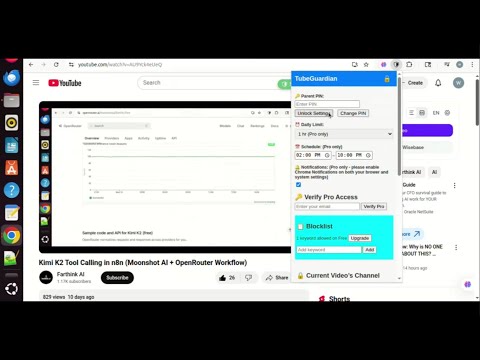
Overview
Parental control for YouTube: block videos, set time limits, and more.
📺 TubeGuardian – Parental Control for YouTube Take control of your child’s YouTube experience with TubeGuardian, the ultimate parental control tool built specifically for YouTube. 🔒 Key Features: ✅ Block Specific Channels — Add any channel to your blocklist instantly to keep unwanted content away. ✅ Allow Only Whitelisted Channels — Create a safe list of approved channels your child can watch. ⏱️ Set Time Limits — Limit daily YouTube usage to encourage healthy screen time habits. 📅 Schedule YouTube Access — Control when YouTube can be accessed (e.g. no access during homework or bedtime). 🚫 Block Shorts and Live Streams — Optional controls to disable YouTube Shorts or live content. 👨👩👧👦 Parent Mode — Password-protected settings and optional email verification for added security. 🔔 Real-Time Monitoring — Detects the currently watched video and shows channel info for easy decisions. 🌐 Privacy-First — No tracking. No data sharing. All controls are handled securely within your browser. 🎯 Designed for Parents, Loved by Families TubeGuardian is simple, lightweight, and focused — built to give parents peace of mind without overcomplicating the YouTube experience. 🛡️ Privacy & Safety TubeGuardian does not collect or sell personal data. All features are designed to respect your family’s privacy. See our Privacy Policy and Terms of Service for details.
0 out of 5No ratings
Details
- Version1.1
- UpdatedAugust 1, 2025
- FeaturesOffers in-app purchases
- Offered bywebestech
- Size26.06KiB
- LanguagesEnglish (United States)
- DeveloperWEBESTECH LLC
982 Main St ste 4 191 Fishkill, NY 12524-3514 USEmail
info@webestech.comPhone
+1 607-527-5018 - TraderThis developer has identified itself as a trader per the definition from the European Union and committed to only offer products or services that comply with EU laws.
- D-U-N-S076072782
Privacy

TubeGuardian - YouTube Parental Control & Screen Time for Kids has disclosed the following information regarding the collection and usage of your data. More detailed information can be found in the developer's privacy policy.
TubeGuardian - YouTube Parental Control & Screen Time for Kids handles the following:
This developer declares that your data is
- Not being sold to third parties, outside of the approved use cases
- Not being used or transferred for purposes that are unrelated to the item's core functionality
- Not being used or transferred to determine creditworthiness or for lending purposes
Support
For help with questions, suggestions, or problems, please open this page on your desktop browser