


總覽
Read out loud any page, directly from within the page
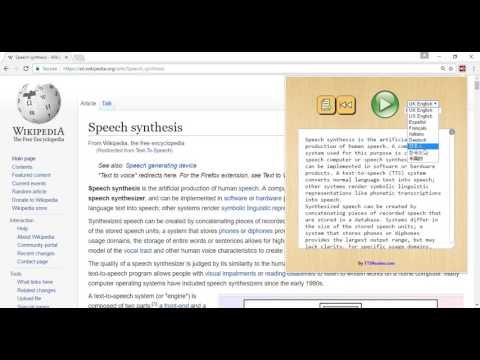
Reads out loud any page without leaving the page. Works continuously - even if you shift to a different tab. No tricks. No privacy violations. Does what it says it does - nothing else hidden under the hood. Listen to news, wiki articles & more, directly on their websites. Reads any website, without having to copy text or leave the website. TTSreader is particularly suited for content based websites, eg Wikipedia articles. Please note: the ability to read an article on a site depends heavily on how the site is built (and tagged under the hood), as we try to read only the interesting content and skip non content like ads and stuff. In case you need it to read a site, and it does not do it very well, you can select the text, right-click with the mouse, then select 'Play Selected Text'. Also - please send us an email, or feedback on https://ttsreader.com/extension/guide/ so we can perhaps adjust for the site you need. Main Features: Reading whole pages Select text on the page -> right mouse click menu -> read selection Marks the currently read sentence, so you can follow the reading. Multilingual, multiple voices and accents. All your website reading needs in a simple, efficient and intuitive manner! The extension is super simple to use and, a professional text to speech. The extension allows for instant reading of text with natural sounding voices, directly from within any website. The extension's icon will be placed right on your Chrome's toolbar, so it will always be available without exiting your working tab. In addition, you can simply select the text you want to be read, and click "Play Selected" right from the popup context menu upon the right-mouse-click. The TTSReader chrome extension has a set features and functionality that allow you to control and customize your listening experience. • Choose a language & voice from a list. • Control and vary reading speeds • Play, pause, skip back and forward • Hear text via selection and use of the right click menu • Listen and continue browsing on other sites. Uses of the TTSreader extenstion: • While working, listen to interesting articles and books • TTSReader allows for listening to written content while doing something else. • Suitable for kids education • Aid for people with difficulties in reading Privacy: We at TTSReader.com value your privacy, and that's why we do not store anything you type or any other data about you. For additional info & feedback, please contact us at admin@speechlogger.com Visit our site on ttsreader.com
3.8 分 (滿分 5 分)192 個評分
詳細資料
隱私權
這位開發者就你的資料做出下列聲明:
- 除經核准的用途外,不會將你的資料販售給第三方
- 不會基於與商品核心功能無關的目的,使用或轉移資料
- 不會為了確認信用度或基於貸款目的,使用或轉移資料
支援
如有疑問或建議,請使用電腦版瀏覽器開啟這個頁面