

ttime Webtime Tracker — Automatic Browser Activity Tracking
1 rating
)
Overview
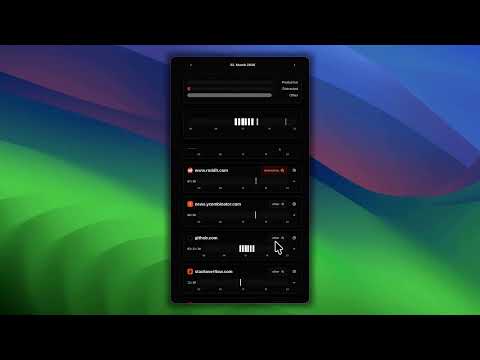
Automatic browser activity tracking. See where your webtime goes, spot productivity patterns, and review daily reports — no signup.
Description: You open your laptop, start working, and 6 hours later you have no idea where the time went. ttime Webtime Tracker runs silently in the background and shows you exactly how you spent your time online. No timers. No buttons. Just browse normally. Automatic webtime tracking: - Tracks time spent on every site automatically - Detects real activity — mouse, keyboard, scrolling — so idle time doesn't count - Categorizes sites automatically: Coding, Research, Communication, AI, Social Media, News, Streaming, and more - Smart grouping for GitHub (by repo, issue, PR), Jira (by project and ticket), and many more See your day at a glance: - Productivity distribution: productive, distracting, and other - 24-hour timeline showing when and where you were active - Per-domain breakdown with favicons, durations, and page-level detail - Live timer on your currently active site Mark what matters: - Set any domain as productive, distracting, or other - Your choices are remembered and shape your daily summary Domain deep dives: - Total sessions, tracked time, and active days per domain - Average daily time and most active day - 30-day stacked timeline chart per domain Navigate your history: - Browse activity day by day, up to 30 days back - Relative labels — Today, Yesterday — for quick orientation Export and backup your data: - Export all tracked sessions, domain settings, and statistics as JSON - Import previously exported data to restore or transfer between devices - Your data, your control Privacy first: - All data stays local in your browser by default - No account required - No data sent anywhere unless you choose to connect - Works fully offline Optional sync: - Connect to a ttime account to sync activity for project tracking and invoicing - Login is entirely optional — the extension works standalone Get started in 3 seconds: 1. Click "Add to Chrome" 2. Browse normally 3. Open the side panel to see where your webtime goes No signup. No setup. Just answers. --- Feedback or questions? Reach out at support@gettti.me
5 out of 51 rating
Details
- Version1.0.19
- UpdatedApril 6, 2026
- Offered bygoogle-developer
- Size397KiB
- LanguagesEnglish (United States)
- Developer
Email
ttime@viktor-braun.de - Non-traderThis developer has not identified itself as a trader. For consumers in the European Union, please note that consumer rights do not apply to contracts between you and this developer.
Privacy

ttime Webtime Tracker — Automatic Browser Activity Tracking has disclosed the following information regarding the collection and usage of your data. More detailed information can be found in the developer's privacy policy.
ttime Webtime Tracker — Automatic Browser Activity Tracking handles the following:
This developer declares that your data is
- Not being sold to third parties, outside of the approved use cases
- Not being used or transferred for purposes that are unrelated to the item's core functionality
- Not being used or transferred to determine creditworthiness or for lending purposes
Support
For help with questions, suggestions, or problems, visit the developer's support site