Item logo image for ttime - Revenue first time tracking for freelancers

ttime - Revenue first time tracking for freelancers

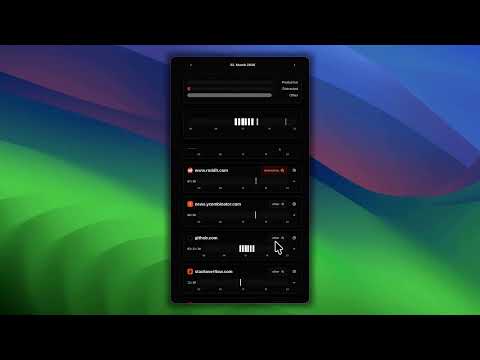
Item media 1 (screenshot) for ttime - Revenue first time tracking for freelancers

Overview

Automatically tracks your browser activity and turns it into billable time — so you never lose revenue to forgotten hours again.

Whether you're reviewing pull requests on GitHub, managing issues in Jira, researching on Stack Overflow, or hopping between Slack, Figma, and your email — ttime silently captures what you're working on. No timers to start. No buttons to click. Just work naturally and let ttime do the tracking. Your browser activity is automatically categorized (Coding, Review, Research, Meeting, AI, Communication, and more) and synced to your ttime account, where you can assign activities to projects, track revenue goals, and export everything for invoicing. Built for freelancers who want to bill every minute they've earned. 1. Click "Add to Chrome" 2. Log in to your ttime account from the side panel or at https://gettti.me (you can sign up with GitHub or Google) 3. Browse and work as usual — ttime tracks your activity in the background 4. Open the side panel anytime to see your recent activity sessions in real time 5. Head to the ttime Activity page to review, assign, and convert activities into billable time records How it works: * Detects user activity (mouse, keyboard, scrolling) and groups it into sessions per site/project * Smart site recognition: GitHub PRs and issues are grouped by repository, Jira issues are captured with project and ticket context * Activities are automatically categorized — Code, Review, Research, AI, Communication, Social Media, Mail, News, Streaming, and more * Sessions sync to your ttime account where you see them in a weekly calendar alongside your time records * Assign one or multiple activities to a time record with a single click The side panel shows: * Live activity sessions with real-time duration counters * Site favicon, page title, and contextual grouping (repo, project, task) * Activity category badges (Coding, Review, AI, Meeting, etc.) * Active vs. inactive session status at a glance Works seamlessly with: * GitHub — groups activity by repository, detects PRs, issues, and actions * Jira — captures project name and issue key automatically * 100+ categorized sites including Slack, Figma, Gmail, ChatGPT, Notion, and many more Privacy first: * Activity data is only sent to your own ttime account — never shared with third parties * Mark any activity as private to hide it from your default view * No data is collected when you're not logged in >>> ttime Overview ttime is revenue-first time tracking built for freelancers. Set your hourly rate, define monthly revenue goals, and track your progress with visual charts that show real earnings — not just hours. Create projects with individual billing rates and currencies, log time with 14 work types, and export polished reports for invoicing in Excel, CSV, or Markdown. Combined with the browser extension and the VS Code extension, ttime builds a complete picture of your workday — so you can stop guessing and start billing with confidence. Learn more at https://gettti.me If you have any problems or feedback, reach out to us at support@gettti.me

Details

  • Version
    1.0.12
  • Updated
    March 5, 2026
  • Offered by
    google-developer
  • Size
    381KiB
  • Languages
    English (United States)
  • Developer
    Email
    ttime@viktor-braun.de
  • Non-trader
    This developer has not identified itself as a trader. For consumers in the European Union, please note that consumer rights do not apply to contracts between you and this developer.

Privacy

Manage extensions and learn how they're being used in your organization

ttime - Revenue first time tracking for freelancers has disclosed the following information regarding the collection and usage of your data. More detailed information can be found in the developer's privacy policy.

ttime - Revenue first time tracking for freelancers handles the following:

Web history
User activity
Website content

This developer declares that your data is

  • Not being sold to third parties, outside of the approved use cases
  • Not being used or transferred for purposes that are unrelated to the item's core functionality
  • Not being used or transferred to determine creditworthiness or for lending purposes

Support

For help with questions, suggestions, or problems, visit the developer's support site

Related

Time Keeper

4.8

A simple time logger for work. Track tasks, boost productivity, and stay organized with this Chrome extension.

Web Activity Time Tracker - Block Websites, Pomodoro & Web Analytics

4.8

Track time of your web activity, limit and block distracting websites. Monitor your web usage.

Action Replay

4.3

Automate browser interactions by recording and replaying user actions.

Timer Countdown

4.8

An easy-to-use interface for the Countdown clock Timer—to manage time! After all, you'll be redirected to the last active tab.

Auto Refresh

5.0

Auto Reload Chrome – Effortless Tab & Page Auto Refresh Extension

Keeping – Tijdregistratie-app

5.0

Meet je productiviteit in de browser met Keeping, de gemakkelijke urenregistratie-app. Data wordt gesynchroniseerd met je account.

Long Live the Session

5.0

Automatically keep web sessions alive. Prevent timeouts and stay logged in on any website with customizable background pings.

Shepherd: Focus & Productivity Time Tracker

5.0

Auto-tracks your browsing time & gives you a daily focus score. See where your hours go, grow your sheep, and stay productive. Free.

Work Hours Tracker

5.0

Use Work Hours Tracker app to increase your productivity and manage projects. Hour tracker for work​ can also track billable time!

Pondr: Tab Manager & Bookmark Reminder

4.7

The extension that manages bookmarks and finds the best time to remind you to revisit.

Tandem: AI Search & Side Panel Browser

0.0

The ultimate AI Search and Mini Browser for seamless multitasking and quick search from your side panel.

actiTIME: Time Management Assistant

4.8

Track all your online activities automatically to see how much time you spend on different platforms and get accurate time track.

Time Keeper

4.8

A simple time logger for work. Track tasks, boost productivity, and stay organized with this Chrome extension.

Web Activity Time Tracker - Block Websites, Pomodoro & Web Analytics

4.8

Track time of your web activity, limit and block distracting websites. Monitor your web usage.

Action Replay

4.3

Automate browser interactions by recording and replaying user actions.

Timer Countdown

4.8

An easy-to-use interface for the Countdown clock Timer—to manage time! After all, you'll be redirected to the last active tab.

Auto Refresh

5.0

Auto Reload Chrome – Effortless Tab & Page Auto Refresh Extension

Keeping – Tijdregistratie-app

5.0

Meet je productiviteit in de browser met Keeping, de gemakkelijke urenregistratie-app. Data wordt gesynchroniseerd met je account.

Long Live the Session

5.0

Automatically keep web sessions alive. Prevent timeouts and stay logged in on any website with customizable background pings.

Shepherd: Focus & Productivity Time Tracker

5.0

Auto-tracks your browsing time & gives you a daily focus score. See where your hours go, grow your sheep, and stay productive. Free.

Google apps