


Overview
All-in-one browser toolkit for devs, designers & marketers. SEO audit, design inspector, utilities, page forensics, and bulk tools.
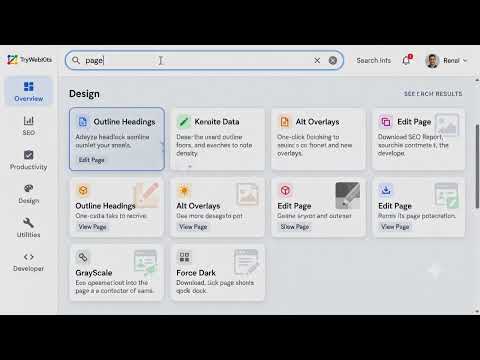
One toolkit. 100+ tools. Built for the people who actually build, design, and rank the web. TryWebKits Helper Kit puts an entire workbench one click away, whether you optimize pages for search, design interfaces, or debug and inspect sites. No sign-up, no accounts, no servers: everything runs right inside your browser, on your machine. When you first open it, the Helper Kit asks one simple question, how do you mainly work? Marketer / SEO, Designer, Developer / Security, or "just exploring" — and arranges itself around what you actually need. You can switch anytime, pin your favorites, and search every tool instantly. — — — — — — — — — — — — — — — — — — — — WHAT YOU GET — — — — — — — — — — — — — — — — — — — — OVERVIEW: a complete, exportable page report • The real meta tags, title and description (with length counters) • Indexability, canonical status, and the exact robots / X-Robots directives • Open Graph, Twitter cards and schema.org structured data • Headings outline, word count, link and image counts • At-a-glance status chips: HTTPS, HTTP status, indexable, canonical, mobile, H1, schema • Show/hide any section, your layout is remembered SEO & CONTENT • Live Google SERP preview that truncates exactly like Google does • Keyword density by 1- to 6-word phrases, with CSV export • Heading outline, canonical & robots.txt checks, sitemap finder • Link explorer (internal / external / nofollow), alt-text report • Open Graph, hreflang and UTM-campaign generators • "Download full SEO report", every tool's data zipped into one file DESIGN • Color palette and font-stack extraction from any page • WCAG contrast checker, gradient / box-shadow / text-shadow / border-radius makers • Color, unit (px/rem/em) and aspect-ratio converters • Image gallery with dimensions and missing-alt flags • One-click page tools: outline boxes, layout grid, grayscale, hide media, big text, edit page, font inspector, element ruler and more DEVELOPER & SECURITY • Network & redirects: the real 301/302 → 200 chain with request & response headers • Live response headers with a security-header scorecard, plus a CSP analyzer • Cookie inspector: view AND edit cookies (SameSite, expiry, HttpOnly, Secure) • Storage viewer: read AND edit localStorage & sessionStorage • Tech-stack detection (React, Vue, Angular, WordPress, Shopify, Node and more, with versions) • Regex tester, JWT decoder, JSON formatter, hashes, Base64/URL, timestamp, URL parser, text diff • Copy CSS selector, find broken images, force-load lazy media, response & caching info • One-click jump to PageSpeed Insights, Rich Results, WHOIS, DNS, SSL Labs, Security Headers, Wayback Machine, BuiltWith and more PRODUCTIVITY • Bulk URL opener with saved, reusable lists • Note Vault and per-site notes, plus an always-there scratchpad • Copy all tab URLs (or as Markdown), save the page to your vault, and more — — — — — — — — — — — — — — — — — — — — WHY YOU'LL LIKE IT — — — — — — — — — — — — — — — — — — — — • 100% local & private: no analytics, no tracking, nothing leaves your device. • Free, with no account and no limits. • Fast and clean: open it with Ctrl+Shift+K (Cmd+Shift+K on Mac). • Light or dark theme. • It shows real values, never vague "yes/no" guesses. • Export almost anything as TXT, CSV or a zipped report. Made by TryWebKits: https://trywebkits.com Built to help everyone, by every means necessary. ================================================== PERMISSIONS — WHY THEY'RE NEEDED ================================================== • activeTab / scripting / host access: to read and analyze the page you're on (meta, headings, links, colors, fonts) and run the one-click page tools you trigger. • tabs: for the bulk URL opener and "copy all tab URLs". • storage: to save your settings, notes, vault and saved lists locally on your device. • cookies: for the Cookie Inspector (view and edit the current site's cookies). • webRequest: to show the current tab's real redirect chain and headers. It only observes your active tab's navigation; it never blocks or sends anything. • browsingData: for the optional one-click "Clear site data" tool. • contextMenus: right-click "Save selection to Vault". • clipboardWrite: for the various copy buttons. No data is ever collected or transmitted. All processing happens in your browser.
0 out of 5No ratings
Details
- Version1.0.0
- UpdatedJune 21, 2026
- Size166KiB
- LanguagesEnglish
- DeveloperWebsite
Email
support@trywebkits.com - Non-traderThis developer has not identified itself as a trader. For consumers in the European Union, please note that consumer rights do not apply to contracts between you and this developer.
Privacy

This developer declares that your data is
- Not being sold to third parties, outside of the approved use cases
- Not being used or transferred for purposes that are unrelated to the item's core functionality
- Not being used or transferred to determine creditworthiness or for lending purposes
Support
For help with questions, suggestions, or problems, visit the developer's support site