


概要
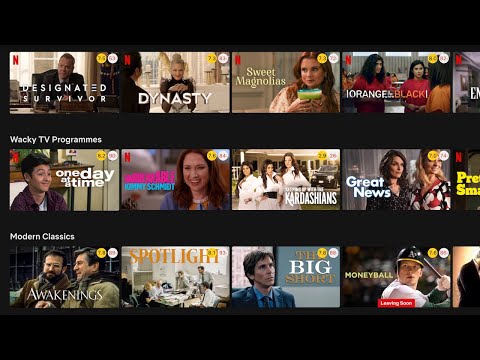
Show IMDB and Rotten Tomatoes ratings on Netflix, Amazon Prime Video, Disney+ and other streaming services
Trim shows IMDB and Rotten Tomatoes ratings on Netflix, Amazon Prime Video, Disney+ and other streaming services. Features: ★ Show IMDB and Rotten Tomatoes ratings Trim shows IMDB and Rotten Tomatoes ratings of all movies and TV shows on Netflix, Prime Video, Disney+ and other streaming services. ★ Fade out low rated movies With Trim you can fade out low rated movies or TV shows on Netflix, Prime Video or Disney+, based on their IMDB or Rotten Tomatoes ratings. ★ Change playback speed With Trim you can adjust the playback speed using the keyboard shortcuts ('[' to slow down and ']' to speed up). This works on Netflix, Prime Video, Disney+ and HBO Max. ★ Show hidden Netflix genres Trim enables and shows an extra tab for the hidden Netflix categories. You can browse your favorite genre by quickly clicking on the drop-down menu “Genre” and selecting a favorite genre. What's new in Trim: • v8.03 - Netflix Genres dropdown now shows up to 20 extra genres - Clicking "Report an error" on a title now sends feedback instantly • v8.02 - Updated extension name to highlight Disney+ support • v8.01 - Added keyword tags (e.g. "thriller", "cult favorite") to IMDB tooltip - Rotten Tomatoes tooltip shows both Critics and Audience scores - Added Reset button to fade-out filters - Added show/hide billboard option for Disney+ and Prime Video - Slightly reduced rating circle sizes • v7.60 - Per-platform rating settings: choose which ratings (IMDB, Rotten Tomatoes) to show for each streaming service. - Fixed playback speed controls on Disney+ and Prime Video. • v7.59 Add an option in the settings page to toggle the instant search feature on/off
5 点満点で 3.3380 件の評価
詳細
プライバシー

このデベロッパーは、お客様のデータについて以下を宣言しています
- 承認されている以外の用途で第三者に販売しないこと
- アイテムの中心機能と関係のない目的で使用または転送しないこと
- 信用力を判断する目的または融資目的で使用または転送しないこと
サポート
質問や提案、問題がある場合は、パソコンのブラウザでこのページを開いてください