


개요
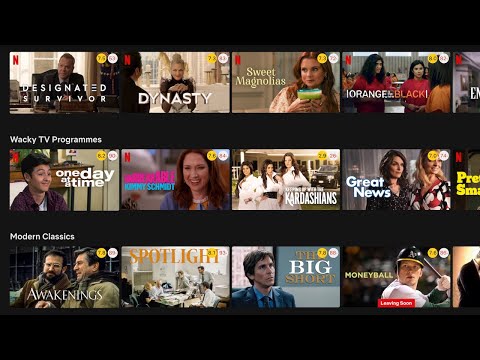
Show IMDB and Rotten Tomatoes ratings on Netflix, Amazon Prime Video, Disney+ and other streaming services
Trim shows IMDB and Rotten Tomatoes ratings on Netflix, Amazon Prime Video, Disney+ and other streaming services. Features: ★ Show IMDB and Rotten Tomatoes ratings Trim shows IMDB and Rotten Tomatoes ratings of all movies and TV shows on Netflix, Prime Video, Disney+ and other streaming services. ★ Fade out low rated movies With Trim you can fade out low rated movies or TV shows on Netflix, Prime Video or Disney+, based on their IMDB or Rotten Tomatoes ratings. ★ Change playback speed With Trim you can adjust the playback speed using the keyboard shortcuts ('[' to slow down and ']' to speed up). This works on Netflix, Prime Video, Disney+ and HBO Max. ★ Show hidden Netflix genres Trim enables and shows an extra tab for the hidden Netflix categories. You can browse your favorite genre by quickly clicking on the drop-down menu “Genre” and selecting a favorite genre. What's new in Trim: • v8.03 - Netflix Genres dropdown now shows up to 20 extra genres - Clicking "Report an error" on a title now sends feedback instantly • v8.02 - Updated extension name to highlight Disney+ support • v8.01 - Added keyword tags (e.g. "thriller", "cult favorite") to IMDB tooltip - Rotten Tomatoes tooltip shows both Critics and Audience scores - Added Reset button to fade-out filters - Added show/hide billboard option for Disney+ and Prime Video - Slightly reduced rating circle sizes • v7.60 - Per-platform rating settings: choose which ratings (IMDB, Rotten Tomatoes) to show for each streaming service. - Fixed playback speed controls on Disney+ and Prime Video. • v7.59 Add an option in the settings page to toggle the instant search feature on/off
5점 만점에 3.8점평점 368개
세부정보
개인정보 보호

개발자가 사용자 데이터에 관해 다음과 같이 선언했습니다
- 승인된 사용 사례를 제외하고 서드 파티에 판매하지 않음
- 항목의 핵심 기능과 관련 없는 목적으로 사용하거나 전송하지 않음
- 신용도 판단 또는 대출 목적으로 사용하거나 전송하지 않음
지원
질문, 제안 또는 문제와 관련하여 도움이 필요하면 데스크톱 브라우저에서 이 페이지를 여세요.