

Trim: IMDB Rating on Netflix, Prime & Disney+

Overview
Show IMDB and Rotten Tomatoes ratings on Netflix, Amazon Prime Video, Disney+ and other streaming services
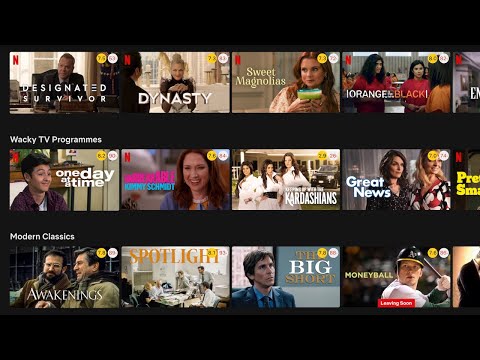
Trim shows IMDB and Rotten Tomatoes ratings on Netflix, Amazon Prime Video, Disney+ and other streaming services. Features: ★ Show IMDB and Rotten Tomatoes ratings Trim shows IMDB and Rotten Tomatoes ratings of all movies and TV shows on Netflix, Prime Video, Disney+ and other streaming services. ★ Fade out low rated movies With Trim you can fade out low rated movies or TV shows on Netflix, Prime Video or Disney+, based on their IMDB or Rotten Tomatoes ratings. ★ Change playback speed With Trim you can adjust the playback speed using the keyboard shortcuts ('[' to slow down and ']' to speed up). This works on Netflix, Prime Video, Disney+ and HBO Max. ★ Show hidden Netflix genres Trim enables and shows an extra tab for the hidden Netflix categories. You can browse your favorite genre by quickly clicking on the drop-down menu “Genre” and selecting a favorite genre. What's new in Trim: • v8.03 - Netflix Genres dropdown now shows up to 20 extra genres - Clicking "Report an error" on a title now sends feedback instantly • v8.02 - Updated extension name to highlight Disney+ support • v8.01 - Added keyword tags (e.g. "thriller", "cult favorite") to IMDB tooltip - Rotten Tomatoes tooltip shows both Critics and Audience scores - Added Reset button to fade-out filters - Added show/hide billboard option for Disney+ and Prime Video - Slightly reduced rating circle sizes • v7.60 - Per-platform rating settings: choose which ratings (IMDB, Rotten Tomatoes) to show for each streaming service. - Fixed playback speed controls on Disney+ and Prime Video. • v7.59 Add an option in the settings page to toggle the instant search feature on/off
3.3 out of 5378 ratings
Details
- Version8.03
- UpdatedFebruary 25, 2026
- Size113KiB
- LanguagesEnglish
- DeveloperWebsite
Email
goodmoviesinfo@gmail.com - Non-traderThis developer has not identified itself as a trader. For consumers in the European Union, please note that consumer rights do not apply to contracts between you and this developer.
Privacy

This developer declares that your data is
- Not being sold to third parties, outside of the approved use cases
- Not being used or transferred for purposes that are unrelated to the item's core functionality
- Not being used or transferred to determine creditworthiness or for lending purposes
Support
For help with questions, suggestions, or problems, please open this page on your desktop browser