

TrickyBird Web Proxy
6 ratings
)
Overview
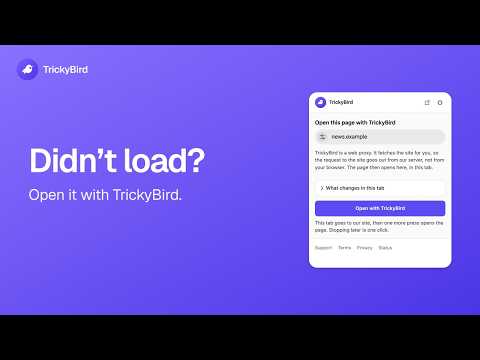
A web proxy for one browser tab. When a page will not open, TrickyBird fetches it for you and opens it in that tab.
A page won't open, on a network you don't run. TrickyBird is a web proxy for 1 tab: our servers fetch that page and hand it back to you, and every other tab goes out to the internet the ordinary way. How to open a page - Press the toolbar icon, or right-click and choose Open with TrickyBird. - The tab goes to our site with the address already in the field. Press once more and it opens there. - If our servers ever stop answering, the rest of your browser doesn't notice. What changes in that tab Our servers fetch the page and rewrite it before your browser sees it, so they handle all of it: the address, the headers, what you type into a form, and the cookies the site sets. - The address bar shows one of our own addresses instead of the site's. It won't carry the site's name, and it won't always look the same; sometimes it is just numbers. - A bookmark or a copied link from that tab points at us, not at the page. - That site's cookies are held on our server, filed under your session, rather than in your browser under the site's name, so you may need to sign in again. They are dropped about an hour after the session goes quiet. - Every other tab is left exactly as it was. What it asks your browser for No access to any site you open, at install or later. Opening a page needs access to nothing, because our site starts the session and the extension only moves the tab into it. A screen inside the extension lists the tabs going through TrickyBird right now, each with a button that stops that one. One thing is optional and starts off: switch on the offer to reopen a page that failed to load, and Chrome asks you for that permission at the moment you switch it on. The extension uses it only to notice the failure and to clear the offer once a page loads. Will it work on the site you need? That depends on the site, and how completely a site works through a proxy varies. Some sites load fully; some play video but will not sign in yet. Before anything is routed, the extension checks the address in the tab and tells you when that page cannot go through TrickyBird at all: a browser page, a file on your computer, or an address inside your local network. For an ordinary site it does not predict what will work, and the way to find out is to open it. A store page is written once, and how much of a site comes through moves when the site changes, so a list of sites printed here would go stale. What we keep There is no account, so there is no name, email, or profile for any of this to attach to. TrickyBird keeps a small access log for at most 48 hours. The log writes 1 line for every request the proxy makes on your behalf, so it holds the hostname of each site or service a page loads from, not only the address you typed, together with a shortened form of your IP address and basic response details. It has no field for a page address, a search, a cookie, or anything you type, so none of those can reach the file. What it will not do - It is not a VPN. There is no country list, no server picker, and no master switch, because a master switch is the thing that takes a whole browser down when it fails. - 1 tab goes through us at a time: turn on a second and the first tab loses its session, so finish what you were doing before you switch. - It is not for getting past a paywall, a sign-in wall, an age check, or the licensing on a video, and it does not try. - Sign-in buttons that hand you to another company's account do not come through in a routed tab, and the large subscription video catalogs are out of scope. - For the page itself, the site sees our address instead of yours, with one exception: WebRTC runs on a path we do not intercept, so a page that uses it can still read your real address. - It runs in Chrome on a computer, and there is no phone version.
5 out of 56 ratings
Details
- Version1.2.4
- UpdatedSeptember 23, 2026
- Offered byTrickyBird
- Size70.88KiB
- LanguagesEnglish
- Developer
Email
support@trickybird.com - Non-traderThis developer has not identified itself as a trader. For consumers in the European Union, please note that consumer rights do not apply to contracts between you and this developer.
Privacy

TrickyBird Web Proxy has disclosed the following information regarding the collection and usage of your data. More detailed information can be found in the developer's privacy policy.
TrickyBird Web Proxy handles the following:
This developer declares that your data is
- Not being sold to third parties, outside of the approved use cases
- Not being used or transferred for purposes that are unrelated to the item's core functionality
- Not being used or transferred to determine creditworthiness or for lending purposes
Support
For help with questions, suggestions, or problems, please open this page on your desktop browser