


Overview
Gradually trickle your text into Google Docs with natural, human-paced typing.
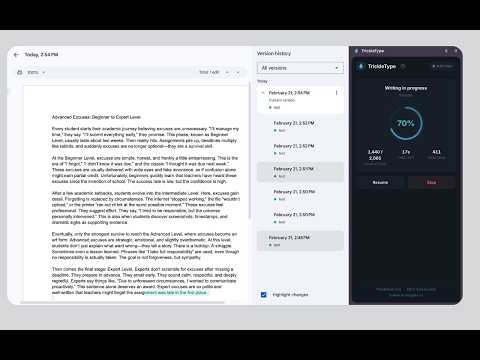
If you use AI tools like ChatGPT or Claude to draft content, dropping a huge wall of text into a Google Doc in one go makes it hard to actually read and edit what you just added. TrickleType is a simple, free Chrome extension that takes a draft you already have and "trickles" it into your document character by character, at a natural human typing speed. Instead of pasting everything at once, TrickleType types your text out over a period you choose. The content arrives at a pace you can actually read, so you can review it as it lands and pick up editing naturally from there. How it works: 1. Open a Google Document you can edit. 2. Click the TrickleType icon to open the side panel. 3. Paste your draft, notes, or rough outline into the text box (or upload a text file). 4. Choose how long the typing session should last - 1m, 5m, 15m, 30m, 1h, 2h, 4h, or any custom number of minutes. 5. Click "Start Writing". The first character appears straight away. A note on pacing: TrickleType spreads your text evenly across the whole duration you choose, so a short text with a long duration means long gaps between keystrokes - 20 characters over 1 hour is roughly one character every three minutes. That is intended, and the side panel shows you the exact pace before you start. To see it typing quickly, paste a paragraph and choose 1 minute. ✨ Features: ↣ Built for AI drafts: move content out of an LLM and into Google Docs at a readable pace. ↣ Adjustable duration: from one minute to four hours, or set your own. ↣ Natural rhythm: variable delays, occasional hesitations, and proper paragraph breaks. ↣ Side panel UI: watch progress, pause, resume or stop without covering your document. ↣ Complete privacy: your drafts never leave your browser. No account, no tracking, no analytics. ↣ 100% free: no subscriptions, no ads, no paywalls, nothing locked behind an upgrade. ↣ Keep the Google Doc tab in front while it types - Chrome slows down background tabs. Privacy Note: Your document text is processed entirely on your device and is never uploaded. The extension sends no data anywhere while you use it. If you uninstall, Chrome opens an optional feedback page; answering is voluntary, and only your chosen reason and any comment you type are sent (via Cloudflare). Full policy: https://tailsgate.com/trickletype/privacy
4 out of 54 ratings
Details
- Version1.1.4
- UpdatedSeptember 24, 2026
- Size83.94KiB
- LanguagesEnglish
- DeveloperWebsite
Email
aarohan789@gmail.com - Non-traderThis developer has not identified itself as a trader. For consumers in the European Union, please note that consumer rights do not apply to contracts between you and this developer.
Privacy

TrickleType has disclosed the following information regarding the collection and usage of your data. More detailed information can be found in the developer's privacy policy.
TrickleType handles the following:
This developer declares that your data is
- Not being sold to third parties, outside of the approved use cases
- Not being used or transferred for purposes that are unrelated to the item's core functionality
- Not being used or transferred to determine creditworthiness or for lending purposes
Support
For help with questions, suggestions, or problems, visit the developer's support site