

TresPrompt: AI Prompt Optimizer for ChatGPT, Claude & Gemini
4 ratings
)
Overview
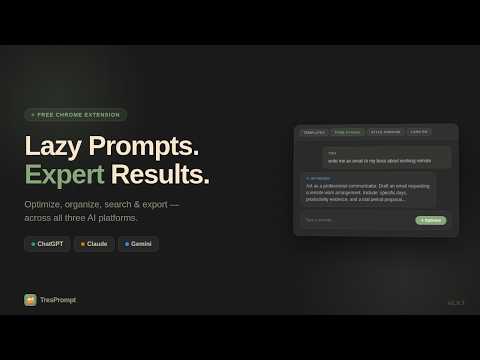
Search, organize, and optimize your AI conversations across ChatGPT, Claude, and Gemini. Folders, full-text search, prompt tools.
You have hundreds of AI conversations. The built-in search only checks titles. There are no folders. And if you use multiple AI platforms, everything is scattered. TresPrompt fixes all of this in one install. No account required to start. ━━━━━━━━━━━━━━━━━━━━ WHAT TRESPROMPT DOES 🔍 Search across all your AI conversations Search inside actual messages — not just titles. Find any conversation in 2 seconds. Results are color-coded by platform with highlighted matches and You/AI labels. Click any result to jump directly to that message. Auto-indexes your conversations the moment you open the page — no manual setup. 📁 Organize with folders and subfolders Create folders right inside the sidebar on ChatGPT, Claude, and Gemini. Drag conversations in, color code them, collapse what you don't need. Works the same on every platform. ⚡ Optimize prompts in one click Transform a rough idea into a clear, structured prompt using the ICC+ framework. Set tone, style, length, and language from the toolbar. Add your "About Me" and project context so every optimization is personalized. 📌 Pin, note, and never lose anything Pin important AI responses to your sidebar. Attach private notes to any conversation. Export any chat or entire folder in Markdown, JSON, Text, or PDF. ━━━━━━━━━━━━━━━━━━━━ ALL FEATURES ★ Search & Discovery - Full-text search across all conversations - Cross-platform search — find Claude results from ChatGPT - Auto-indexes conversations on page load - Color-coded results by platform - You/AI message labels on every result - Click-to-jump to the exact message - Search filters — role, platform, sort by date ★ Folders & Organization - Folders and subfolders in the sidebar - Drag and drop conversations into folders - Color-coded folders with rename and reorder - Drag subfolders between parent folders - Bulk select, move, export, or remove - Works identically on ChatGPT, Claude, and Gemini ★ Prompt Optimization - One-click optimization using ICC+ framework - Toolbar controls for tone, style, length, language - Context memory — About Me and project auto-included - Multi-language support — 17 languages plus custom - 70+ prompt templates across 8 categories - Save any optimization as a custom template - Prompt history with original, optimized, and reasoning ★ Export & Backup - Markdown, JSON, Text, or PDF - Export entire folders with full message content - Auto-scroll captures complete conversations - Bulk export multiple conversations at once - Keyboard shortcut: Ctrl+Shift+E ★ Pins & Notes - Pin important AI responses to sidebar - Hover preview with full message content - Click to navigate to original message - Private conversation notes with auto-save ★ Productivity - Word and character counter - Keyboard shortcut: Ctrl+Shift+O to optimize - Light and dark theme support - Usage stats in popup ━━━━━━━━━━━━━━━━━━━━ WORKS EVERYWHERE YOU USE AI ✅ ChatGPT — full support ✅ Claude — full support ✅ Gemini — full support ✅ Edge, Brave, Arc, Opera — any Chromium browser Most extensions only work on ChatGPT. TresPrompt works across all three platforms with one install. ━━━━━━━━━━━━━━━━━━━━ YOUR DATA STAYS YOURS All conversation data, folders, and indexed content are stored locally in your browser. Nothing is sent to external servers except your prompt text during optimization — processed and never stored. No ads. Ever. ━━━━━━━━━━━━━━━━━━━━ COMMON QUESTIONS Q: Do I need an account? A: No. Install and start using immediately. Create an account only to unlock Pro features. Q: Will it slow down my AI platform? A: No. Lightweight — only activates when you interact. Q: What happens to my folders if I uninstall? A: Stored in your browser. Reinstall on the same profile and they're still there. Q: How is this different from other extensions? A: Most only work on ChatGPT and only do one thing. TresPrompt combines search, folders, optimization, and export across ChatGPT, Claude, and Gemini in one extension. ━━━━━━━━━━━━━━━━━━━━ WHY "TRESPROMPT"? The name came from a tres leches cake. I was picking one up for my wife at a cafe in Charlotte when I saw the domain was available. "Tres" fit — three AI platforms, three pillars (Instructions, Context, Constraints), and the search across all three that I wished existed. 100+ hours of building later, here we are. ━━━━━━━━━━━━━━━━━━━━ Your AI conversations are piling up. Stop losing them. Install TresPrompt today. Questions or feedback? Visit tresprompt.com
5 out of 54 ratings
Details
- Version1.0.9
- UpdatedJune 10, 2026
- Offered byTresPrompt
- Size282KiB
- LanguagesEnglish (United States)
- DeveloperHarris Ahmad
5004 Rill Court Charlotte, NC 28262 USEmail
support@tresprompt.comPhone
+1 443-980-9821 - TraderThis developer has identified itself as a trader per the definition from the European Union and committed to only offer products or services that comply with EU laws.
Privacy

TresPrompt: AI Prompt Optimizer for ChatGPT, Claude & Gemini has disclosed the following information regarding the collection and usage of your data. More detailed information can be found in the developer's privacy policy.
TresPrompt: AI Prompt Optimizer for ChatGPT, Claude & Gemini handles the following:
This developer declares that your data is
- Not being sold to third parties, outside of the approved use cases
- Not being used or transferred for purposes that are unrelated to the item's core functionality
- Not being used or transferred to determine creditworthiness or for lending purposes