

TreeView — Notion tree view + audit

Overview
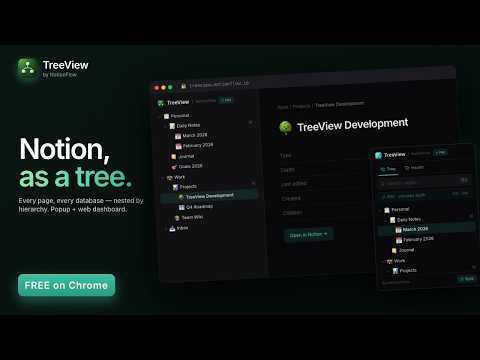
See every page in your Notion workspace as a navigable tree. Find duplicates, orphans, and stale pages. Free.
TreeView turns your Notion workspace into a navigable hierarchy tree. Click the toolbar icon and your entire workspace opens as a collapsible tree — every page, every database, every nested child. Search jumps you to any page in milliseconds. If your Notion workspace has more than a few hundred pages, you've probably stopped navigating it. The sidebar doesn't scale past two levels deep, and once you start searching for everything, you stop trusting that pages you wrote a year ago are still findable. TreeView is the visibility layer Notion's UI doesn't give you. ◆ WHAT TREEVIEW DOES • Renders your entire Notion workspace as a collapsible tree — pages and databases, every nested level • Instant search across every page name in your workspace, with highlight-in-place + match count • Jump to any page in Notion with one click • Filter the view to All / Pages / Databases • Light, dark, and auto themes that follow your system • Cmd+Shift+T (⌘⇧T on Mac) opens the popup from anywhere • Companion full-screen dashboard at treeview.notionflow.io for navigating bigger workspaces ◆ ALSO INCLUDED — FREE • Unlimited depth — see every nested level • Unlimited syncs • Workspace Health — surfaces duplicates, orphans, and stale pages so you can clean up the clutter Notion buries • Per-item dismiss + restore, cross-surface synced between the extension and the web dashboard • Configurable stale-page threshold (30 / 90 / 180 days / 1 year) • Companion web dashboard with full-screen tree, breadcrumb context, and per-page detail ◆ HOW IT WORKS 1. Install TreeView from the Chrome Web Store 2. Click the toolbar icon → "Connect Notion" 3. Authorize via Notion's official OAuth (no passwords, no manual API keys) 4. TreeView reads your workspace tree directly from Notion's API in your browser 5. The tree is cached locally on your device for instant opens between syncs That's it. No account creation. No copy-paste setup. No third-party server in the middle of your workspace data. ◆ PRIVACY • Notion connects via official OAuth 2.0 with PKCE — TreeView never sees your Notion password • Your page contents are read directly from your browser to Notion's API. TreeView's backend never sees them. • The workspace tree is cached in chrome.storage.local on your device, never uploaded • Historical Pro subscriptions (before TreeView became free in October 2026) stored an email + Stripe ID for validation; no new subscription data is collected. • We don't sell your data, share it with advertisers, or use it to train AI models • Anonymous usage events go to PostHog (US region) to help us improve reliability — they never include page titles, page contents, search queries, or browsing activity Full privacy policy: https://notionflow.io/treeview/privacy ◆ PRICING Free. All of it — unlimited depth, unlimited syncs, Workspace Health, the web dashboard. No subscription, no license key. ◆ SUPPORT Questions, feedback, or bug reports: support@notionflow.io Documentation: https://notionflow.io/treeview/support Companion dashboard: https://treeview.notionflow.io
5 out of 51 rating
Details
- Version1.0.3
- UpdatedOctober 8, 2026
- FeaturesOffers in-app purchases
- Size328KiB
- LanguagesEnglish
- DeveloperBeast Creative LLCWebsite
30 N Gould St Ste N Sheridan, WY 82801-6317 USEmail
treyinchina@gmail.comPhone
+1 503-308-8900 - TraderThis developer has identified itself as a trader per the definition from the European Union and committed to only offer products or services that comply with EU laws.
- D-U-N-S143977674
Privacy

TreeView — Notion tree view + audit has disclosed the following information regarding the collection and usage of your data. More detailed information can be found in the developer's privacy policy.
TreeView — Notion tree view + audit handles the following:
This developer declares that your data is
- Not being sold to third parties, outside of the approved use cases
- Not being used or transferred for purposes that are unrelated to the item's core functionality
- Not being used or transferred to determine creditworthiness or for lending purposes
Support
For help with questions, suggestions, or problems, visit the developer's support site