


Overview
Tabs as a tree in a floating panel. Nest, drag, search, save sessions, and browse without leaving anything in history.
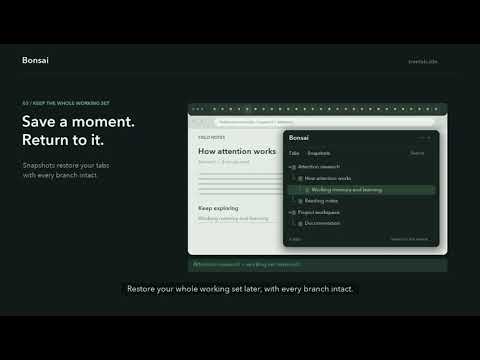
Bonsai turns your open tabs into a clean, collapsible tree instead of a flat row you have to scroll through. Tabs opened from another tab nest automatically underneath it, so research threads, project docs, and reference material stay grouped together — even across 50+ tabs. 🌳 TREE TAB VIEW See parent and child tabs at a glance. Collapse branches you don't need and expand the ones you do. New tabs nest under whichever tab opened them, so related work stays connected instead of scattered across your tab bar. 🪟 FLOATING PANEL Open your tab tree in a compact floating panel right over the page you're viewing — no dedicated sidebar required. Launch it from the extension icon or Ctrl+Shift+E. 💾 SESSION SNAPSHOTS Save your entire tab layout as a named snapshot and restore it later by replacing your current tabs, opening it in a new window, merging it with what's already open, or restoring multiple windows to their original structure. Made a mistake? Undo the restore instantly. 👻 HOUDINI MODE Turn this on and pages you open while it's active won't be added to Chrome history. Existing history entries are untouched, and nothing is sent anywhere — this only changes what gets recorded locally. 🚫 SITE EXCLUSIONS Keep specific sites or domains — localhost, internal tools, anything noisy — out of your tree entirely. 🖱️ DRAG & DROP Move any tab above, below, or inside another tab as a child, using a dedicated drag handle so you don't rearrange things by accident. Automatic scrolling helps with large trees. 🔎 INSTANT SEARCH Start typing to filter your whole tree by tab title or URL. ♻️ CLOSED TAB RECOVERY Recently closed tabs stay visible in your tree so you can bring them back. Choose how long — from 12 hours up to 7 days, or never expire — with a clock badge showing time remaining. 🎨 THEMES & ACCESSIBILITY Five themes, consistent hover/selection states, full keyboard navigation, and ARIA live announcements. PRIVACY Bonsai stores your tab and session data locally on your device. There are no accounts, no analytics, no tracking, and no external servers — nothing about your browsing is sent anywhere. Uninstalling Bonsai removes its stored data with it. WHO IT'S FOR Researchers following sources across dozens of tabs, developers juggling docs/GitHub/localhost across projects, students organizing material by subject, and anyone who regularly ends up with 20, 50, or 100+ tabs open. HOW IT WORKS 1. Install Bonsai and open it from the extension icon or Ctrl+Shift+E. 2. Your open tabs appear as a live tree. 3. New tabs nest automatically under the tab that opened them. 4. Search, collapse, drag, and organize as you go. 5. Save your current setup as a snapshot anytime. 6. Restore any saved session whenever you need it back.
5 out of 515 ratings
Details
- Version3.0.1
- UpdatedSeptember 24, 2026
- FeaturesOffers in-app purchases
- Size129KiB
- LanguagesEnglish (United States)
- DeveloperWebsite
Email
sshanto@onlyflows.site - Non-traderThis developer has not identified itself as a trader. For consumers in the European Union, please note that consumer rights do not apply to contracts between you and this developer.
Privacy

Bonsai - Tree Style Tab Manager & Sessions has disclosed the following information regarding the collection and usage of your data. More detailed information can be found in the developer's privacy policy.
Bonsai - Tree Style Tab Manager & Sessions handles the following:
This developer declares that your data is
- Not being sold to third parties, outside of the approved use cases
- Not being used or transferred for purposes that are unrelated to the item's core functionality
- Not being used or transferred to determine creditworthiness or for lending purposes
Support
For help with questions, suggestions, or problems, please open this page on your desktop browser