

Translate Workspace: AI Translator

Overview
Translate Workspace is an AI translator for selected text and live typing in a compact window or side panel.
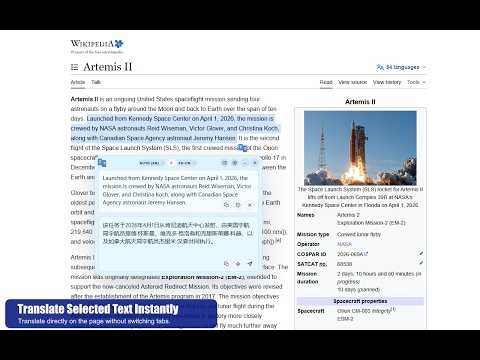
Translate Workspace is an AI translator for selected text and live typing in a floating window or side panel without leaving the current tab. It helps you translate directly on the page you are already using, so you can stay focused on your work instead of switching between tabs, websites, or external translation tools. Translate selected text instantly, type and get translations as you write, and keep your workflow in one place. Use the floating translator window for fast in-page translation, open the side panel for longer tasks, or translate full pages when needed. Translate Workspace is built to make translation feel like part of your normal browsing workflow. Key Features: • Translate selected text in the current tab • Get AI-powered translation for selected text and live typing • Send translated text into forms and target fields • Use popular AI providers or connect your own custom OpenAI-compatible endpoint • Use a floating translator window without leaving the page • Work in a side panel for longer translation tasks • Minimize the floating window or side panel so the translator stays ready at the edge of the page while you browse • Translate full pages when needed • Personalize how the extension opens, closes, looks, and behaves with advanced settings Translate Workspace is useful for browsing, research, study, writing, customer support, multilingual communication, and everyday work across websites. It is designed for people who want translation to stay inside their workflow instead of interrupting it. Premium unlocks an ad-free experience, advanced AI translation providers, and more control for users who want a more powerful translation workflow. Security and Privacy Your settings and API keys are stored locally in Chrome on your device and are not sent to our servers. Translation data is only sent to the AI provider you choose to use.
5 out of 58 ratings
Details
- Version1.0.0
- UpdatedApril 12, 2026
- FeaturesOffers in-app purchases
- Size1.11MiB
- Languages9 languages
- DeveloperWebsite
Email
hakanyildiz3151@gmail.com - Non-traderThis developer has not identified itself as a trader. For consumers in the European Union, please note that consumer rights do not apply to contracts between you and this developer.
Privacy

Translate Workspace: AI Translator has disclosed the following information regarding the collection and usage of your data. More detailed information can be found in the developer's privacy policy.
Translate Workspace: AI Translator handles the following:
This developer declares that your data is
- Not being sold to third parties, outside of the approved use cases
- Not being used or transferred for purposes that are unrelated to the item's core functionality
- Not being used or transferred to determine creditworthiness or for lending purposes
Support
For help with questions, suggestions, or problems, please open this page on your desktop browser