

Translate Feed — Read & Listen, Bilingual

Overview
Read, listen to, and reply to your feed and team chat in your language — inline and hands-free. Free, or bring your own AI key.
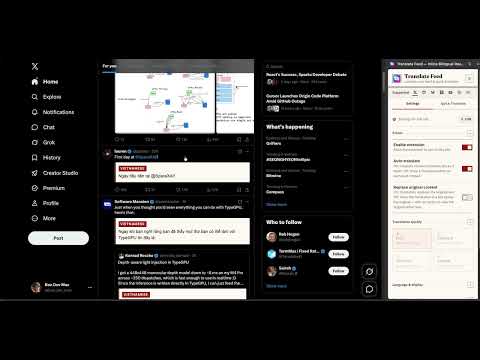
📣 Translate Feed — read, listen to, and reply to your feed and your team chat bilingually, right where you scroll. Stop scrolling past posts you can't read. Translate Feed turns your feed into a bilingual reader — original text and your language, side by side, exactly where you scroll. Built for developers, founders, and the perpetually online: read global tech conversations without ever leaving your feed, or your team's workspace. Free to use, or bring your own AI key for premium-quality translation. HOW IT WORKS 1. Install Translate Feed and pin it to your toolbar. 2. Open a site it supports and pick your target language. 3. Scroll. Your feed — and your team chat — is localized automatically. 📰 INLINE FEED TRANSLATION - Translates posts in place, directly under the original — no popups, no copy-paste, no new tabs. The original stays; the translation appears beneath it for true bilingual reading. - Smartly detects post content and skips interface labels, usernames, and code blocks, keeping your timeline clean and readable. - Translates as you scroll — new posts are handled automatically so your reading flow never breaks. - Always one click back to the original. Every translated post keeps a "Show original" toggle, so you're never left wondering what was actually written. 🌐 TUNED FOR THE PLACES YOU ACTUALLY READ - Microblogging timelines: posts, replies, and quoted text are translated where they sit, without ever breaking the layout — including on X (Twitter). - Decentralised microblogging networks are handled the same way, so a timeline on a smaller network reads exactly like your main one. - Community discussion sites: a nested comment tree on Reddit stays nested, so you never lose track of who is replying to whom. - Link-aggregator threads — the famously dense, deeply indented ones developers live in — become readable end to end instead of stopping you at the first unfamiliar language. - Video pages: on YouTube the title, the description, and the comments underneath are all handled, not just one of the three. - Every integration is built against that site's own layout, which is why it reaches corners of the web that generic page translators skip entirely. 🎧 LISTEN, DON'T JUST READ - Listen to any post out loud — original or translation — with a single tap. Great for long threads, or for resting your eyes. - Feed Reader turns your timeline into a hands-free podcast: press play and it scrolls and reads each post to you, announcing who wrote it before the words. - Free with your browser's built-in voice, or add your own AI voice for a more natural read. Set the reading speed, the volume, and the pause between posts. 💬 NOW WITH TEAM CHAT - The message text you read in Slack is translated inline, right in the conversation — the same bilingual reading, now for work. - Microsoft Teams works the same way. And to be clear: this translates chat text, not meeting captions or audio. If your teammates write in a language you don't read, this is for you. - One extension for both your social feeds and your work chat — no juggling a separate translator for every app. ✍️ REPLY & COMPOSE, IN ANY LANGUAGE (with your own AI key) - Not sure how to reply? Get ready-to-send drafts written in the language of the conversation, each with the meaning in your own — so you never post something you don't fully understand. - Staring at a blank composer? Describe your idea and get three distinct drafts to choose from, tuned to the angle you want. - Rewrite a post in your own voice, or ask a question about one — even summarize a whole thread — without leaving the page. ⚡ QUICK TRANSLATE - Need to translate something fast? Use the built-in side-panel Quick Translate to drop in any text and get an instant translation, without leaving your tab. 🤖 FREE, OR BRING YOUR OWN AI - Free out of the box with Google Translate — no signup, no API key required. - BYOK power users: plug in your own key from any major AI provider, or any OpenAI-compatible endpoint, to unlock nuanced, context-aware LLM translation that understands slang, tone, and technical jargon. - Translation quality options and custom prompts: tune the translation to your style — Fast, Standard, or Tech-Pro mode, which keeps technical terms and code identifiers untranslated. Or write your own prompt. 🎨 MAKE IT YOURS - Per-site settings: target language, font, size, and color. Configure one site one way and another site differently. - Show the translation beneath the original, or replace the original entirely. Your call, per site. 💸 EASY ON YOUR API QUOTA - Only the content actually visible on your screen gets translated, plus a little ahead as you scroll. Nothing is translated in the background, so your AI API usage stays low and predictable. 🔐 PRIVACY FIRST - Your API keys stay on your device — stored locally, never on our servers. - With BYOK, requests go straight to your chosen AI provider — we're not in the middle. - No account required to start. Anonymous usage analytics are off by default. Your reading stays yours. 💡 WHY TRANSLATE FEED Most translators force you to leave the page, paste text, or translate the entire web. Translate Feed obsesses over one place — where the tech world actually talks, from social feeds to team chat — and makes it something you can read, hear, and reply to in your language: instantly, inline, and on your terms. Break the language barrier of the global timeline. Read it, hear it, reply to it — and miss nothing. ❤️
0 out of 5No ratings
Details
- Version1.1.0
- UpdatedSeptember 7, 2026
- Offered byMina Team
- Size512KiB
- Languages3 languages
- Developer
Email
uqey0123@gmail.com - Non-traderThis developer has not identified itself as a trader. For consumers in the European Union, please note that consumer rights do not apply to contracts between you and this developer.
Privacy

Translate Feed — Read & Listen, Bilingual has disclosed the following information regarding the collection and usage of your data. More detailed information can be found in the developer's privacy policy.
Translate Feed — Read & Listen, Bilingual handles the following:
This developer declares that your data is
- Not being sold to third parties, outside of the approved use cases
- Not being used or transferred for purposes that are unrelated to the item's core functionality
- Not being used or transferred to determine creditworthiness or for lending purposes