


Overview
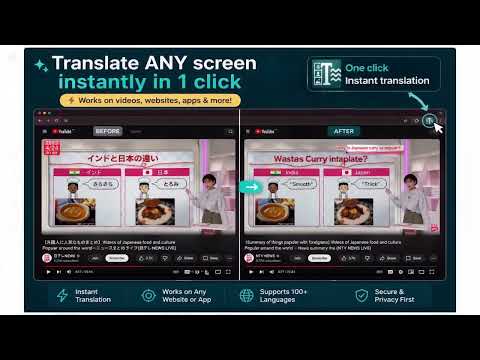
Translate screenshots, videos, and image text with Google Translate image mode in one click.
Translate ANY screen — even where normal translation fails. Translate Any (Capture) lets you instantly translate text inside images, videos, PDFs, apps, and websites that block Chrome’s built-in translation. ⚡ How it works 1. Click the extension icon 2. A screenshot of your current tab is captured 3. Google Translate (image mode) opens automatically 4. Paste → see translated text directly over the image That’s it. No setup. No extra steps. --- 🎯 Works on: • YouTube videos (paused frames) • Notion, PDFs, dashboards • Images, screenshots, manga, menus • Canvas-based apps • Any website where Chrome Translate doesn’t work --- 🌍 Perfect for: • Japanese, Korean, Chinese, Spanish, French, German, and more • Language learners • Expats & travelers • Reading visual or non-selectable text --- 🔒 Privacy-first by design: • No account required • No tracking • No analytics • No data collected by us • Capture happens only after you click Your screenshot is copied locally to your clipboard and sent only to Google Translate for processing. --- ⚠️ Important: Google Translate is a third-party service. Any image you paste or upload is processed according to Google’s own terms and privacy policy.
5 out of 52 ratings
Details
- Version1.0.0
- UpdatedApril 29, 2026
- Size45.58KiB
- LanguagesEnglish
- DeveloperWebsite
Email
anirudha237@gmail.com - Non-traderThis developer has not identified itself as a trader. For consumers in the European Union, please note that consumer rights do not apply to contracts between you and this developer.
Privacy

This developer declares that your data is
- Not being sold to third parties, outside of the approved use cases
- Not being used or transferred for purposes that are unrelated to the item's core functionality
- Not being used or transferred to determine creditworthiness or for lending purposes
Support
For help with questions, suggestions, or problems, please open this page on your desktop browser