Item logo image for Transforme Textos

Transforme Textos

5.0(

1 rating

)
Item media 6 (screenshot) for Transforme Textos
Item video thumbnail
Item media 2 (screenshot) for Transforme Textos
Item media 3 (screenshot) for Transforme Textos
Item media 4 (screenshot) for Transforme Textos
Item media 5 (screenshot) for Transforme Textos
Item media 6 (screenshot) for Transforme Textos
Item video thumbnail
Item media 2 (screenshot) for Transforme Textos
Item media 3 (screenshot) for Transforme Textos
Item media 4 (screenshot) for Transforme Textos
Item media 5 (screenshot) for Transforme Textos
Item media 6 (screenshot) for Transforme Textos

Overview

Transforme Textos de forma rápida e prática sem precisar sair da sua aba atual.

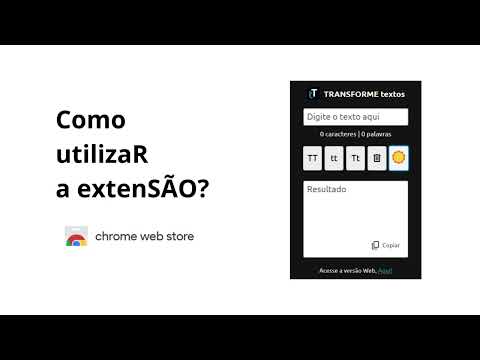
💡 Transforme Textos de forma rápida e prática diretamente no navegador, transforme frases para MAIÚSCULAS, minúsculas ou Primeira Letra Maiúscula, Limpe os campos ou Copie os textos editado para área de transferência do S.O. Ideal para quem escreve com frequência, cria conteúdo, faz trabalhos acadêmicos ou precisa ajustar textos rapidamente. ✨ Por que usar o Transforme Textos? ✔ Rápido e intuitivo — basta abrir a extensão, colar o texto e clicar no formato desejado. ✔ Leve e eficiente — criada sem frameworks, para máximo desempenho. ✔ Sem sair da aba atual — edição instantânea dentro do popup da extensão. ✔ Produtividade real — transforme textos repetitivos em um processo instantâneo. 🌟 Funcionalidades 🔠 Converter para MAIÚSCULAS Transforma todo o texto em caixa alta. 🔡 Converter para minúsculas Deixa todo o texto em caixa baixa. ✨ Converte a Primeira Letra para Maiúscula Capitalização Inteligente ajusta automaticamente a primeira letra após pontos finais, exclamações, interrogações e outras pontuações. 🧹 Limpar tudo Com um clique, você limpa o campo de entrada e o campo de resultado. 🌙 Tema Dark / ☀️ Tema Light Escolha o modo mais confortável para trabalhar, diretamente no popup. 📲 Copie os textos A função copiar facilita o uso a aplicação na versão web para celulares. 🧪 Como funciona 1. Clique no ícone da extensão na barra do Chrome. 2. Digite ou cole o texto a ser formatado. 3. Escolha o formato desejado (MAIÚSCULA, minúscula ou Capitalização). 4. O resultado aparece imediatamente no campo resultado. 5. Copie os textos formatados para área de transferência do PC ou celular. 6. Use o botão de limpeza ou alternância de tema quando quiser. 🔒 Privacidade Esta extensão não coleta dados pessoais. Nenhuma informação é enviada para servidores externos. Todo o processamento ocorre localmente no navegador. 👤 Desenvolvido por Tiago Neves 🌐 Versão Web: https://tiagoneves.com.br/transformeTextos 🔗 LinkedIn: https://linkedin.com/in/tiagosfneves 💻 Suporte ao usuário Encontrou um problema? Quer sugerir uma melhoria? Abra um issue no GitHub: https://github.com/tiagosfneves/transformeTextos

Details

  • Version
    4.0
  • Updated
    November 26, 2025
  • Offered by
    tiagonevestec
  • Size
    133KiB
  • Languages
    português (Brasil)
  • Developer
    Email
    tiagonevestec@gmail.com
  • Non-trader
    This developer has not identified itself as a trader. For consumers in the European Union, please note that consumer rights do not apply to contracts between you and this developer.

Privacy

The developer has disclosed that it will not collect or use your data. To learn more, see the developer’s privacy policy.

This developer declares that your data is

  • Not being sold to third parties, outside of the approved use cases
  • Not being used or transferred for purposes that are unrelated to the item's core functionality
  • Not being used or transferred to determine creditworthiness or for lending purposes

Support

For help with questions, suggestions, or problems, visit the developer's support site

Related

Extract Text from Image

3.6

Extract text from image and enhance your productivity. Effortlessly copy text from image and elevate your workflow!

Text Editor

4.7

Plain Text Editor: a simple online notepad to quickly edit the text, jot bloc note and make txt file effortlessly.

Online Notepad

2.0

Use Online Notepad to write and save your notes, edit any text in an online text editor, making rapid notes and memos easily.

ShortcutAI: AI Transformer & Expander via Keyboard Shortcut or Text Command

4.4

Transform & rewrite text with AI instantly in any input field or page. Trigger by shortcut or hotkey. No clicks, no popups.

Web Text Expander: Text Shortcuts & Snippets

4.6

Work smarter and type faster with text shortcuts! Use text expander to turn text snippets into words or sentences anywhere online

RewritePal

5.0

Instantly rewrite and enhance your text with AI in multiple tones - professional, casual, friendly, and more.

Smart Text Expander

3.4

Expand your short text with long descriptive text quickly with help of this Smart Text Expander extension

Get Text from Image

5.0

Quickly Get Text from Image using OCR character recognition​ to convert image, copy and extract text from picture in just seconds.

Memo Notepad

4.0

Memo Notepad helps you quickly take rough notes, without ever switching the context.

Easyfill: Text Expander and Snippet Manager

5.0

Quickly insert saved text snippets anywhere on the web, reducing the need for repetitive typing.

Google Translate & Image Translator by Tranzly – Popup View

4.4

Quickly translate texts and images with Google Translate without any copy‑pasting.

BeLikeNative: AI Writing with Shortcuts - Paraphrase, Translate, and More

4.6

Boost your writing with AI! Instantly paraphrase, translate, and enhance text using simple shortcuts. Fast, easy, and effective!

Extract Text from Image

3.6

Extract text from image and enhance your productivity. Effortlessly copy text from image and elevate your workflow!

Text Editor

4.7

Plain Text Editor: a simple online notepad to quickly edit the text, jot bloc note and make txt file effortlessly.

Online Notepad

2.0

Use Online Notepad to write and save your notes, edit any text in an online text editor, making rapid notes and memos easily.

ShortcutAI: AI Transformer & Expander via Keyboard Shortcut or Text Command

4.4

Transform & rewrite text with AI instantly in any input field or page. Trigger by shortcut or hotkey. No clicks, no popups.

Web Text Expander: Text Shortcuts & Snippets

4.6

Work smarter and type faster with text shortcuts! Use text expander to turn text snippets into words or sentences anywhere online

RewritePal

5.0

Instantly rewrite and enhance your text with AI in multiple tones - professional, casual, friendly, and more.

Smart Text Expander

3.4

Expand your short text with long descriptive text quickly with help of this Smart Text Expander extension

Get Text from Image

5.0

Quickly Get Text from Image using OCR character recognition​ to convert image, copy and extract text from picture in just seconds.

Google apps