


Overview
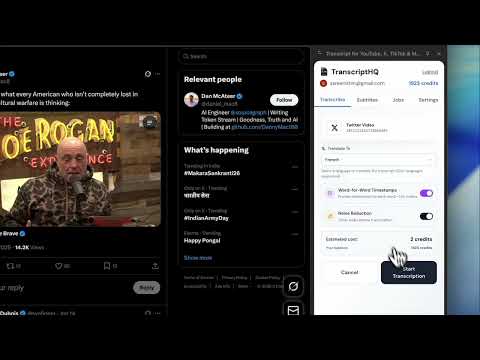
AI transcription for YouTube, TikTok, Vimeo, Twitter, Twitch. Subtitle overlay, export to SRT/VTT. Works on any video site.
AI-powered video transcription for YouTube, TikTok, Vimeo, Twitter/X, Twitch, and any video website. Get accurate transcripts with real-time subtitles in 100+ languages. Stop rewinding videos to catch what was said. Stop struggling with videos in foreign languages. Stop dealing with missing or poor-quality captions. TranscriptHQ uses advanced AI to transcribe AND translate any video on any website - whether it has captions or not. ✅ How to use: 1. Visit any video on the web 2. Click the "Transcribe" button 3. Select your language (optional: translate to 100+ languages) 4. Get AI-generated transcripts with synced subtitles in seconds 🎯 What makes TranscriptHQ different: • Works on ANY Website - Major video platforms plus literally any website with video content. • True AI Transcription + Translation - Unlike basic tools that only extract existing captions, we use AI to transcribe videos that have NO captions. Transcribe in any language, then translate to 100+ languages instantly. • Noise Reduction Built-In - Advanced audio processing removes background noise, music, and interference for cleaner transcripts. • Word-for-Word Timestamps - Get precise timestamps for every single word. Jump to exact moments instantly. • Real-Time Subtitle Overlay - Beautiful, synchronized subtitles display directly on videos as you watch. Adjustable size, position, and styling. • Professional Export Formats - Download as SRT, VTT, TXT, or JSON. Import directly into Adobe Premiere, Final Cut Pro, DaVinci Resolve, or any video editor. 🧠 Perfect for: • Students - Turn lectures into searchable notes. Study by reading instead of rewatching. • Content Creators - Add captions automatically. Repurpose video content into blog posts and social media. • Video Editors - Get transcript files with word-level timestamps. Create subtitle tracks in seconds. • Researchers - Transcribe interviews and focus groups. Search across videos to find quotes instantly. • Language Learners - Read along with foreign videos. Translate any video to your native language. • Accessibility Advocates - Add captions to any video content. Make the web accessible to everyone. ✨ Key Features: • Universal Compatibility - Works on any video site • AI-Powered Accuracy - Handles accents, technical terms, and multiple speakers • No Captions Required - Transcribes videos without existing captions • 100+ Languages - Transcribe and translate to over 100 languages • Word-Level Timestamps - Precise timing for every word • Noise Reduction - Removes background noise for better accuracy • Real-Time Subtitles - Beautiful overlay that syncs perfectly • Multiple Export Formats - SRT, VTT, TXT, JSON • Search Transcripts - Find any word and jump directly to that moment • Clean Interface - Minimal design that stays out of your way 🚀 Common problems we solve: • Missing or inaccurate captions on videos • Videos in foreign languages you can't understand • Need to reference something but can't remember where it was said • Video editing requires accurate subtitle files with precise timestamps • Accessibility - most videos lack proper captions 📝 Export Formats: • SRT (SubRip) - Most popular subtitle format • VTT (WebVTT) - Web standard for online video • TXT - Plain text transcript • JSON - Structured data with timestamps 🌐 Supported Platforms: Native integration with major video platforms. Universal mode works on any website with video content. 🔒 Privacy & Security: No video content stored - only transcripts. All data encrypted and GDPR compliant. Your transcripts are private by default. 💬 Support: support@transcripthq.io --- Stop struggling with missing captions. Stop rewinding videos. Stop being blocked by language barriers. Install TranscriptHQ and get AI-powered transcripts for any video on any website in seconds.
0 out of 5No ratings
Details
- Version1.0.1
- UpdatedFebruary 10, 2026
- FeaturesOffers in-app purchases
- Size180KiB
- LanguagesEnglish
- DeveloperWebsite
Email
support@transcripthq.io - Non-traderThis developer has not identified itself as a trader. For consumers in the European Union, please note that consumer rights do not apply to contracts between you and this developer.
Privacy

Transcript for YouTube, X, TikTok & More has disclosed the following information regarding the collection and usage of your data. More detailed information can be found in the developer's privacy policy.
Transcript for YouTube, X, TikTok & More handles the following:
This developer declares that your data is
- Not being sold to third parties, outside of the approved use cases
- Not being used or transferred for purposes that are unrelated to the item's core functionality
- Not being used or transferred to determine creditworthiness or for lending purposes
Support
For help with questions, suggestions, or problems, visit the developer's support site