

Transcript for YouTube: Search, Copy, Download (TranscribeYouTube)

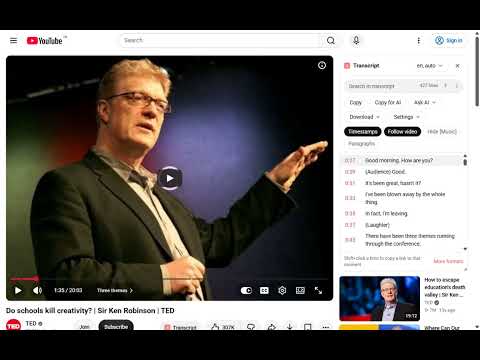
Overview
Transcript beside the YouTube player: search, highlights, SRT/VTT, AI summaries. Free; Pro adds AI on any computer.
Adds a Transcript panel to YouTube. Open any video that has captions, click Transcript (or press Alt+T), and the full caption track appears as searchable, timestamped text that follows the video as it plays. Click a line to jump to that moment, Shift+click to copy a link to it. Translate the transcript into any of YouTube's machine-translation languages. Copy the text, or use "Copy for AI" to get a clean, timestamp-free version ready for ChatGPT, Claude or Gemini. "Ask AI" opens the chat for you with the transcript included. Download as TXT, SRT (including an editor-ready wrapped version), VTT or Markdown. Hide [Music] tags, switch to paragraph view, resize the panel. It reads the captions YouTube already holds, the creator's subtitles or YouTube's automatic captions, and works in your own browser session, so it needs no account and sends nothing anywhere. It does not transcribe audio: a video without captions has no transcript to show, and the extension says so. Built by Shinel Studios, the team behind transcribeyoutube.com, where the same transcript can also be exported as CSV, Word, PDF, clean text, study notes and chapter timestamps.
5 out of 51 rating
Details
- Version1.6.1
- UpdatedNovember 20, 2026
- Size64.65KiB
- LanguagesEnglish
- DeveloperNeeraj DograWebsite
House No. B19 Green Avenue Near Sujanpur Railway Station Sujanpur, PATHANKOT (145023) Pathankot, Punjab 145023 INEmail
shinelstudiocontact@gmail.comPhone
+91 89681 41585 - TraderThis developer has identified itself as a trader per the definition from the European Union and committed to only offer products or services that comply with EU laws.
Privacy

This developer declares that your data is
- Not being sold to third parties, outside of the approved use cases
- Not being used or transferred for purposes that are unrelated to the item's core functionality
- Not being used or transferred to determine creditworthiness or for lending purposes
Support
For help with questions, suggestions, or problems, visit the developer's support site