

Strategy Optimizer for TradingView

Overview
Free, open-source optimizer for TradingView strategies: grid search, walk-forward validation, prop firm check and heatmaps.
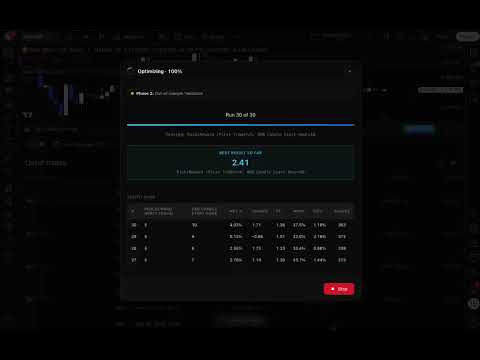
The missing optimization layer for TradingView. Free and open source. TradingView gives you Pine Script. It gives you backtesting. What it doesn't give you is a way to systematically find the best parameter settings for your strategy. You're left clicking through values one at a time, eyeballing results, and hoping you land somewhere good. That's not optimization. That's guessing. This extension fixes that. No account, no login, no paid tier. 100% FREE AND OPEN SOURCE Every feature is free for everyone: all optimization modes, walk-forward analysis, heatmaps and the prop firm check, with no parameter limits. The full source code is on GitHub under the MIT license: https://github.com/Roboquant-AI/tradingview-optimizer Read the code, fork it, and help make it better. Found a bug or want a new feature? Open an issue or send a pull request. Contributions of every size are welcome: bug reports, TradingView selector fixes when the page changes, new metrics, documentation. WHAT'S NEW IN 3.0.0 - Everything is free: all modes and features are unlocked for everyone - No account needed: sign-in is gone - Open source under the MIT license - Send to app is removed: your results stay in your browser, and you can download them as JSON - Metrics now read TradingView's current trade export format and use your strategy's real initial capital WHAT IT DOES Select any strategy inputs, define a search range, and run a full grid search on your own chart. Every combination runs through TradingView's Strategy Tester. No external simulator, no data export or import on your side. When the optimization finishes, you get a sortable results table ranked by your chosen goal. Found the best settings? Apply them to your chart with one click. HOW IT WORKS 1. Open any TradingView chart with a Pine Script strategy applied 2. Click Optimizer in the panel tab bar below the chart 3. Your strategy inputs are detected automatically, no setup needed 4. Select the inputs you want to optimize and set min / max / step 5. Choose your goal: Sharpe ratio, Sortino ratio, net profit %, profit factor, win rate or minimum drawdown 6. Hit Start and watch results come in as each combination is tested 7. Sort and compare results in the built-in table 8. Apply the parameter set you want to your chart with one click OPTIMIZATION MODES Standard Mode Grid search across your selected inputs on the current chart. The fastest way to find better settings for any strategy. Multi-Timeframe Mode Test your strategy across multiple timeframes in a single run. A strategy that only works on the 1H chart isn't a strategy, it's a coincidence. Multi-timeframe testing shows whether your edge holds across time horizons. Multi-Symbol Mode Validate your settings across different instruments without switching charts by hand. One run, many symbols. Full Grid Mode Exhaustive sweep of every combination of inputs, symbols and timeframes together. Thorough, systematic and complete. WALK-FORWARD ANALYSIS Optimized parameters that fall apart on new data are worse than no optimization at all. Walk-forward analysis is the standard way to detect overfitting. Split your history into an in-sample period, where inputs are optimized, and an out-of-sample period, where they are checked on data the optimizer never saw. If the settings hold up out-of-sample, you have evidence of a real edge rather than a curve fit. Single Split One in-sample and one out-of-sample window. Quick validation for any parameter set. Rolling Walk-Forward Slides the in-sample / out-of-sample windows across your date range in configurable steps (window sizes and step in months). This simulates re-optimizing periodically, the most realistic test of whether your strategy adapts or decays. PARAMETER HEATMAPS Numbers tell you what happened. Heatmaps show you why. 2D Heatmaps Pick two inputs and a metric. Every combination is colored so you can instantly see which zones are consistently good and which are fragile one-off peaks. A robust strategy shows broad stable regions, not isolated hot spots. 3D Surface Plots Rotate, zoom and hover across the full parameter landscape to see how your inputs interact. Metrics: Sharpe ratio, Sortino ratio, net profit %, profit factor, win rate, max drawdown or total trades. PROP FIRM CHALLENGE CHECK Check your best result against a profit target, a daily loss limit and a maximum drawdown for a given account size before you take a challenge. RESULTS, APPLY AND HISTORY - Sortable table with net profit %, Sharpe ratio, profit factor, win rate, max drawdown and trade count - One-click Apply for the best result or any row - Download results as JSON for analysis in Python, R, Excel or any other tool - Your last 10 optimizations are saved locally so you can review them without re-running Metrics are calculated from TradingView's exported trade list for each run, so every combination is scored the same way. WORKS WITH ANY PINE SCRIPT STRATEGY If your strategy has input parameters and runs on a TradingView chart, this extension can optimize it. No code changes, no special syntax. Moving average crossovers. RSI mean reversion. Bollinger Band breakouts. Multi-indicator systems. Custom strategies you wrote yourself. PRIVACY - No account and no login - Your TradingView credentials are never accessed or stored - Your strategy code and results are never sent to any server - The extension only runs on tradingview.com - Don't take our word for it: the code is open source REQUIREMENTS - A TradingView account - A chart with a Pine Script strategy applied - Chrome CONTRIBUTE Strategy Optimizer for TradingView is built in the open. Star the repo, report issues and send pull requests: https://github.com/Roboquant-AI/tradingview-optimizer ABOUT ROBOQUANT Built by Roboquant. Want to go beyond TradingView? Roboquant 2.0 lets you build and backtest strategies on its native engine with CME market data, then optimize and deploy them. Learn more at https://roboquant.dev DISCLAIMER Not affiliated with, endorsed by or sponsored by TradingView. The extension automates the TradingView web page; use it at your own risk and in line with TradingView's terms. Past performance does not guarantee future results.
4 out of 54 ratings
Details
- Version3.0.1
- UpdatedSeptember 22, 2026
- Size1.48MiB
- LanguagesEnglish
- DeveloperFXC Algo Trade LLCWebsite
30 n gould st Sheridan, WY 82801 USEmail
info@roboquant.devPhone
+357 95 953155 - TraderThis developer has identified itself as a trader per the definition from the European Union and committed to only offer products or services that comply with EU laws.
- D-U-N-S137851669
Privacy

Strategy Optimizer for TradingView has disclosed the following information regarding the collection and usage of your data. More detailed information can be found in the developer's privacy policy.
Strategy Optimizer for TradingView handles the following:
This developer declares that your data is
- Not being sold to third parties, outside of the approved use cases
- Not being used or transferred for purposes that are unrelated to the item's core functionality
- Not being used or transferred to determine creditworthiness or for lending purposes
Support
For help with questions, suggestions, or problems, visit the developer's support site