

TradingView Screener
1 rating
)
Overview
Instant NSE/BSE fundamentals, FII/DII ownership & price alerts for Indian traders on TradingView. No tab switching.
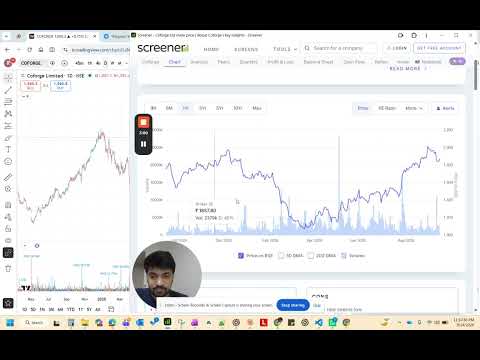
TradingView Screener for India brings Screener.in fundamentals directly into your TradingView chart — no tab switching, no copy-pasting tickers. 🔍 WHAT IT DOES Switch to any NSE or BSE stock on TradingView and instantly see the company's key financial data in a floating panel, powered by Screener.in. 📊 FUNDAMENTALS TAB • P/E, EPS, ROE, ROCE, Debt/Equity, Book Value, Dividend Yield and more • Industry P/E shown alongside stock P/E for instant comparison • Revenue & Profit Growth: QoQ and YoY % with color-coded tiles (green = growth, red = decline) • "Turned Loss" / "Turned Profit" badge when net profit crosses zero — no more misleading -100% percentages • Actual Cr values shown alongside percentages (e.g. 3,414 Cr → -167 Cr) • Strengths and Concerns parsed from Screener.in's analysis 🏛️ OWNERSHIP TAB • Promoter, FII/FPI, DII, Government, Public shareholding % • QoQ and YoY change with directional arrows (▲ / ▼) • Mini 5-quarter sparkline trend for each group • Smart border highlight: green = institutional buying, red = promoter selling ⚡ PERFORMANCE • 6-hour local cache — revisit any stock instantly without re-fetching • Cache status bar shows "Cached · 12m ago" with a one-click refresh • Direct URL fetch (no search API detour) for fastest cold load 🔔 PRICE ALERTS • Set price targets for any stock directly from the extension • Reads live price from TradingView every 10 seconds • Toast notification when price crosses your target • Above / Below direction supported 🔗 QUICK LINKS • One-click open to Screener.in, Moneycontrol, Tickertape, Chartink, NSE India • Alt+S → Screener.in | Alt+M → Moneycontrol keyboard shortcuts • Copy ticker to clipboard in one click • Consolidated / Standalone toggle (CON / STD) 🇮🇳 BUILT FOR INDIAN TRADERS Works only for NSE and BSE listed stocks. Automatically detects non-Indian tickers (NASDAQ, NYSE, etc.) and shows a clear message instead of failing silently. PRIVACY • No data is collected, stored, or transmitted to any server • All cache is stored locally on your device (chrome.storage.local) • No account required, no login, no tracking Screener.in, Moneycontrol, Tickertape, Chartink, and NSE India are independent services not affiliated with this extension.
5 out of 51 rating
Details
- Version3.4.7
- UpdatedSeptember 15, 2026
- Offered byRavi Theja T
- Size55.14KiB
- LanguagesEnglish
- DeveloperRAVI THEJA T
6301 Stonewood Drive Plano, TX 75024 USEmail
teja.ravi244@gmail.comPhone
+1 945-335-7611 - TraderThis developer has identified itself as a trader per the definition from the European Union and committed to only offer products or services that comply with EU laws.
Privacy

This developer declares that your data is
- Not being sold to third parties, outside of the approved use cases
- Not being used or transferred for purposes that are unrelated to the item's core functionality
- Not being used or transferred to determine creditworthiness or for lending purposes
Support
For help with questions, suggestions, or problems, please open this page on your desktop browser