

TradeIQ AI Lab - TradingView strategy optimization

Overview
Institutional Quant Tool for TradingView strategy optimization.
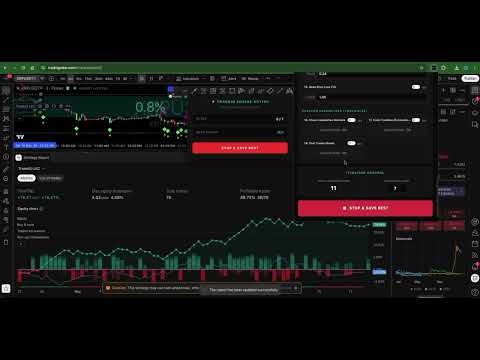
Welcome to the next tier of algorithmic trading. The TradeIQ AI Lab Quant Engine is a powerful, institutional-grade extension designed to automate and enhance your strategy backtesting process directly within TradingView. Stop guessing which parameter combination works best—let mathematics do the heavy lifting. Built for serious traders, quantitative analysts, and strategy developers, our engine connects seamlessly to your TradingView chart. It allows you to run thousands of parameter permutations in minutes to find the most mathematically optimal settings for your trading strategies. 🔹 CORE FEATURES: • Automated Parameter Scanning: Instantly extracts numeric and boolean (true/false) variables from any TradingView strategy. • Multi-Method Optimization: Choose between exhaustive Grid Search, Random Sampling, or Sequential iterative improvement to map the market. • Timeframe Automation: Automatically cycles through different timeframes (1m, 5m, 1H, 1D, etc.) to find the highest-yielding environments. • Intelligent HUD: Track real-time metrics, combinations, and best-performing results via a sleek, non-intrusive on-chart overlay. • Performance Filters: Automatically reject results that fall below your strict criteria (Minimum Win Rate, Max Drawdown limits, etc.). 🔹 HOW IT WORKS: 1. Open your TradingView chart and open any Strategy's settings window. 2. Click the TradeIQ Extension and hit "SCAN TV" to load the parameters. 3. Define the minimum, maximum, and step size for the variables you want to test. 4. Hit "START OPTIMIZATION" and watch the engine iterate through the combinations automatically. ⚠️ IMPORTANT ACCOUNT REQUIREMENT: To unlock the execution capabilities and run automated optimizations, an active account at TradeIQAILab.com is strictly required. The extension is free to install and scan parameters, but launching the optimization engine requires logging into your TradeIQ AI Lab account via the extension interface to validate your daily scan limits. Free and Premium tiers are available on our website. ⚖️ RISK DISCLAIMER: TradeIQ AI Lab provides quantitative analysis tools for educational and research purposes only. We do not provide financial advice. Trading forex, crypto, stocks, and CFDs involves a high level of risk and may result in the loss of capital. Past backtesting performance does not guarantee future market results. Trade at your own risk. 📜 OPEN SOURCE & CREDITS: TradeIQ AI Lab believes in the power of open-source development. The core quantitative loop mechanics within this extension are built upon the excellent foundation originally developed by OptiPie. In compliance with the GNU General Public License v3 (GPLv3), this extension is open-source. The source code is publicly accessible within the extension package itself, and you are free to inspect, modify, and distribute it under the same GPLv3 terms.
3.7 out of 53 ratings
Details
- Version1.0.1
- UpdatedJune 3, 2026
- Size3.0MiB
- LanguagesEnglish (United States)
- DeveloperWebsite
Email
tradeiqailab@gmail.com - Non-traderThis developer has not identified itself as a trader. For consumers in the European Union, please note that consumer rights do not apply to contracts between you and this developer.
Privacy

TradeIQ AI Lab - TradingView strategy optimization has disclosed the following information regarding the collection and usage of your data. More detailed information can be found in the developer's privacy policy.
TradeIQ AI Lab - TradingView strategy optimization handles the following:
This developer declares that your data is
- Not being sold to third parties, outside of the approved use cases
- Not being used or transferred for purposes that are unrelated to the item's core functionality
- Not being used or transferred to determine creditworthiness or for lending purposes
Support
For help with questions, suggestions, or problems, visit the developer's support site