

Trade Translate - WhatsApp Two-Way Translator
4 ratings
)
Overview
Two-way auto translation for WhatsApp Web: translate incoming chats and reply in your customer's language with one keystroke.
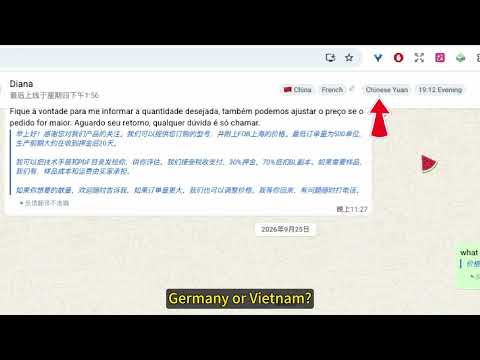
What is it? Trade Translate is a foreign-trade translation assistant that runs inside WhatsApp Web. Its purpose is simple: chat with clients who speak English, Spanish, Portuguese, Arabic… without ever leaving the conversation window to open a translation site and copy-paste. Once installed, it does two things: · Incoming messages — foreign-language messages are automatically translated into your language and shown right below the original · Outgoing messages — type in your language, press Enter, and the message is automatically translated into your client's language before sending; your original text is kept for review Why install it? 1. Zero clicks. The translation appears on its own the moment a message arrives — no buttons to click, no copy-pasting. 2. No mistakes. Your original text stays visible below the translation so you can double-check the wording at any time. 3. Know your client first. Recognizes 214 countries/regions from the phone country code and shows country, language, currency and local time — British client or Brazilian client, you can tell at a glance. 4. Reply faster. 13 built-in foreign-trade message templates (company info, purchase inquiries, after-sales, offline replies) with automatic keyword matching and one-click sending. 5. Zero configuration. No API key, no fees, no complicated setup — just reload the WhatsApp page and start. Automatic failover across three engines (Edge + Google) with fallback if one fails. Languages supported Translation and replies in 75 languages, with automatic detection of your counterpart's language and real-time two-way translation. Free tier · Usable without registration: 1,800 automatic translations per day · Sign in with Google to unlock full-length translations and unlimited count · Engines based on the free Edge / Google APIs — no subscription fees Privacy · Only the text being translated is sent to the Microsoft Edge or Google translation APIs · Our servers receive only translation counts and character counts — never the content of your chats · We do not read or upload your chat history; analytics events contain metadata only (no message content) · Translation cache and templates are stored locally in your browser How to use 1. Search for Trade Translate in the Chrome Web Store and click "Add to Chrome" 2. Pin it to the toolbar, open web.whatsapp.com and reload the page 3. Turn on the "Auto translation" switch and you're ready to go
4.8 out of 54 ratings
Details
- Version1.5.1
- UpdatedOctober 23, 2026
- Offered bythomas.wang
- Size1.12MiB
- Languages9 languages
- Developer
Email
wangweiwen200@gmail.com - Non-traderThis developer has not identified itself as a trader. For consumers in the European Union, please note that consumer rights do not apply to contracts between you and this developer.
Privacy

Trade Translate - WhatsApp Two-Way Translator has disclosed the following information regarding the collection and usage of your data. More detailed information can be found in the developer's privacy policy.
Trade Translate - WhatsApp Two-Way Translator handles the following:
This developer declares that your data is
- Not being sold to third parties, outside of the approved use cases
- Not being used or transferred for purposes that are unrelated to the item's core functionality
- Not being used or transferred to determine creditworthiness or for lending purposes