

TractorBeam

Overview
Create, evaluate, and develop custom AI highlighting for PDF documents in the browser. TractorBeam is a browser extension for…
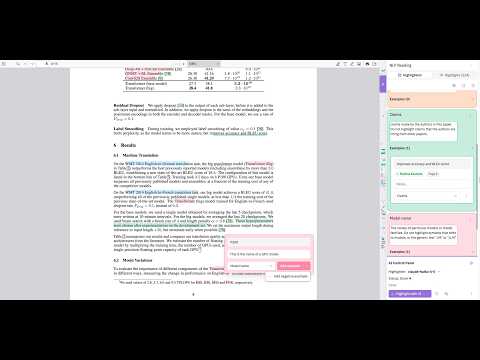
Create, evaluate, and develop custom AI highlighting for PDF documents in the browser. TractorBeam is a browser extension for highlighting and taking notes on PDFs, with AI assistance visualized as highlights directly on the document. Use TractorBeam to structure your reading with highlights, or as a kind of semantic find: specify what you want to look for in natural language, and TractorBeam will place highlight on the areas to look. In presenting highlights instead of generated text or a chat interface, TractorBeam allows you to immediately evaluate whether AI is working as you intend, and preserves your ability to create your own understanding of what you read. Launch TractorBeam by opening a PDF in your browser, then clicking the extension icon: you should now see the project sidebar. Create highlights by selecting text. Highlights are grouped into categories, which we call highlighters. Each highlighter pairs your highlights with a name and description. When you trigger AI annotation (from the bottom right panel), TractorBeam constructs a prompt for a large language model using your highlights and descriptions, and place suggested highlights directly onto the document. AI highlights are always considered suggestions, and are visualized differently from yours: your highlights are underlines, while AI's are squiggly block highlights. TractorBeam is also designed to be local-first: your annotations and notes are stored in local browser storage, and only leave your computer when you start AI annotation with a remote language model provider. We support any OpenAI- or Anthropic-compatible endpoint with a bring-your-own-key setup. Follow your provider's instructions to generate a key, then hit the gear icon in the AI control panel to enter your API key and test your connection. If you're running a local model (e.g. through Ollama or llama.cpp), TractorBeam can be run entirely locally. TractorBeam doesn't assume that AI will understand what you want it to highlight right away, and is built for you to iterate on how the AI works. Highlighters are easily editable at any point to specify what should and shouldn't be highlighted, and you can mark AI highlights as good or bad examples for the AI to follow. Happy annotating!
0 out of 5No ratings
Details
- Version0.4.1
- UpdatedOctober 30, 2026
- Offered bysireesh.gururaja
- Size6.18MiB
- LanguagesEnglish
- Developer
Email
sireesh.gururaja@gmail.com - Non-traderThis developer has not identified itself as a trader. For consumers in the European Union, please note that consumer rights do not apply to contracts between you and this developer.
Privacy

TractorBeam has disclosed the following information regarding the collection and usage of your data. More detailed information can be found in the developer's privacy policy.
TractorBeam handles the following:
This developer declares that your data is
- Not being sold to third parties, outside of the approved use cases
- Not being used or transferred for purposes that are unrelated to the item's core functionality
- Not being used or transferred to determine creditworthiness or for lending purposes