


Overview
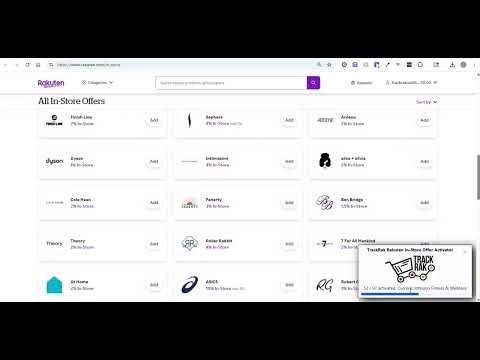
Instantly activate every Rakuten In-Store offer so you never miss a deal! For Premium TrackRak members only.
TrackRak Rakuten In-Store Offer Activator – Instructions Activate all Rakuten In-Store offers with one click (for Premium TrackRak Users only) 1. Install - Get the extension from the Chrome Web Store and search for: TrackRak Rakuten In-Store Offer Activator 2. Log In - Open the extension → enter your TrackRak email + password. 3. Make Sure Rakuten Is Ready - Be logged into your Rakuten account - Have at least one credit card in your Rakuten Wallet 4. Go to In-Store Offers - Click the Go to Rakuten In-Store button in the extension. 5. Activate Everything - Click the Activate Offers button → all in-store offers are added to your Rakuten account. Tips: - Make sure to pin the extension to your browser bar for easy access! - Use the extension approximately once a week to refresh new/expiring offers. Sign up at https://trackrak.com/
5 out of 53 ratings
Details
- Version1.0.1
- UpdatedDecember 9, 2025
- Size117KiB
- LanguagesEnglish (United States)
- DeveloperCarrie MeurerWebsite
3243 Galena St Denver, CO 80238-3342 USEmail
hello@trackrak.comPhone
+1 303-888-3561 - TraderThis developer has identified itself as a trader per the definition from the European Union and committed to only offer products or services that comply with EU laws.
Privacy

TrackRak Rakuten In-Store Activator has disclosed the following information regarding the collection and usage of your data. More detailed information can be found in the developer's privacy policy.
TrackRak Rakuten In-Store Activator handles the following:
This developer declares that your data is
- Not being sold to third parties, outside of the approved use cases
- Not being used or transferred for purposes that are unrelated to the item's core functionality
- Not being used or transferred to determine creditworthiness or for lending purposes
Support
For help with questions, suggestions, or problems, please open this page on your desktop browser