

TrackMate – Free Jira Time Tracker & Timesheet

Overview
Free Jira time tracker. Start timers on issues, visualize your week, and save worklogs. Your Jira data stays private. No account.
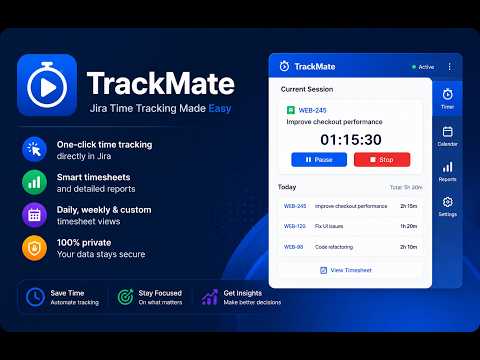
⏱️ TrackMate: Free Time Tracker, Timesheets & Reports for Jira ⭐ 100% Free. No Account Required. Your Jira Data Stays Private. ⭐ A lightweight, frictionless alternative to heavy timesheet apps (like Tempo or Clockify). Transform how you log and manage time in Jira. TrackMate is an all-in-one productivity workspace designed for software engineers, project managers, and agile teams. Seamlessly track time, visualize your week, and generate beautiful reports — all without ever leaving Jira. TrackMate injects native-feeling Start / Pause / Stop buttons directly into your Jira interface (on issue pages, boards, and sidebars). Click Start, focus on your work, click Stop. Your worklogs are instantly synced. ━━━━━━━━━━━━━━━━━━━━━━━━ 🚀 CORE FEATURES ━━━━━━━━━━━━━━━━━━━━━━━━ 🔵 1. Frictionless Time Tracking & Floating Timer • One-Click Tracking: Start and stop timers directly from any Jira issue or board card. • Floating Widget: A draggable, unobtrusive timer stays with you across every Atlassian page. • Dynamic Browser Icon: Your extension icon changes to a "stop" symbol when a timer is running, so you never forget an active session. • Smart Auto-Save: Never lose a logged minute. Set custom intervals to automatically sync your active timer while a Jira tab for that site is open. 📅 2. Visual Weekly Calendar & Drag-and-Drop • Intuitive Editing: Drag and drop worklogs to reschedule them. Resize blocks to adjust duration. • Local-First Edits: Make adjustments locally without hitting Jira's API constantly. TrackMate groups pending changes and syncs them in one bulk action (Ctrl+S). • Visual Diff Review: See a color-coded summary (New, Updated, Deleted) before pushing changes to Jira. • Multi-step Undo & Protection: Press Ctrl+Z to undo your calendar edits instantly. TrackMate also warns you if you try to close the tab with unsaved changes. 👥 3. Team Management & Insights (NEW) • Team Activity Dashboard: Monitor team performance and ensure everyone is aligned on sprint goals. • Workload Comparison: Easily identify who is overallocated and who has capacity. • Collaborative Visibility: Perfect for Scrum Masters and PMs who need to track team velocity and logged hours during stand-ups. 📊 4. Advanced Statistics & Analytics (NEW) • Visual Dashboards: Turn raw Jira data into beautiful, actionable charts. • Time Allocation: See exactly how much time is spent on Bugs vs. Tasks, or Project A vs. Project B. • Deep Filtering: Filter your statistics by project, issue type, status, or date range to find productivity bottlenecks. 📑 5. Powerful Monthly Reporting • Custom Timesheets: Generate detailed monthly worklog reports in seconds. • Flexible Exports: Download reports as PDF for clients, CSV for Excel, or JSON for developers. • Customizable Columns: Choose exactly which data points (Issue Key, Parent Issue, Comments, Total Time) to include in your exported reports. 🎯 6. Gamified Goal Tracking • Daily Targets: Set a daily work hour goal (e.g., 8 hours). • Color-Coded Calendar: Your calendar dates turn green when you hit your goal, orange when you are close, and red when you are behind. 🔍 7. JQL Presets & Quick Access • Save your most complex JQL queries as one-click presets. • Instantly load specific issues into your sidebar and drag them directly onto your calendar to log time retroactively. 🌍 8. Multi-Domain & Cross-Device Sync • Each Jira domain has independent settings and timers, so timers can run concurrently across client instances. • Back up preferences in your Jira account and explicitly choose when to upload or download them on another device. 🗓️ 9. Public Holidays & Work Days • Configure your country to automatically block out national holidays on your calendar. • Set your custom working days to get an accurate calculation of expected vs. logged hours. 🌐 Available in 10 languages: English · Türkçe · Français · Deutsch · Italiano · Português · Español · Русский · 日本語 · 한국어 ━━━━━━━━━━━━━━━━━━━━━━━━ 🔒 PRIVACY & SECURITY ━━━━━━━━━━━━━━━━━━━━━━━━ TrackMate never sends your Jira content (issues, titles, comments, worklogs, site address) anywhere but your own Jira. The only data that leaves your browser is optional, anonymous usage statistics — which features are used, never your Jira content — on by default and can be turned off at any time in Settings → General. • No backend. No servers. No account required. • No advertising SDKs, tracking pixels or remote scripts. Usage statistics go to Google Analytics 4 (Measurement Protocol) only while enabled. • Authentication is session-based — TrackMate uses your existing Jira browser session and never stores credentials. • Your Jira data is stored only in Chrome local storage and your own Jira account. Permissions: • storage — timer state and settings saved locally • alarms — schedules optional auto-save, timer review limits, Pomodoro, and daily summaries • notifications — optional daily summaries, Pomodoro reminders, and timer-review alerts • https://*.atlassian.net/* — injects buttons and communicates with Jira ━━━━━━━━━━━━━━━━━━━━━━━━ 📋 REQUIREMENTS ━━━━━━━━━━━━━━━━━━━━━━━━ • Jira Cloud account (*.atlassian.net) • Chrome 120 or newer • Active Jira session in the same browser profile ━━━━━━━━━━━━━━━━━━━━━━━━ 💬 SUPPORT ━━━━━━━━━━━━━━━━━━━━━━━━ Have questions, feature requests, or enterprise/SaaS inquiries? Please reach out to us at: mustafa@onderyazilim.com
5 out of 58 ratings
Details
- Version1.5.4
- UpdatedSeptember 28, 2026
- Size7.28MiB
- Languages10 languages
- DeveloperWebsite
Email
mustafa@onderyazilim.com - Non-traderThis developer has not identified itself as a trader. For consumers in the European Union, please note that consumer rights do not apply to contracts between you and this developer.
Privacy

TrackMate – Free Jira Time Tracker & Timesheet has disclosed the following information regarding the collection and usage of your data. More detailed information can be found in the developer's privacy policy.
TrackMate – Free Jira Time Tracker & Timesheet handles the following:
This developer declares that your data is
- Not being sold to third parties, outside of the approved use cases
- Not being used or transferred for purposes that are unrelated to the item's core functionality
- Not being used or transferred to determine creditworthiness or for lending purposes
Support
For help with questions, suggestions, or problems, please open this page on your desktop browser