

TraceMind: Local AI & Semantic History Search

Overview
AI browser history search. Find any page you've read by meaning, not exact words. Private, on-device, and free to use.
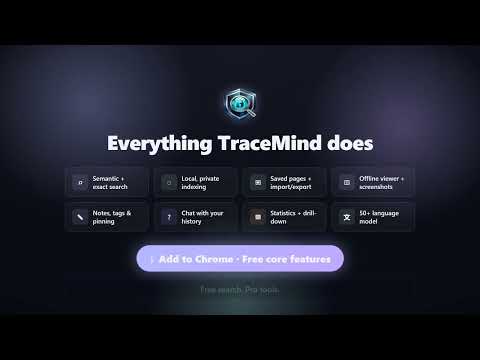
Find pages again by describing what you remember. TraceMind turns readable pages you visit into a private, searchable memory inside your browser. Describe a tutorial, article, product, recipe, error message, or idea in your own words. TraceMind searches captured text by meaning and exact terms. Core capture, indexing, storage, screenshots, search, and analytics run locally. You do not need a TraceMind account for core search. THE PROBLEM: "I KNOW I READ THAT SOMEWHERE" You remember what a useful guide explained, but not its title, website, or exact words. Chrome history helps when you know the title or URL, but less when you remember only the idea. TraceMind captures useful text and metadata as you browse, then helps you rediscover a page by topic, phrase, domain, or date. HOW TRACEMIND SEARCH WORKS TraceMind combines local search methods for vague memories and precise details: - Semantic search compares the meaning of your query with the meaning of captured page text. - Full-text search finds exact phrases, error codes, names, product terms, and URL fragments. - Hybrid ranking blends those results so the strongest matches rise together. Search "mobile data for my trip to Europe" to surface a captured eSIM comparison without repeating its title. Exact function names and error codes favor the keyword index. The semantic model runs inside the extension, using WebGPU when available and WebAssembly otherwise. Keyword results can appear while the model or vector cache warms up. Semantic results require embeddings for the page. THE SEARCHES YOU CAN FINALLY DO - "That tutorial about making blurry photos look sharper" - "The article comparing two ways to merge ranked lists" - "Mobile data for my trip to Europe" - "The recipe with miso and eggplant I saw last month" - "What was I reading last Tuesday?" - An exact error code, product SKU, function name, or quotation Describe the page the way you remember it. Then narrow by date, domain, tag, saved status, notes, or pins when useful. WHAT TRACEMIND CAN DO SEMANTIC AND KEYWORD HISTORY SEARCH Search captured page text by meaning and exact language. TraceMind uses intent-aware hybrid ranking and shows match context to help you understand why a result appeared. AUTOMATIC READABLE-PAGE CAPTURE TraceMind captures readable text and metadata from supported HTTP and HTTPS pages, including supported single-page-app navigation. It skips Incognito. Protected or restricted pages and pages with little readable content may have limited or no capture. POPUP AND FULL DASHBOARD Use the popup for quick search, recent pages, and fixed date filters. Open the dashboard for more filters, sorting, pagination, bulk management, saved pages, and the complete workspace. New installs receive short, skippable popup and full-view guides to capture, search, filters, and navigation. Updates do not retrigger the tour for existing users. SEARCH BY DATE, DOMAIN, AND ORGANIZATION Filter by date and domain on Free. Pro adds custom date ranges, hour filtering, tags, notes, and pinned pages. Sort results by relevance, recent activity, or visit count. SAVE PAGES ON FREE Save useful pages into a dedicated Saved view. Saved pages are protected from finite retention cleanup. Saving is local; it is not cloud synchronization. NOTES, TAGS, AND PINS ON PRO Add notes, organize with tags, accept suggested tags, and pin important pages. Suggested tags use page, domain, and topic signals and remain under your control. SCREENSHOTS AND VISUAL PREVIEWS TraceMind can store local screenshot previews for eligible active pages when capture succeeds. Free includes Low quality. Pro adds Medium, High, and Ultra HD choices up to a configured 1920 x 1080 target. Compression and capture limits can reduce the final image or dimensions. MULTILINGUAL SEMANTIC SEARCH TraceMind starts with a fast English model. For cross-language search, choose Multilingual MiniLM L12. It runs locally and rebuilds the semantic index in the background while keyword search remains available. Unicode-aware query handling supports non-Latin searches, including Japanese-only queries, after the rebuild completes. LOCAL BROWSING INSIGHTS See indexed pages, visit activity, peak browsing hour, top domains, daily patterns, hourly patterns, monthly activity, and local storage information. Free includes core activity and storage views. Pro adds custom date ranges and chart-driven filtering. CHAT WITH YOUR HISTORY ON PRO Ask questions about your history and receive streamed answers with citations back to selected sources. Choose OpenAI, Anthropic, or Google Gemini and bring your own API key. Chat is optional and off until enabled. Retrieval is local. A question sends selected matching excerpts, titles, URLs, and the active in-memory conversation directly to your configured provider. TraceMind does not proxy or retain those requests. Your key is stored locally, excluded from backups, and not protected by the optional content passphrase. Chat turns are not saved as TraceMind history. Provider processing follows that provider's terms and privacy practices. IMPORT YOUR EXISTING CHROME HISTORY Start with metadata from Chrome history instead of an empty list. TraceMind can import up to 10,000 Chrome-history records from the previous 365 days. Chrome imports do not include historical page text, screenshots, offline copies, or semantic embeddings. Imported records support title and URL search immediately. Revisit a page to capture its readable text and create its semantic index. KEEP CAPTURED HISTORY FOR AS LONG AS YOU CHOOSE New TraceMind captures default to keep forever, and TraceMind does not impose a product-level page-count cap. Browser and device storage remain the practical limit. You can choose a finite retention window instead. Saved pages are exempt from finite automatic cleanup. This captured-history retention is separate from Chrome-history import, which currently reaches back up to 365 days. BACK UP AND RESTORE YOUR DATA Plain backup export and import are free. Backups include indexed entries, content, metadata, organization, saved state, supported settings, and available screenshots. Embeddings rebuild after import; offline snapshots are excluded. Exact URL and visit-time matches can restore valid tags without adding another visit. Older same-URL snapshots are skipped; newer ones preserve local notes, tags, pins, saved state, and the higher recorded visit count. Large plain backups download as one ZIP of bounded parts. Import it directly for integrity checks, progress, duplicate skipping, cancellation, and recovery. Older numbered JSON part sets remain supported when selected together. Optionally enable Automatic Pre-Update Backup in Settings and grant Downloads permission. After Chrome reports an available update, TraceMind attempts a bounded no-screenshot multipart recovery backup and intentionally reloads only after success. It is off by default and tries to retain two newest successful sets. If Chrome no longer exposes an older record, TraceMind cannot verify deletion and tells you to check Downloads. No backup or intentional reload occurs when disabled, permission is unavailable, encryption is locked at update time, or export fails. Pro users who set a custom passphrase can create encrypted backups. Restoring a backup you can decrypt is not Pro-gated. Encrypted backups remain subject to their documented technical size limit. An encrypted automatic backup uses only a key already loaded when Chrome reports the update and never falls back to plaintext. OFFLINE READING SNAPSHOTS ON PRO Save HTML reading snapshots manually or automatically, optionally request images, set a per-page size limit, and manage local copies. Snapshots open in a sandboxed viewer without script permission. They are reading copies, not guaranteed complete archives; images or other resources may be missing. EXCLUDED DOMAINS Keep selected sites out of the index. Free supports up to 10 excluded domains. Pro supports any number. Exclusions help you control capture, but they do not replace the privacy and security controls of the websites you visit. PRIVATE BY DESIGN, WITH CLEAR EXCEPTIONS Browsing history is sensitive. TraceMind keeps its core search pipeline local: - Readable-page capture, indexing, embeddings, keyword search, semantic search, screenshots, storage, and analytics run in the browser. - Core history data is not uploaded to TraceMind servers for indexing or search. - TraceMind does not sell browsing data or use it for advertising. - Incognito browsing is skipped. - Plain export and import keep your data portable. - Free local storage is local browser storage, not passphrase-encrypted at rest. - Pro can optionally protect supported stored content and new encrypted backups with a custom passphrase using AES-256-GCM and PBKDF2-SHA-256. The feature is off by default. - Pro license activation and refresh contact TraceMind services but do not upload browsing history. - Optional Chat sends a user-initiated question and selected source material directly to the chosen AI provider. The local search model's weights may download when needed and are then browser-cached. Model files are data used by the bundled runtime, not remote executable code. FREE AND PRO Free includes: - Local semantic, keyword, and hybrid search - Automatic capture of supported readable pages - No TraceMind page-count cap - Keep-forever default or a chosen finite retention period - Popup and full-dashboard search - Fixed date filters and domain filtering - Save pages and use the Saved view - Low-quality local screenshot previews - Core browsing and storage insights - Chrome-history metadata import - Plain backup export and import - Optional multilingual semantic model - Up to 10 excluded domains Pro adds: - Optional Chat with your history using your own provider key - Offline reading snapshots - Notes, tags, suggested tags, and pins - Medium, High, and Ultra HD screenshot choices - Custom date ranges, hour filtering, and chart drill-down - Unlimited excluded domains - Optional passphrase protection for supported stored content - Encrypted-backup creation Everything required for core local history search remains available on Free. WORKS IN CHROME TraceMind is built as a Chrome Manifest V3 extension. It may also run in Chromium-based browsers that support the required Chrome extension APIs, but Chrome is the primary supported Store platform. WHAT'S NEW IN 1.10.13 - Notes, tags, pins, and saves made while a page is still being captured are no longer overwritten. - Visits are counted once per page visit, so most-visited sorting no longer inflates. - A failed page save is no longer reported as stored; it retries automatically. - Encrypted automatic backups now include your supported settings. - Automatic backups verify saved file names. On Windows, a Downloads folder path over about 150 characters prevents them; TraceMind now reports that instead of keeping an unrestorable set. GET STARTED IN UNDER A MINUTE 1. Install TraceMind and pin it to your toolbar. 2. Follow the short first-run guide. 3. Optionally import Chrome-history metadata from the previous 365 days. 4. Keep browsing normally so TraceMind can capture readable pages. 5. Open the popup and describe what you remember. COMMON QUESTIONS DOES TRACEMIND SEND MY HISTORY TO OPENAI, GOOGLE, OR ANYONE ELSE? Not for core search. Capture, indexing, embeddings, and search run locally. Optional Pro Chat is different: when you use it, your question and selected matching excerpts, titles, URLs, and current conversation context go directly to the provider you selected using your own key. IS TRACEMIND FREE? Free includes core search, readable-page capture, saved pages, fixed filters, insights, Chrome-history import, plain backups, and the multilingual model. Pro adds Chat, snapshots, organization tools, higher screenshot choices, advanced analytics controls, unlimited exclusions, and optional encryption. WILL IT SLOW DOWN MY BROWSER? TraceMind moves model and image work outside the visible interface and can defer indexing while you interact. Performance depends on history size and hardware. Full-speed rebuild uses more CPU or GPU to finish sooner. HOW IS THIS DIFFERENT FROM CHROME'S BUILT-IN HISTORY? Chrome history is strongest when you remember a title or URL. TraceMind captures readable page text and adds meaning-based search, full-text search, organization, local previews, and flexible retention for new captures. CAN I GET MY DATA OUT? Yes. Plain export and import are free. Large plain profiles use a ZIP with bounded parts. Embeddings rebuild after import, and offline reading snapshots are excluded. DOES TRACEMIND WORK OFFLINE? Core search runs locally after model assets are available. Captured data remains searchable without the original site. Chat needs its provider, license actions need TraceMind services, and capturing a live page needs that page. CAN I DELETE PAGES OR CLEAR MY HISTORY? Yes. Delete individual records, use bulk management in the full view, clear local history, or exclude domains from future capture. WHAT AI MODEL POWERS SEARCH? TraceMind uses a compact on-device sentence-embedding model by default and offers an optional multilingual model. The bundled runtime prefers WebGPU and falls back to WebAssembly. CAN I SEARCH WITHIN ONE WEBSITE? Yes. Use the domain filter in the full dashboard. You can also narrow by date, saved pages, and Pro organization filters. DOES IT CAP HOW MANY PAGES I CAN INDEX? TraceMind does not impose a product-level page-count cap on Free or Pro. Browser and device storage capacity still apply. The full dashboard uses a memory-safe 1,000-most-recent-page browse window, while an active search still covers the full searchable database. DOES IT CAPTURE INCOGNITO? No. TraceMind skips Incognito browsing. IS THIS A BOOKMARK OR TAB MANAGER? It includes a local Saved view, but its main job is automatic capture and search. You do not need to remember to bookmark every readable page before TraceMind can help you find it later. PERMISSIONS IN PLAIN ENGLISH - History: reads Chrome history metadata and supports user-initiated Chrome-history import. - Storage and unlimited storage: keep the local index, settings, screenshots, and optional snapshots. Browser and device limits still apply. - Tabs and activeTab: detect eligible loaded pages and capture an active page or screenshot when allowed. - Scripting: restores TraceMind's bundled capture helper in a page that was already open after install or update when you explicitly save it. It does not inject remote code. - Alarms and idle: schedule maintenance, license refresh, and background indexing at less disruptive times. - Offscreen: provides the DOM context required by the local AI and image runtime outside the visible interface. - Favicon: displays site icons from Chrome's local favicon cache without fetching them from websites. - Downloads (optional): saves an automatic pre-update recovery backup locally only after you enable the setting and grant this permission. It does not grant website downloads. - Host access: reads supported pages you browse to create the local index and supports requested reading snapshots. TraceMind requests these permissions to provide local history capture, search, maintenance, and optional saved copies. Optional Chat uses direct provider requests only after you enable and use it. IN SHORT TraceMind is a private search engine for the readable pages you browse: part history search, part saved-page library, and part research assistant. It helps you recover a tutorial, article, product, quote, or reference when you remember the idea but not the title. Stop losing useful pages. Give your browser a searchable memory.
4 out of 51 rating
Details
- Version1.10.13
- UpdatedSeptember 20, 2026
- FeaturesOffers in-app purchases
- Size22.36MiB
- LanguagesEnglish
- DeveloperWebsite
Email
fuat.shakjiri@proton.me - Non-traderThis developer has not identified itself as a trader. For consumers in the European Union, please note that consumer rights do not apply to contracts between you and this developer.
Privacy

TraceMind: Local AI & Semantic History Search has disclosed the following information regarding the collection and usage of your data. More detailed information can be found in the developer's privacy policy.
TraceMind: Local AI & Semantic History Search handles the following:
This developer declares that your data is
- Not being sold to third parties, outside of the approved use cases
- Not being used or transferred for purposes that are unrelated to the item's core functionality
- Not being used or transferred to determine creditworthiness or for lending purposes
Support
For help with questions, suggestions, or problems, please open this page on your desktop browser