


Overview
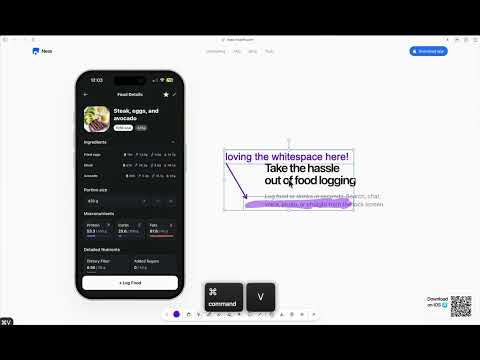
Annotate any website. Mark up your screen, then copy or export the result as an image.
Tracemark turns any webpage into your canvas. Point something out, sketch an idea, or mark up a page without leaving your browser. Tracemark puts a drawing toolbar right on top of the page so you can annotate, capture, and share — no switching apps. Drawing tools • Pencil & Highlighter — free-draw or mark up text with translucent strokes • Line & Frame — point things out and box off what matters • Text — add labels, notes, and callouts • Eraser & color picker — clean up strokes and pick any color Edit & capture • Undo, redo, copy, paste, group, and delete your drawings • Copy the marked-up page to your clipboard or export it as a PNG Stays out of your way • Toolbar snaps to any edge of the screen • Hide the overlay to use the page, then bring your drawings right back • Interact & Select modes, light & dark themes, and reduced-motion support Keyboard shortcuts I — Interact V — Select P — Pencil H — Highlighter E — Eraser T — Text F — Frame L — Line ⇧C — Copy page to clipboard ⌘C / Ctrl+C — Copy selection ⌘V / Ctrl+V — Paste at cursor ⌘Z / Ctrl+Z — Undo ⌘⇧Z / Ctrl+Y — Redo ⌘G / Ctrl+G — Group selection Backspace — Delete selection ⌘. / Ctrl+. — Hide / show overlay Private by design Tracemark only runs on the tab you're viewing. Everything happens in your browser, and nothing you draw leaves your device. Perfect for design feedback, bug reports, and anyone who thinks faster with a pen in hand.
5 out of 57 ratings
Details
- Version2.1.1
- UpdatedNovember 14, 2026
- Size465KiB
- LanguagesEnglish
- DeveloperWebsite
Email
hoanganthony2207@gmail.com - Non-traderThis developer has not identified itself as a trader. For consumers in the European Union, please note that consumer rights do not apply to contracts between you and this developer.
Privacy

This developer declares that your data is
- Not being sold to third parties, outside of the approved use cases
- Not being used or transferred for purposes that are unrelated to the item's core functionality
- Not being used or transferred to determine creditworthiness or for lending purposes