


Overview
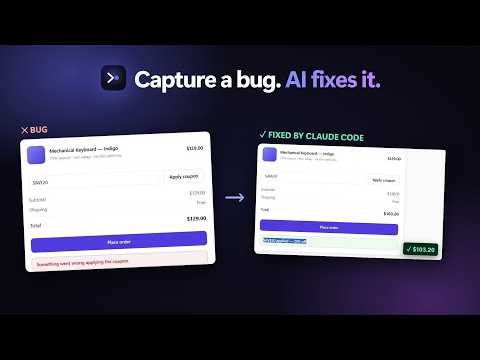
Record a browser bug: replay, console and network in one offline file your AI agent (Claude Code, Cursor) can fix. Free, no upload.
New in 1.13.0: draw on the page while you record (pen, boxes, arrows, text, highlighter, eraser), trim the video in the ticket, and a rebuilt screenshot editor with numbered steps, pixelate and full-resolution saves. Site Audit now remembers its last result, shows the old and new score after a re-scan, and hands the findings to your coding agent with Fix with AI or Open in Claude. After 3 free audits it asks for a free account (just your email and a code). Bug capture still needs no account. Also new: the welcome page shows the one-line command to connect Claude Code, Cursor or Windsurf, the popup leads with Capture Bug, and personal data hidden inside stored values (an analytics visitor's name and email) is masked in every report. Record a bug once. Get a report a developer can actually reproduce: a replay of what happened, the console errors, the failed requests and the steps, in one file that opens offline. Free and open source (MIT). No account for bug capture, nothing uploaded. Site Audit asks for a free account (just your email) after 3 audits. Watch the 1-minute demo: https://www.youtube.com/watch?v=-U64GIPfeiQ ━━━━━━━━━━━━━━━━━━━━ HOW IT WORKS ━━━━━━━━━━━━━━━━━━━━ 1. Click the TraceBug icon → Capture Bug (or press Alt+B). 2. Reproduce the bug. TraceBug records clicks, typing, navigation, console output and network requests. 3. Click Stop. Review the report, then export it or send it to your tracker. Want video too? Turn on "Events + Video". Tab mode records the current tab in one click, with no "Choose what to share" dialog; Desktop mode records any window or screen through Chrome's share dialog. Narrate with your microphone, pick which mic, and blur sensitive areas before you start. ━━━━━━━━━━━━━━━━━━━━ AUDIT ANY PAGE ━━━━━━━━━━━━━━━━━━━━ Click "Audit this page" for a 0–100 score and a list of real problems, each with where it is and how to fix it: • Accessibility: axe-core WCAG 2.0–2.2 A/AA, plus keyboard checks (focus outline, focus hidden by a sticky header) • Layout and phone width: overflow, overlapping controls, cut-off text, broken images, the page at 390px • Speed: LCP, layout shift, main-thread blocking, heavy and oversized images • SEO: title, description, canonical, headings, social tags, structured data, robots.txt and sitemap • Errors: console errors and failed requests on the page Locate each problem on the page, copy the fixes for your AI agent, or export the audit. Results the checks can't decide are listed for a person to check, not guessed. The audit never clicks, types or submits anything; it reads the site's robots.txt and sitemap.xml and loads the page once more, hidden, at phone width. ━━━━━━━━━━━━━━━━━━━━ WHAT'S IN A REPORT ━━━━━━━━━━━━━━━━━━━━ • A DOM replay of the session (and the video, if you recorded one) • Console errors and warnings with stack traces • Network requests, with the failed ones flagged • Repro steps: every click, input, select and navigation, in order • Environment: browser, OS, viewport, timezone, connection • Screenshots of the visible area or a cropped region, which you can annotate • A pattern-based hint at the likely cause, e.g. "POST /api/orders failed with 404 after clicking Place order" ━━━━━━━━━━━━━━━━━━━━ FIX IT WITH YOUR AI AGENT ━━━━━━━━━━━━━━━━━━━━ Export the report, then connect TraceBug's local MCP server once (Claude Code: "claude mcp add -s user tracebug -- npx -y tracebug mcp"). Claude Code, Cursor or any MCP client reads the report locally and works the bug in your codebase. It can also generate a failing Playwright test from the repro steps. Nothing is uploaded. ━━━━━━━━━━━━━━━━━━━━ EXPORT AND SHARE ━━━━━━━━━━━━━━━━━━━━ • One self-contained .html replay anyone on your team can open offline • GitHub, Linear and Slack, with your own token (TraceBug asks before each send) • Jira markup, Markdown, .zip, HAR, and a failing Playwright test (.spec.ts) ━━━━━━━━━━━━━━━━━━━━ PRIVATE BY DEFAULT ━━━━━━━━━━━━━━━━━━━━ • Reports and settings stay on your device; your captures and reports never go to TraceBug. Only your email goes to tracebug.dev, and only if you sign in for Site Audit or join the update list. • Passwords, tokens, card numbers and secret URL parameters are masked as they're captured. Add your own redaction rules for anything else. • Blur any element before or during a recording. • No analytics, no telemetry, no remote code. • Chrome words the tab-recording permission as "Read and change all your data on all websites". TraceBug uses it only to record the tab you start a recording on, after you press Start. • Open source: github.com/prashantsinghmangat/tracebug-ai ━━━━━━━━━━━━━━━━━━━━ WHO IT'S FOR ━━━━━━━━━━━━━━━━━━━━ QA engineers, frontend developers, designers checking accessibility, and anyone who has had to answer "can you send me the steps?" ━━━━━━━━━━━━━━━━━━━━ LINKS ━━━━━━━━━━━━━━━━━━━━ • Website and live demo: https://tracebug.dev • Source: https://github.com/prashantsinghmangat/tracebug-ai • npm SDK (add TraceBug to your own app): https://www.npmjs.com/package/tracebug-sdk • Issues and feedback: https://github.com/prashantsinghmangat/tracebug-ai/issues
5 out of 53 ratings
Details
- Version1.13.0
- UpdatedNovember 17, 2026
- Size880KiB
- LanguagesEnglish
- DeveloperWebsite
Email
prashantsinghmangat5@gmail.com - Non-traderThis developer has not identified itself as a trader. For consumers in the European Union, please note that consumer rights do not apply to contracts between you and this developer.
Privacy

TraceBug: Bug Report Recorder & Replay has disclosed the following information regarding the collection and usage of your data. More detailed information can be found in the developer's privacy policy.
TraceBug: Bug Report Recorder & Replay handles the following:
This developer declares that your data is
- Not being sold to third parties, outside of the approved use cases
- Not being used or transferred for purposes that are unrelated to the item's core functionality
- Not being used or transferred to determine creditworthiness or for lending purposes
Support
For help with questions, suggestions, or problems, visit the developer's support site