

Trace

Overview
Save and auto-highlight text snippets from any webpage
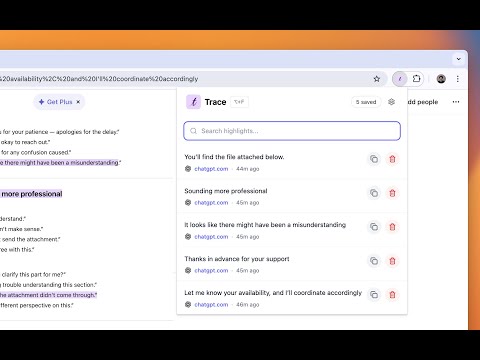
Save, organize, and rediscover important text from any webpage. Trace is a lightweight Chrome extension that lets you highlight and save text snippets as you browse. Your highlights are automatically restored when you revisit pages, making it easy to build a personal knowledge base from the web. Why Trace? • AI Conversations — ChatGPT, Claude, and other AI chats get long fast. Trace lets you mark the golden nuggets so you can find that perfect code snippet or explanation from weeks ago. • Research & Learning — Highlight key insights across articles, documentation, and tutorials. Build your own searchable knowledge trail. • Reading & Reference — Save quotes, statistics, or important passages. Never lose that paragraph you meant to come back to. Features • Instant Highlighting — Select text, right-click, and save. Your highlight appears immediately. • Auto-Restore — Highlights automatically reappear when you revisit a page. • Quick Navigation — Click any saved highlight to jump directly to it on the original page. • Organized Library — Browse all your highlights in a clean popup interface, grouped by page. • Privacy-First — All data stays locally in your browser. No accounts, no cloud sync, no tracking. • Lightweight — Minimal permissions, fast performance, zero bloat. How to Use 1. Select any text on any webpage 2. Right-click and choose "Save to Highlighter" 3. Your highlight is saved and appears with a yellow background 4. Click the extension icon to view all your saved highlights 5. Click any highlight to jump back to the original page Keyboard Shortcuts • Alt+S — Save selected text as a highlight • Alt+F — Open Trace popup All your data stays private and local in your browser. You don't need to sign up.
0 out of 5No ratings
Details
- Version1.0.0
- UpdatedDecember 3, 2025
- Offered bysherifsaleh111
- Size223KiB
- LanguagesEnglish
- DeveloperSherif Saleh
Goldbrunnenstrasse 139 Zürich 8055 CHEmail
sherifsaleh111@gmail.comPhone
+41 78 237 37 73 - TraderThis developer has identified itself as a trader per the definition from the European Union and committed to only offer products or services that comply with EU laws.
Privacy

Trace has disclosed the following information regarding the collection and usage of your data. More detailed information can be found in the developer's privacy policy.
Trace handles the following:
This developer declares that your data is
- Not being sold to third parties, outside of the approved use cases
- Not being used or transferred for purposes that are unrelated to the item's core functionality
- Not being used or transferred to determine creditworthiness or for lending purposes