


Overview
A tool that counts characters by simply dragging text on a website when the extension is enabled.
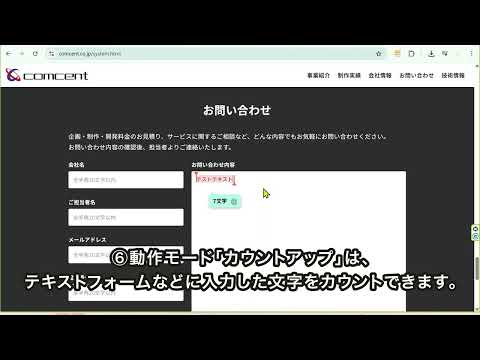
You can check various information about character count by hovering over the count number at the end of the drag. Quick & Easy Character Counter Click the icon next to the count to instantly copy the selected text to your clipboard. Use it as your go-to tool for effortless character counting! Key Features Switch between operation modes using the radio buttons: Hidden ↔ Character Count ↔ Count Up (Selection Range) ↔ Google Search Mode 1: Hide Counter Disables the counter button that usually appears when selecting text. Mode 2: Character Count Displays the character count at the end of your text selection. Custom Color Coding: You can change the button color for selections under a specific character limit (e.g., "Under 100 characters"). You can add multiple color rules, and the count will prioritize displaying based on these thresholds. Mode 3: Count Up (Selection Range) Tracks the character count within a specific range in text input fields. Visual Selectors: When you click an input field to edit, a red vertical bar appears at the cursor. Drag the top triangle left to set the start point and the bottom triangle right to set the end point. Real-time Sync: The counter updates instantly as you add or remove text within the selected range. Note: This feature may not work in Rich Text Editors (WYSIWYG) that use complex formatting. Mode 4: Google Search Instantly opens a new window to Google Search using the selected text. ▼ Text Copy Functions Click the icon to the right of the "Count" button to copy the text. Copy All: Copies the text exactly as it is, preserving paragraphs and formatting. Copy (Remove Spaces/Line Breaks): Copies the text as a single continuous line, stripping out all spaces and line breaks.
0 out of 5No ratings
Details
- Version0.0.9
- UpdatedApril 14, 2026
- Size71.47KiB
- Languages2 languages
- DeveloperWebsite
Email
info2@comcent.co.jp - Non-traderThis developer has not identified itself as a trader. For consumers in the European Union, please note that consumer rights do not apply to contracts between you and this developer.
Privacy

This developer declares that your data is
- Not being sold to third parties, outside of the approved use cases
- Not being used or transferred for purposes that are unrelated to the item's core functionality
- Not being used or transferred to determine creditworthiness or for lending purposes
Support
For help with questions, suggestions, or problems, visit the developer's support site