

TR eXporter (CSV)
1 个评分
)
概述
Export your data from Trade Republic to CSV
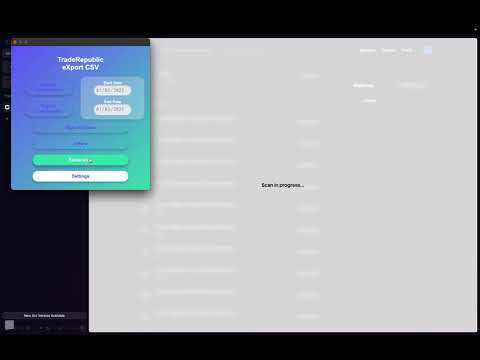
📊 TR eXporter - Export your Trade Republic data in one click Simplify the management of your investments with our extension! Easily export your transactions and Trade Republic portfolio to CSV format for optimized accounting tracking and analysis. ⚡ Simple and fast operation 1️⃣ Install the extension in your browser 2️⃣ Log in to your Trade Republic account 3️⃣ Go to your transactions or portfolio page 4️⃣ Launch the data scan (scan duration is proportional to the amount of data to process) 5️⃣ Select the desired export period 6️⃣ Click "Export" and download your CSV file 7️⃣ Use your data in Excel, Google Sheets or your accounting software 🔄 Data available today ✔️ Transactions for accounting purposes (transactions from the current account perspective) ✔️ History of completed investments (purchases, sales, dividends, fees) ✔️ Complete portfolio export with all your positions (Beta version, long operation as it is proportional to the amount of data) ✨ Available features 📈 Transaction export • Transactions for accounting purposes (current account view) • Complete history of operations (purchases, sales, dividends, fees) • Customizable filters by transaction type • Configuration of amount signs according to your needs 💼 Portfolio export • Details of all your investments • Quantities held per asset • Current prices and performance • Complete information on each position ⚙️ Advanced settings • Date format customization • Display currency choice • Country configuration for local formats • Import/export of your configuration 🔒 Privacy and security ✅ 100% local processing: all your data stays on your device ✅ No transmission to external servers ✅ No collection of personal data 🐛 Debug mode for troubleshooting If you encounter a problem during export, debug mode allows you to collect detailed information to help us quickly identify and fix problems. Here's how to use it: 1️⃣ Enable debug mode from the extension settings (the "Debug mode" button in the popup) 2️⃣ Reproduce the problem you are experiencing (launch the scan, try the export, etc.) 3️⃣ Disable debug mode (logs are automatically exported to a file) 4️⃣ Send us the exported log file to tr-exporter.bug-report@nkapps.com with a description of the problem The log file is a TXT file, editable with Notepad, Sublime Text and other text editors. It is the user's responsibility to remove any information they do not wish to share before sending us the file. Logs mainly contain technical information about how the extension works. ⭐ Support us! Your opinion matters! Use the "Give feedback" button in the extension to share your experience and help us improve TR eXporter. Each positive review helps us make the extension more visible and help more investors. 📧 Need help or suggestions? We're listening! Contact us at tr-exporter@nkapps.com for any questions, improvement suggestions or bug reports. ⚠️ Important note This extension is an independent tool developed by enthusiasts. It is not affiliated, associated, authorized, endorsed or sponsored by Trade Republic. Trade Republic is a registered trademark of Trade Republic Bank GmbH.
5 星(5 星制)1 个评分
详情
- 版本1.2.7
- 上次更新日期2026年1月4日
- 提供方contact
- 大小903KiB
- 语言22 种语言
- 开发者Guillemard Florian
2795 Rte de Royan Eygurande-et-Gardedeuil 24700 FR邮箱
contact@nkapps.com电话
+33 7 68 71 69 36 - 交易者此开发者已根据欧盟的定义将自己标识为交易者,并承诺仅提供符合欧盟法律要求的产品或服务。
隐私权
该开发者已声明,您的数据:
- 不会因未获批准的用途出售给第三方
- 不会为实现与产品核心功能无关的目的而使用或转移
- 不会为确定信用度或放贷目的而使用或转移