


Overview
Your Twitter & X bookmarks, waiting on every new tab — finally read what you saved. Search, highlight, export. Local-first.
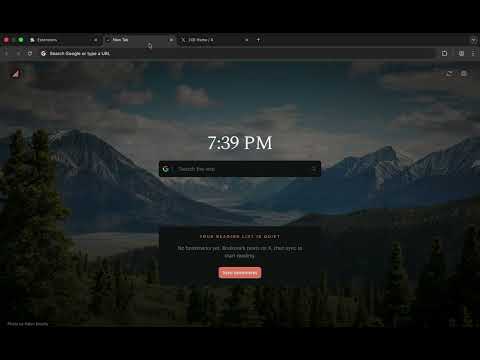
Totem is a local-first bookmark manager for Twitter and X. It does the part other tools skip: it helps you actually read what you saved. Your new tab becomes a calm reading queue. Your saved tweets, threads, and X articles come back to you instead of getting lost. Most people bookmark a tweet and never look at it again. Open X to find it and you lose twenty minutes to the feed. Totem fixes both. Your saved posts wait for you on every new tab. No feed. No algorithm. No noise. EVERY NEW TAB IS YOUR READING QUEUE • Your bookmarks load automatically every time you open a tab • Today's Read sizes your queue to the time you have: 5, 15, or 30 minutes a day. You make progress instead of drowning. • Every post has a clear state: Unread, Reading, or Read. Your scroll position is saved, so you pick up where you left off. • Snooze a post for later. File one as a reference. Flag one as "action needed." Pull in two more when you're on a roll. • Pin up to 6 favorites. Sort by recent, oldest, or annotated. • Works from the keyboard: j/k to move, / to search, Space to open A CLEAN READER FOR TWEETS & THREADS • Distraction-free reader for single tweets and full threads. Threads are rebuilt in order, so you read the whole thing in one place. • Reads X long-form Articles in full: headings, lists, images, and video • Shows link previews, quoted tweets, reposts, images, and video • Jump to the next or previous bookmark. Or hit "Surprise me" for a random unread. • Add an "Open in Totem" button on X to send any tweet straight to the reader SEARCH EVERY TWITTER BOOKMARK YOU'VE SAVED Full-text search across your whole library, with fuzzy matching and did-you-mean. Narrow it with real operators: • from: / to: - by author • since: / until: / within: - by date • has:image, has:video, has:link, has:thread, has:article - by content type • min_faves:, min_retweets:, min_replies: - by engagement • Combine with AND / OR / NOT, "quoted phrases," and ( ) groups HIGHLIGHT & ANNOTATE • Highlight any passage in a tweet or article, in four colors • Add private notes to anything you save • Send a highlight to Grok in one click • Highlights and notes stay on your device EXPORT TWITTER BOOKMARKS & OWN YOUR LIBRARY Your bookmarks are yours to take. Export the whole library to a single ZIP: • Markdown: one clean file per bookmark, threads included • CSV: opens in Excel, Google Sheets, and Notion • JSON (JSONL): complete, re-importable data • A manifest with SHA-256 checksums, so you can verify the archive You can also copy any post as Markdown, copy it for an AI assistant, or print to PDF. Back up and restore your full library anytime. WORKS OFFLINE Totem prefetches your saved posts. Keep reading on a plane or a weak connection. Your library lives in your browser, not on a server. A CALMER NEW TAB • A quiet clock and an optional search box (Google, Bing, DuckDuckGo, Brave, Ecosia, Yahoo, or your browser default) • Optional Quick Links to your most-visited sites • Curated wallpapers or generated gradients • Light, dark, and system themes • A focus mode that dims everything but what you're reading PRIVATE BY DESIGN • Local-first: no Totem account, no login, no server • Your bookmarks, highlights, and notes live in your browser's IndexedDB • We can't see your data, because we never receive it • Signed into more than one X account? Each one gets its own local library. • Totem uses your existing X session to sync your own bookmarks. No X Premium required. WHY TOTEM vs other Twitter bookmark managers • It lives on your new tab. Other managers are websites you have to remember to open. Totem shows up on its own, every time you start browsing. • It's built for reading, not just filing. Most tools help you store and export. Totem helps you finish what you saved. • No bookmark limit. No subscription to search your own saves. • Local-first and private by default. WHO IT'S FOR • Heavy Twitter/X readers who save threads and never get back to them • Anyone who wants a read-it-later for the posts they save on X • People who want a calmer, more intentional new tab • Privacy-conscious users who don't want a third-party server holding their saves Open a new tab and start reading what you saved. That's Totem.
5 out of 58 ratings
Details
- Version1.2.10
- UpdatedOctober 19, 2026
- Size5.8MiB
- LanguagesEnglish
- DeveloperWebsite
Email
iankit17@gmail.com - Non-traderThis developer has not identified itself as a trader. For consumers in the European Union, please note that consumer rights do not apply to contracts between you and this developer.
Privacy

Twitter & X Bookmarks on New Tab — Totem has disclosed the following information regarding the collection and usage of your data. More detailed information can be found in the developer's privacy policy.
Twitter & X Bookmarks on New Tab — Totem handles the following:
This developer declares that your data is
- Not being sold to third parties, outside of the approved use cases
- Not being used or transferred for purposes that are unrelated to the item's core functionality
- Not being used or transferred to determine creditworthiness or for lending purposes
Support
For help with questions, suggestions, or problems, visit the developer's support site